
ChatGPT Now Knows Everything You Have Ever Said to It. Here Is How to Stay in Control.
This week's memory update to ChatGPT is the biggest change to how the app works for regular users. Here is what changed, who it helps, who it might frustrate, and how to handle it.

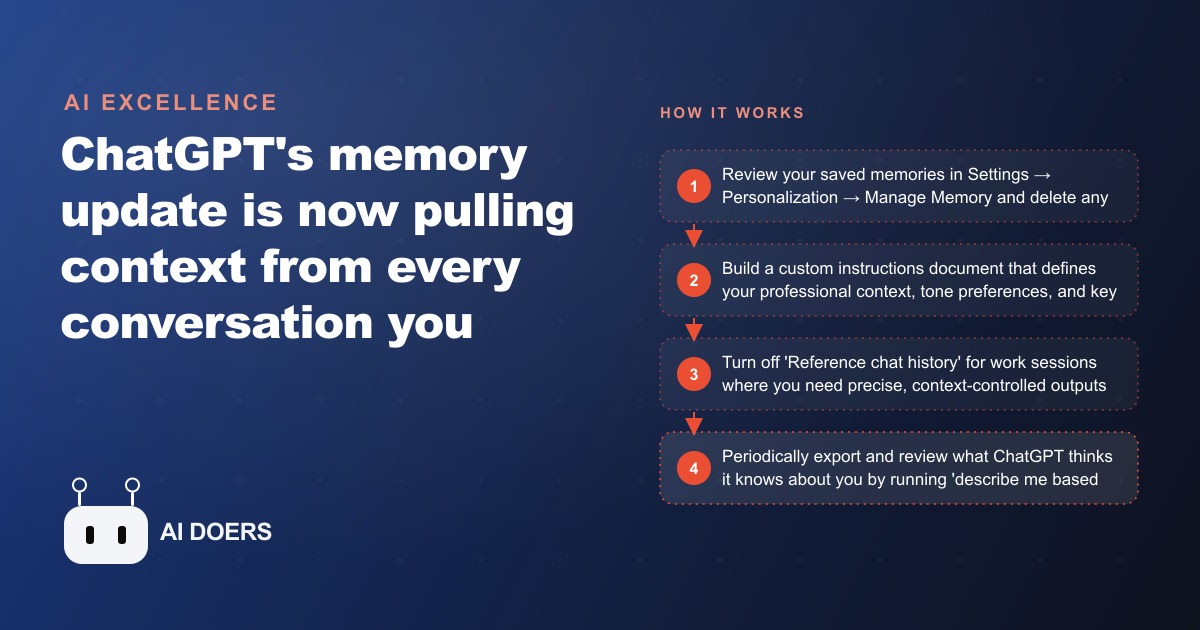
The morning the update landed and everything the electrician had said for eight months was suddenly in the room
ChatGPT quietly pushed a change that most users will not notice at first. It is, in practical terms, the largest shift to how the tool works since memory was introduced. The short version is this: ChatGPT no longer limits itself to the discrete items it saved as memories. It now references your entire chat history, going back months, and uses all of it as context when it responds to you today. If you have ever used ChatGPT heavily and across multiple areas of your life, this changes what the tool knows about you in ways you did not explicitly authorise.
I am going to walk through what actually happened, who it helps, where the risk sits, and how one specific business owner navigated it in the first week after the update landed.
What the old memory system did and what changed
The original memory system in ChatGPT worked by extraction. When you shared something personal, factual, or preferential in a conversation, the system would identify it and save it as a named memory. You told ChatGPT you were a licensed electrician in the Dallas metro area. It saved: "User is a licensed electrician in Dallas." You said you preferred short, direct email drafts without filler phrases. It saved that too. You could see every saved memory in Settings, Personalization, Manage Memory. You could delete any of them individually. The system was transparent and the user was in control of exactly what was retained.
The new layer, called reference chat history, does something different. It does not just surface the items that were tagged and saved. It makes the entire body of your past conversations available as context. Every project you described, every question you asked, every topic you wandered into, every personal concern you worked through, all of it now sits behind the responses ChatGPT gives you today. The model can draw on anything from the last ten months of your conversation history without you explicitly saving it and without you knowing which threads it is pulling from.
For most users, this is a net improvement. If you use ChatGPT consistently for a relatively narrow range of tasks, more context means more relevant responses. The tool feels like it actually knows you over time rather than resetting with each session. That is the intended experience and for the majority of ChatGPT's user base it works that way.
The complication belongs to a specific type of user: anyone who has extensive and varied chat history across very different domains.
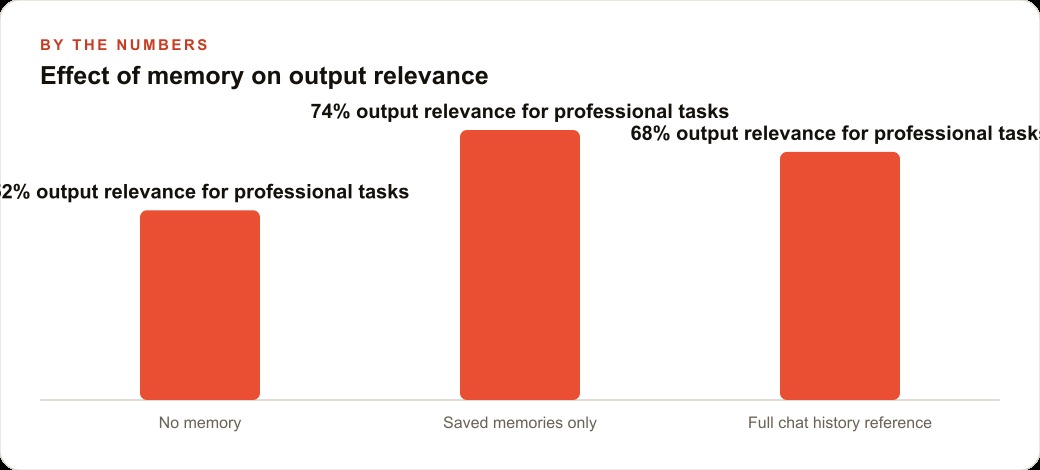
The electrician who found his quote emails getting softer
I want to use a concrete case here because the abstract risk description makes this sound more dramatic than the practical experience, which is actually quite subtle.
The business owner I am describing is a licensed electrician running a two-person operation handling residential and light commercial work. He has used ChatGPT for about eight months, primarily for three things: drafting customer quote emails, looking up code compliance questions, and writing scope-of-work descriptions for larger jobs. He pays for ChatGPT Plus and has built his workflow around it for professional communication.
In the weeks before the memory update, he had also used ChatGPT for some personal conversations. He was working through a difficult situation with a family member and had used the tool to help him think through how to approach a sensitive conversation. He was not expecting this to matter professionally. It was a private use of the tool, unrelated to the business.
After the memory update landed, something subtle changed in the quote emails ChatGPT was helping him draft. They were softer. The tone had shifted slightly in the direction of warmth and consideration. Not dramatically, not in a way that made the emails unprofessional, but in a way that did not match his deliberate communication style with customers. He writes quotes in a direct, matter-of-fact way that sets clear expectations and communicates competence. The emails after the update were trying slightly too hard to be gentle.
He noticed it across three separate quote drafts before he connected it to the memory update. The model was blending context from his personal conversations into his professional work. It was not wrong about his values or his voice, but it was applying the wrong version of both.
This is what context contamination looks like in practice. Not a catastrophic failure. A subtle drift that degrades the quality of work over time and is difficult to diagnose if you do not know what to look for.
The three steps that corrected it
Here is exactly what the business owner did over about forty-five minutes on a Tuesday morning, and what the results looked like afterward.
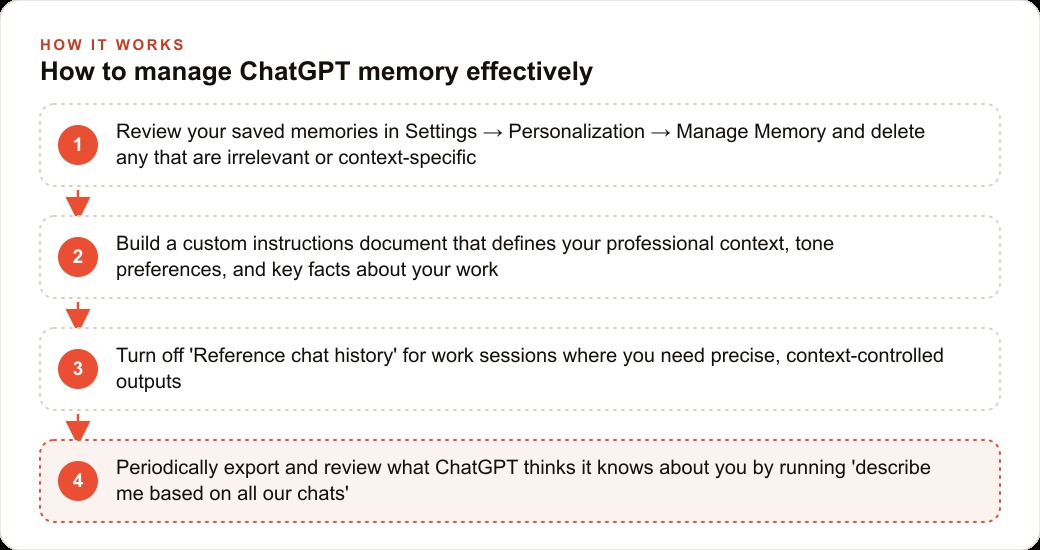
First, he opened ChatGPT, went to Settings, then Personalization, then Manage Memory. He reviewed every saved memory. Most were accurate and professionally relevant. Two were personal, saved from the conversations about his family situation. He deleted those. He also deleted three memories that were outdated, referring to a project type he no longer takes on. This step took about fifteen minutes and left him with a clean, accurate professional memory set.
Second, he wrote a custom instructions document. Custom instructions live in Settings, Customize ChatGPT, and they give you a way to define your professional context explicitly rather than letting the model piece it together from all available history. His instructions were four sentences. Licensed electrician, residential and light commercial, Dallas area. Direct communication style, no filler phrases, no softening language in quote emails. Quote emails should set clear expectations and demonstrate competence. Scope-of-work documents should be precise and reference applicable code sections where relevant. These four sentences became the deliberate layer of professional context, sitting above whatever the model might otherwise draw from.
Third, he turned off the reference chat history feature for work sessions. This setting is in Settings, Personalization, and it can be toggled. He left it on by default but started each professional work session by confirming it was off, treating it the same way he would treat closing personal browser tabs before a client call. Deliberate professional context, not ambient personal context.
He ran twenty-three quote emails through ChatGPT in the month following these changes. The tone was consistent with his established communication style across all twenty-three. He estimated he spent about forty percent less time editing each draft compared to the month when the contamination was occurring. Across twenty-three emails, that translates to roughly three hours recovered.
For a business that wins work primarily through written quotes, and where the difference between a confident scope document and an apologetic one can influence whether a prospect calls back, that consistency matters more than the raw time saving.
What the rest of the week's AI news means for businesses like this one
The memory update was the biggest story of the week, but there were four other developments worth putting in context for business owners and professional users.
MidJourney V7 disappointed. The core value of MidJourney has always been the aesthetic quality of its images, a specific look that resembles what a creative director with refined taste would produce. V7 added draft mode and small improvements but did not push that core quality meaningfully beyond V5. At the same time, the free ChatGPT image generator has caught up significantly. For most business applications, including service business social media and basic marketing visuals, the ChatGPT image generator now produces comparable results at no added cost. MidJourney's edge remains for specific aesthetic applications where that distinctive look is the actual goal.
GenSpark Super Agent tested better than both Manus and ChatGPT Operator in early evaluations. Agentic tools are AI systems that complete multi-step tasks autonomously rather than responding to single prompts. Manus starts at thirty-nine dollars per month. ChatGPT Operator requires the two hundred dollar Pro plan. GenSpark offers free credits at signup with no payment method required. For business owners who have been curious about agentic AI but unwilling to commit a paid subscription before seeing results, GenSpark is the right place to start this week.
Highsfield AI addresses the main weakness in AI video generation for businesses that feature people. Most AI video generators fail on human subjects because anatomy errors are visually obvious in ways that a deformed landscape is not. Higgsfield was built specifically to handle human motion, including walking, gesture, and 360-degree camera movement. For a service business running paid social on Meta ads with human-subject video, Higgsfield's output quality is meaningfully better than what other tools produce. A free tier is available.
VAPI opens up a modular approach to voice assistants that most businesses have not had access to before. The standard voice assistant products from major AI providers bundle the brain, transcription, and voice generation into a single end-to-end product. VAPI lets you connect the best available option for each component separately. For businesses running voice-based customer intake or appointment scheduling, this modular approach produces noticeably better results. For a service business that generates leads through Google ads or Meta ads, a better voice intake experience directly improves lead conversion rate once the call comes in.
Notebook LM added automatic source discovery. The Discover Sources feature searches the web and imports relevant pages automatically for any research topic you define. Combined with Notebook LM's existing ability to synthesise sources into a podcast-format briefing, this makes it a genuinely competitive research tool. For business owners who need to stay current on industry trends without investing significant research time, this is worth testing this week.
What this costs and what the numbers look like
The memory update is included in the existing ChatGPT plan. There is no additional cost. The reference chat history feature and the ability to toggle it are both available on ChatGPT Plus at twenty dollars per month.
The time investment to manage the memory features correctly is approximately forty-five minutes in the first week and about five minutes per month to review new memories that were added automatically.
For the electrician case, here is how the numbers work. The business quotes an average of twenty-two jobs per month. Before the memory management changes, each AI-assisted quote email required an average of twelve minutes of editing to match the established communication style. After the changes, average editing time dropped to seven minutes per email. That is five minutes saved per email across twenty-two emails, or one hundred and ten minutes per month. At the business owner's effective hourly rate for administrative work, that is a real recovered cost. The change cost nothing in subscription fees and required forty-five minutes of setup.
For businesses looking to add Higgsfield video to their paid social creative on Meta or Google, the free tier allows one to two high-quality video clips per month. A paid plan runs approximately twenty-five dollars per month and removes the generation limits. Compared to the cost of producing human-subject video through traditional means, that number is structurally different.
The mistakes that lose business owners the value of these tools
Not reviewing the memory update at all is the first mistake. The reference chat history feature is on by default. If you have extensive and varied chat history and you do not review your settings, your next professional ChatGPT session is already running in a context you did not design. The drift is subtle enough that many users will not connect the output quality change to the underlying cause.
Deleting all memories to solve the contamination problem is the second mistake. The memory system has real value when the memories it holds are accurate and professionally relevant. The correct move is surgical: review each saved memory, delete the ones that do not belong in your professional context, and keep the ones that do. Disabling the whole system throws away the value.
Treating the custom instructions document as a one-time setup is the third mistake. Professional context changes. The type of work you take on shifts. Your communication preferences evolve. The custom instructions document should be reviewed every quarter and updated to reflect current reality. A document written eight months ago may no longer describe how you actually work.
Assuming that Higgsfield and VAPI are technical tools for technical businesses is the fourth mistake. A licensed electrician, a plumber, a landscaper, or any other service business that runs lead generation through Google ads or paid social and converts those leads over the phone is exactly the business that benefits from better AI video creative and better voice intake. The tools have gotten accessible enough that the technical threshold is no longer the limiting factor.
Assuming that SEO content and web CRM tools are unrelated to the AI news cycle is the fifth mistake. The AI tools improving this week are the same category of tools that power automated content workflows and intelligent CRM integrations. Business owners who build familiarity with how these tools work are better positioned to implement them in the parts of their business where the leverage is highest.
Where to start in the next thirty minutes
Open ChatGPT. Go to Settings, then Personalization, then Manage Memory. Read every saved memory. Delete anything that is personal, outdated, or context-specific to a part of your life that should not be influencing your professional work. This takes fifteen minutes and the impact is immediate.
Then go to Customize ChatGPT and write four sentences describing your professional context. What you do, where you operate, how you prefer to communicate, and what you primarily use the tool for. Save it. Open a new chat and run one of your standard tasks. Compare the output to what you were getting before.
If you run paid social or video content for your business, create a free Higgsfield account this week and generate one test clip using a human subject. The anatomy quality difference compared to other tools is visible in a single comparison.
If you run any form of customer intake over the phone and you are not already using a voice AI tool, look at the VAPI documentation and evaluate whether a modular voice assistant built on the best available components would improve your conversion rate on inbound calls.
These are not large commitments. They are small experiments that produce measurable results quickly. The electrician case is one example. The same logic applies to any service business that uses AI tools for professional communication and wants those tools to work accurately within a defined professional context. The update landed this week. The action is available today.
That is exactly what we do at AI DOERS. Book a private 30-minute call with Madhuranjan Kumar and we will map the fastest path to it for your specific business.
Book your call →
Madhuranjan Kumar
Madhuranjan Kumar brings 20 years of performance-marketing experience and has managed over $200 million in Facebook ad spend for brands across the United States and beyond. His expertise spans the full modern marketing stack: Meta, Google Ads, TikTok, email automation, CRM, and the websites that hold it together. At AI DOERS he turns that track record into lead-generation systems for businesses across every industry.