
ChatGPT Can Now Connect to Everything: What This Means for Your Business
ChatGPT just added Google Drive, Calendar, Gmail, MCP servers, and a built-in meeting recorder. Here is what each integration actually does and how to put it to work today.

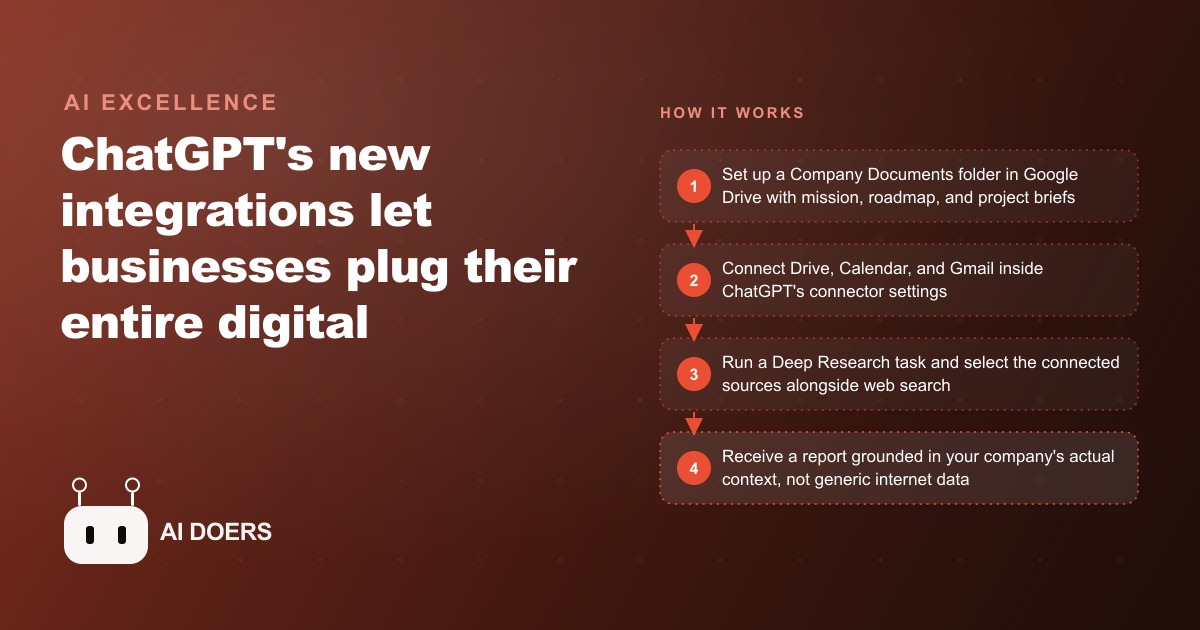
OpenAI just shipped the workspace integration update that business owners have been requesting for three years. ChatGPT can now connect directly to Google Drive, Gmail, Google Calendar, Dropbox, GitHub, HubSpot, SharePoint, and hundreds of other external services through a protocol called MCP, which stands for Model Context Protocol, and the practical consequence is not incremental. Instead of copying and pasting context from one tool into a chat window every time you need help, the AI now reads your live documents, your real calendar, and your actual email threads as part of answering your question.
I have been watching this integration landscape closely for months. This update is the one that shifts ChatGPT from being a powerful text tool into something closer to a genuine operational layer across a business. Here is what launched, what each piece actually does, and the specific move I recommend making this week.
MCP just made ChatGPT a real workspace hub, not just a chatbot
The Model Context Protocol is the technical backbone of this entire update. Think of it as a standard connector format, similar to how USB-C standardized the way devices plug into each other. Before MCP, connecting ChatGPT to an external service required custom integrations, API keys, and often a developer to wire everything together. With MCP, any software company can build a server that exposes their data to AI tools in a standard format, and ChatGPT can plug into it with nothing more than a URL.
The list of services with MCP servers is already substantial. GitHub lets the AI read your repositories and pull request history. HubSpot exposes your CRM records and contact timelines. Dropbox makes your file storage searchable. Slack opens up your team's message history by channel. Financial data feeds, internal databases, and project management tools are all building MCP servers now. By the time this becomes widely available across all plan types, the ecosystem will be hundreds of tools deep.
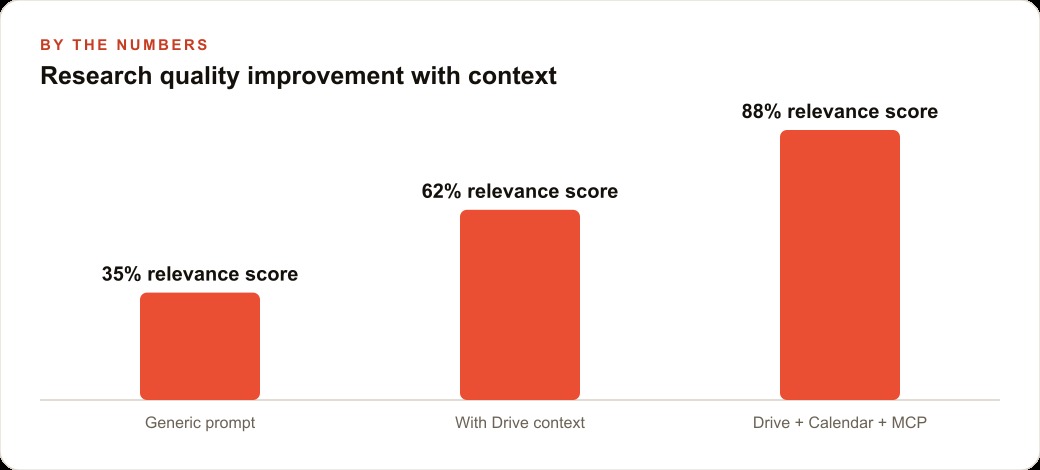
What this means in practice is that ChatGPT can now hold a conversation with you that is grounded in real context from your actual business. Not generic internet data. Not whatever you remembered to paste in. Your real documents, your real schedule, your real deal pipeline. The shift in output quality between a generic prompt and a prompt where the AI has read your actual company context is not subtle. It is the difference between advice from someone who has never met you and advice from someone who has spent a week studying your operation.
The rollout as of mid-2025 is limited to Teams, Enterprise, and Educational plan accounts. Standard Plus subscribers do not yet have access to all connectors, though this is expanding in stages. If you are unsure which plan you are on, check the billing settings in your account before assuming the integrations are unavailable.
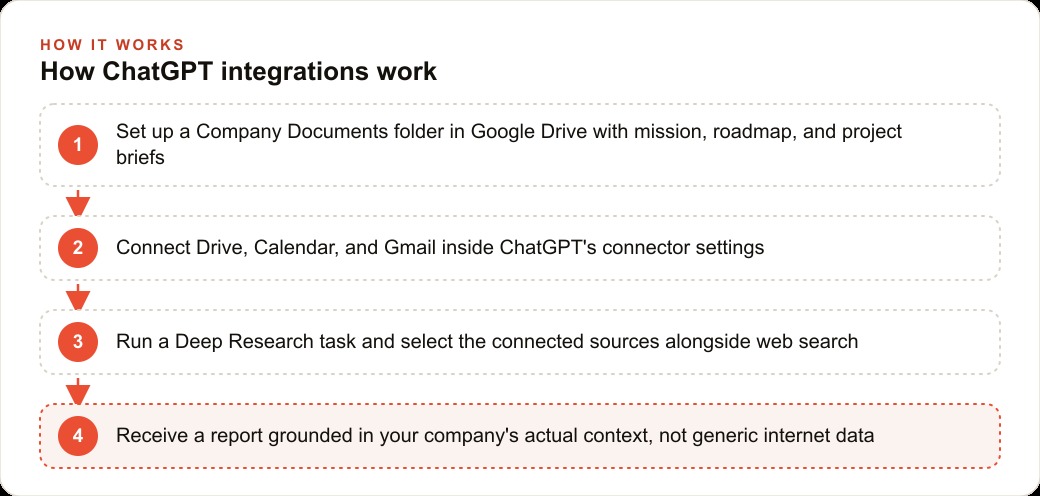
Google Drive inside Deep Research changes what a research report actually means
The most immediately valuable integration in this update is Google Drive working inside Deep Research. I want to explain clearly what that combination actually unlocks, because it is more significant than it might sound from the headline.
Deep Research is ChatGPT's long-form research mode. You give it a question and it spends twenty to forty minutes browsing the internet, reading sources, synthesizing findings, and producing a detailed, cited report. It is genuinely one of the most useful AI capabilities released in the past two years for strategic questions, competitive analysis, market research, and planning documents. The limitation has always been that the output is thorough but generic. The model knows nothing about your company's specific positioning, your client relationships, your internal constraints, or your active projects. You get the world's information filtered through nothing at all.
Connect Google Drive to Deep Research and that limitation collapses. You tell the AI to use your Company Documents folder alongside web search. It reads your brand positioning document, your competitor tracking sheet, your product roadmap, and your recent project briefs before it starts searching the internet. The report it produces does not just summarize what is publicly known about a topic. It filters everything through your actual business context and flags where the external research reinforces or contradicts your internal strategy.
This is the difference between a market research firm handing you a generic industry report and handing you a report written by someone who has read every strategy deck your company produced in the last two years. The same underlying information, but filtered through knowledge of who you are and what you are trying to accomplish.
One important technical note: Google Drive is only available as a source inside Deep Research, not in standard chat. If you open a regular chat and ask ChatGPT a question, it cannot pull from your Drive. You have to run a Deep Research task specifically, then select your Drive folder as a source alongside the web. This distinction matters for how you organize your files and how you build your workflow.
The businesses most exposed to this shift run five or more tools every single day
I track which types of businesses gain the most from AI integrations. The consistent pattern is that the biggest gains go to businesses whose daily operations already span five or more digital tools. A business that does everything in spreadsheets with a single inbox gains something modest from this update. A business whose team switches between Gmail, Google Calendar, HubSpot, Slack, Google Drive, and a project management tool every single day gains enormously.
The reason is cognitive friction. Every context switch between tools requires a human to reconstruct the relevant state of a project or a relationship in their head before they can take any action. A sales manager who needs to prepare for a quarterly business review with a key account might spend an hour pulling together CRM notes, email history, calendar events, and internal strategy documents before they can even begin thinking about what to say in the meeting. The work of assembling context is invisible on any time sheet, but it is real and it compounds across a team.
With MCP and Drive and Calendar integrations active, that same preparation task takes minutes. The AI assembles the context automatically, from the tools where that context already lives.
The businesses most affected by this shift include agencies, consultancies, law firms, investment teams, property managers, and any organization where client relationships require maintaining context across email, calendar, documents, and a CRM simultaneously. These are the operations where the friction of context assembly has been quietly costing hours every week for years. This update makes that friction addressable for the first time without a custom software build.
Google Calendar is the integration that actually works reliably first
Of all the connectors available in this update, Google Calendar is the one I recommend connecting first. The reason is data quality. Your calendar contains structured, unambiguous, high-value information: specific events, specific attendees, specific times, and often attached notes or agendas. Unlike email, which is noisy and requires a lot of interpretation, and unlike a large Google Drive full of miscellaneous files accumulated over years, a calendar gives the AI clean and reliable context.
When ChatGPT can see your calendar, it understands your week at a structural level. It knows which client you are meeting Thursday. It knows who will be in the room. It knows when your next quarterly planning session is and what is already on the agenda. This allows the AI to give you advice that is actually relevant to your current situation, not advice that could apply to anyone in your industry.
Ask it to help you prepare for a client meeting and it reads the calendar event, looks at who is attending, surfaces relevant documents from your Drive if that is also connected, and gives you a briefing that accounts for the specific conversation you are about to have. The difference between that and a generic meeting preparation prompt is immediately obvious.
Gmail is the connector I recommend being more careful with. Email inboxes are useful repositories of context but they are messy by default. Promotional messages, internal threads lacking context, and half-finished conversations can all bleed into AI outputs in confusing ways. If you have a very disciplined inbox with strong labeling, Gmail works well. If your inbox resembles most business inboxes, start with Calendar and Drive and add Gmail later once you understand how the AI uses each source.
A worked example: how a twelve-person agency cuts 14 hours of prep work per week
I want to make this concrete with an example that shows the actual time math.
Consider a twelve-person marketing agency with four senior strategists. Each strategist manages six active client accounts. Every week, before each client's check-in call, the strategist pulls together the relevant context: recent campaign performance numbers from the reporting tool, notes from the previous call, the client's brand document, any strategy briefs discussed that month, and whatever emails have come in from the client team. For a typical strategist at this agency, this preparation takes roughly 45 minutes per client per week. Six clients times 45 minutes equals about 4.5 hours per week, per strategist, just assembling context before they can begin thinking.
After setting up the ChatGPT integration with Google Drive and Google Calendar, the workflow changes substantially. The agency creates a Client Files folder in Google Drive with a subfolder for each account. Each subfolder contains the brief, the most recent strategy document, and the performance summary from the last two quarters. The strategist connects Drive and Calendar to ChatGPT, runs a Deep Research task before the upcoming client meeting, selects the client subfolder and the web as sources, and receives a detailed briefing document in under four minutes. The briefing covers recent industry news relevant to the client's category, flags performance questions to address, and summarizes the strategic priorities from the internal documents.
Each context-prep session drops from 45 minutes to roughly 8 minutes, once you factor in reading and annotating the output. Time saved per client per week: about 37 minutes. Six clients times 37 minutes equals roughly 3.7 hours per strategist per week. Four strategists times 3.7 hours equals approximately 14.8 hours per week reclaimed across the team.
At a loaded cost of around $85 per hour for a senior strategist, that is roughly $1,260 per week in labor redirected from context assembly to actual strategic work. Monthly, that is about $5,040. The Teams plan that unlocks these integrations costs approximately $30 per user per month. For twelve users, that is $360 per month. The net monthly return is well over $4,000. The tool pays for itself in the first two days of the first month, and the gains compound as the Drive folders get richer over time.
The setup mistake that wastes the most time on day one
The single most common mistake when activating the Google Drive integration is connecting your entire Drive without creating a focused folder first. If you link Google Drive and the AI has access to four years of mixed documents, including personal files, abandoned project drafts, old proposals, and unrelated reference material, the context it pulls into your research tasks will be noisy and sometimes actively misleading. A strategy document from 2021 could bleed into your 2025 proposal and make the AI confident about something that is no longer true.
The fix is straightforward but requires doing it before you connect anything. Create a folder called Company Documents or AI Context. Inside it, create subfolders as needed for active clients, internal strategy documents, and templates. Move only the files that reflect current, accurate, and relevant information into these subfolders. Keep it lean at first. Twenty well-chosen documents consistently outperform two hundred poorly organized ones.
The same discipline applies to MCP servers. Start with one. Install the Slack MCP server if your team lives in Slack, or the HubSpot server if you manage a sales pipeline. Test it with a simple query. Understand how the AI uses that context before adding the next tool. Connecting everything at once before you understand how each source behaves produces outputs that are hard to evaluate and even harder to improve.
The meeting recorder that ChatGPT now includes natively is worth activating early as well. It transcribes and summarizes calls directly inside the platform, removing the need for a separate transcription service. If you have been using a third-party tool for this, the built-in option reduces friction and keeps the transcript in the same environment where you ask follow-up questions.
The concrete move to make this week
Here is exactly what I would do this week, starting from scratch.
First, open your Google Drive and create a single folder called Company Documents. Inside it, place three to five of the most important documents that describe your business: your mission or positioning statement, your current project or client list with one-line descriptions of each, and any product or service document that a new colleague would need to read on their first day. Keep the folder to under ten files for now. Quality and relevance matter more than volume.
Second, check whether your ChatGPT plan includes connectors. Teams, Enterprise, and Educational accounts have access. If you are on an individual Plus plan, check the integrations section of your settings because this is rolling out in stages and you may already have partial access.
Third, connect Google Calendar. This takes about two minutes and immediately gives the AI clean, structured context about your schedule and upcoming meetings.
Fourth, run your first Deep Research task with Drive as a source. Pick a strategic question your business is actively sitting with. Select your Company Documents folder and the web as sources. Read the output carefully. Notice how different it is from a generic research report. That gap, between generic and grounded, is the practical value of the integration.
Fifth, after that first task, add one MCP server. If your team uses Slack, start there. If you run a sales motion out of HubSpot, start there instead. Test it with a simple question before relying on it for anything consequential.
The integration is real, the setup is faster than most people expect, and the quality difference between AI outputs with rich context and without it is immediately obvious. The businesses that build this workflow well in the coming months will be operating at a speed and depth that businesses still copying and pasting context cannot match. The window to set this up before it becomes standard practice is short, and the cost of waiting is measured in hours every week.
That is exactly what we do at AI DOERS. Book a private 30-minute call with Madhuranjan Kumar and we will map the fastest path to it for your specific business.
Book your call →
Madhuranjan Kumar
Madhuranjan Kumar brings 20 years of performance-marketing experience and has managed over $200 million in Facebook ad spend for brands across the United States and beyond. His expertise spans the full modern marketing stack: Meta, Google Ads, TikTok, email automation, CRM, and the websites that hold it together. At AI DOERS he turns that track record into lead-generation systems for businesses across every industry.