
ChatGPT Codex Turns Hours of Manual Bookkeeping Into a Two-Minute Automated Job
A standalone AI agent app from OpenAI processes receipt images, extracts PDF invoice data, and reorganizes client file folders automatically, with no coding required and a free usage tier to start.

Step 1: Understand that Codex is a separate application from the ChatGPT you already use
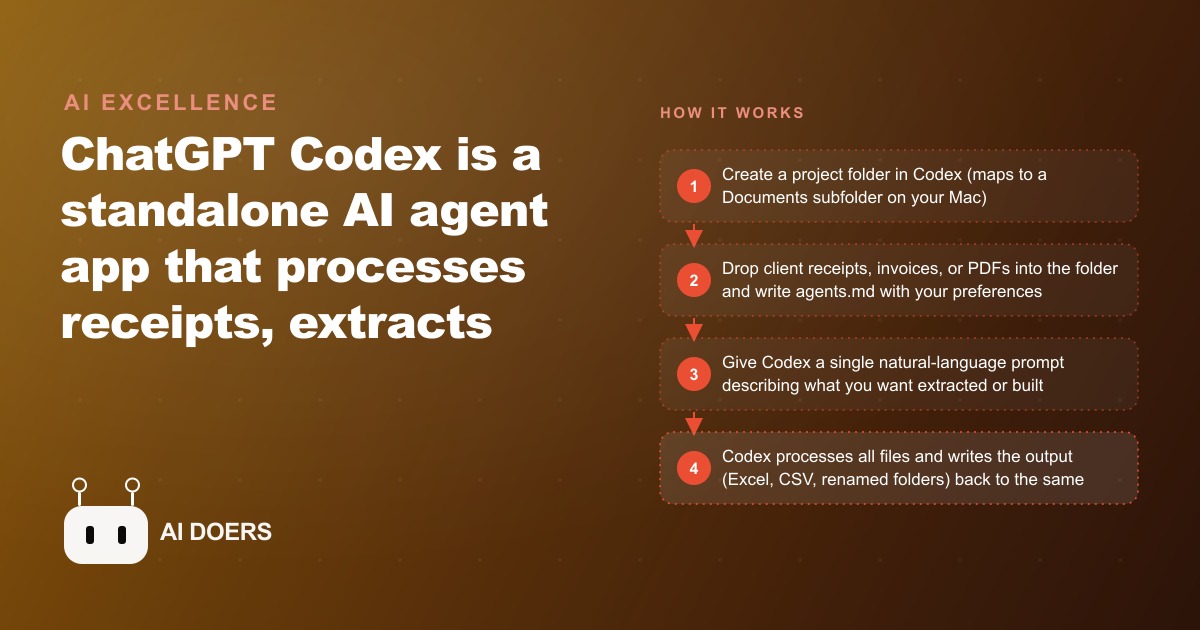
The first thing that trips people up when setting up ChatGPT Codex is the assumption that it is an updated version of the ChatGPT web interface. It is not. Codex is a standalone Mac application that you download from the OpenAI website at chat.openai.com/codex. It installs and runs as its own application separate from any browser tab.
I am Madhuranjan Kumar, and this distinction matters because Codex is designed to do something fundamentally different from the ChatGPT web interface. The web interface is a conversation window. Codex is a file-based agent that reads files from folders on your computer, processes them, and writes outputs back into those same folders. The files are the medium of exchange, not the chat messages.
That design decision shapes everything about how Codex works. Your client data stays on your machine in your own folders. The AI reads what you point it at and writes what you ask for back to the same location. Nothing is uploaded to a cloud storage service. Nothing appears in a shared interface. The work product stays in your Documents folder.
Step 2: Create a project for each client and load their files into it
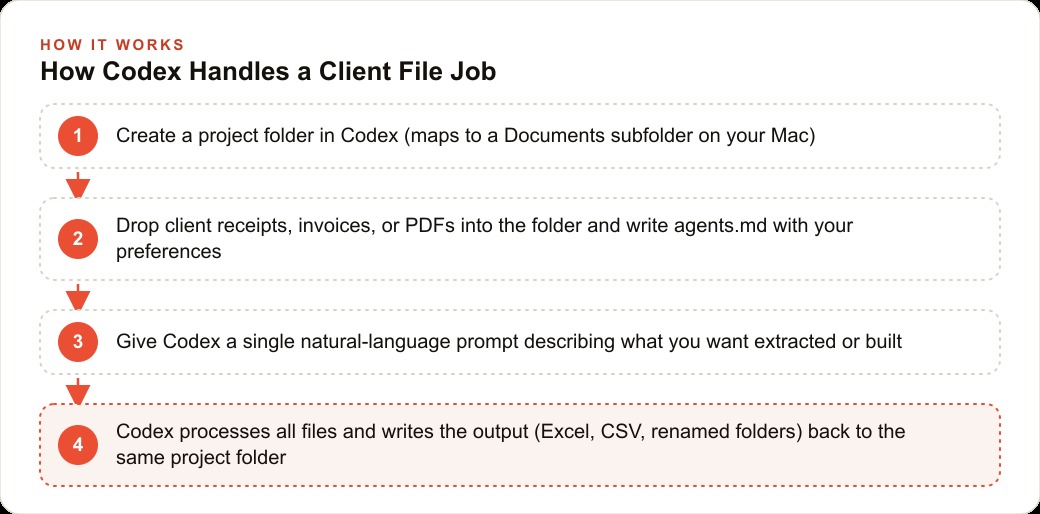
Every Codex project maps to a specific folder in your Documents directory. When you create a project in the Codex interface, it creates the corresponding folder. Drop your client's files into that folder, and Codex can work with them.
For an accounting firm, this means one project folder per client. One folder holds all of Client A's receipts, invoices, bank statements, and reports. A separate folder holds everything for Client B. Codex only reads the files in the folder that is associated with the active project, so there is no cross-contamination of data between clients.
The separation that this creates is operationally significant. When you switch to Client A's project, everything Codex produces is written into Client A's folder. When you switch to Client B's project, the same is true for Client B. The folder structure enforces the separation that accounting work requires without requiring you to manually manage which data is in scope for each task.
Step 3: Set up an agents.md file in each project folder
An agents.md file is a plain text document in the project folder that Codex reads automatically at the start of every session. It functions as a persistent briefing document for the AI. You write it once and it applies every time you open that project.
For an accounting firm, the agents.md file for each client would contain the client's name and business type, the naming conventions you use for output files, the output format preferences for reports, any recurring categories used for expense classification specific to that client's industry, and any quirks of their data, like whether their receipts consistently use a specific vendor name format.
Writing the agents.md file takes twenty to thirty minutes per client setup. After that, every Codex session for that client starts from a shared understanding of the client context without you needing to re-explain it. The time saving accumulates across every session that follows.
The agents.md pattern also produces consistency across sessions. If you open a client project a month after the last session, Codex reads the agents.md and picks up the context exactly where the previous session left it. You do not need to remember or re-explain what you established in the last session.
Step 4: Extract structured data from receipts with a single prompt
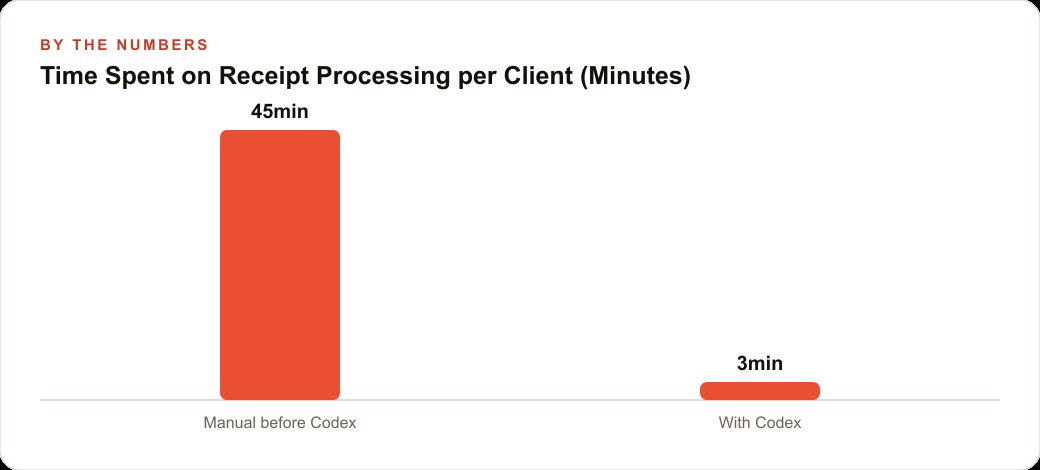
The demonstrated use case for receipt processing shows the practical scale of what Codex can accomplish in a single prompt. Five receipt images placed in the project folder, with a single instruction to extract vendor name, date, amount, and category from each and build an Excel dashboard with spending by category, produced a fully formatted Excel file with charts in under two minutes.
For an accounting firm that processes client receipts at volume, the math is straightforward. If a client submits fifty receipts per month and manual extraction takes three minutes per receipt, that is two and a half hours per client per month. A Codex session that processes all fifty receipts in ten minutes returns more than two hours per client per month to higher-value work.
The output is not just extracted data in a spreadsheet. The demonstrated example produced a dashboard with category breakdowns and spending charts. That dashboard is presentation-quality output that a client can read without explanation, not a raw data dump that requires further formatting before it can be shared.
Step 5: Process PDF invoices in batch with a structured extraction prompt
Invoice processing follows the same pattern as receipt processing but with a format consideration. PDF invoices are not images. They contain text, and the text is what Codex reads to extract invoice fields.
A prompt like "read each PDF invoice in this folder and extract the invoice number, date, vendor name, line items, and total for each, then write everything into a spreadsheet with one row per invoice" produces the result you would expect. For a set of invoices from a client's suppliers, the output is a spreadsheet that contains the complete information from every invoice, in a standardized format, without manual re-entry.
The specific extraction fields you request determine what ends up in the spreadsheet. For an accounts payable workflow, you might also want to extract the payment due date and whether the invoice is marked as paid or outstanding. Specifying these fields in the prompt produces them in the output.
Step 6: Connect to Gmail to process invoices and receipts from email attachments
The Gmail plugin for Codex adds a significant automation layer for accounting firms where client documents arrive primarily via email. With the plugin connected and appropriate permissions granted, a prompt can instruct Codex to scan the inbox for emails that contain invoice or receipt attachments, extract the attachments, process them using the same extraction logic as the folder-based workflow, and return a structured summary without you manually downloading each attachment.
This changes the data ingestion step from a manual process of checking the inbox, identifying relevant emails, downloading attachments, and placing them in the correct project folder, to a single prompt that handles all of those steps automatically.
The demonstrated case had Codex scan for sponsorship inquiry emails, research each sender, and return a structured table. The same pattern applied to invoice and receipt processing means the firm can process incoming client documents without the administrative work of organizing and downloading them first.
Step 7: Schedule recurring reports and summaries with the Automations tab
The Automations tab in Codex allows scheduling recurring tasks that run on a specified schedule without requiring you to initiate them. For an accounting firm, the recurring tasks most worth automating are the ones that are genuinely repetitive and happen on a predictable schedule.
A weekly brief that summarizes all receipts and invoices processed in the past seven days and produces a running total by category is an example of a task that runs the same way every week and does not require judgment about whether to run it. Setting it up in Automations means it runs on Monday morning regardless of whether you remember to run it, and the output is waiting for you when you open the project.
A monthly summary that compares this month's spending across categories to the previous month and flags any categories that increased by more than a specified threshold is a similar case. It requires the same logic every month applied to different data.
Automations run without you being present, which means they run during off-hours and overnight. A firm that sets up a nightly automation to process any new files that arrived in a client folder during the day comes into the office each morning with the previous day's documents already extracted and organized.
The compounding advantage of maintaining agents.md files consistently
The agents.md pattern produces value that compounds over time in a way that is easy to underestimate when first setting up the system. In the first month, the agents.md saves you from re-explaining client context at the start of each session, which is a minor time saving. By the sixth month, the agents.md file for each client has been refined through use and now captures nuances specific to that client's data patterns and reporting preferences that took multiple sessions to learn.
A client whose expense reports consistently have receipts from a specific set of vendors, and whose categories are labeled in a specific way that differs from a generic chart of accounts, is a client whose agents.md captures those specificities explicitly. Every Codex session for that client automatically applies those specificities to the extraction and categorization logic without requiring you to re-specify them.
The firm that maintains agents.md files consistently across all clients builds a library of client context that is persistent, searchable, and transferable. If a different team member needs to run a Codex session for a client they have not worked with before, the agents.md provides the briefing that would otherwise require a hand-off conversation. The firm's knowledge about each client becomes a documented asset rather than tacit knowledge that exists only in the heads of the people who have worked with that client before.
What the Skills tab adds for recurring task patterns
Skills in Codex are saved prompt recipes for tasks you run repeatedly. When you save a skill, you define the task description, the input it expects, and the output it should produce. You activate a skill with a slash command in the chat interface and it runs with the parameters you saved.
For an accounting firm, the skills worth saving are the ones that run most frequently with the same logic each time. A receipt extraction skill that always extracts vendor, date, amount, and category and writes to a spreadsheet with the firm's preferred column headers. An invoice summary skill that always extracts the same fields and applies the same duplicate-checking logic. A monthly comparison skill that always compares the same categories across the same date ranges.
Once a skill is saved, activating it for a specific client's folder is a single command rather than a full prompt. The task logic is stored in the skill. The operator's role is selecting which skill to run and confirming the input files, not re-writing the prompt logic each time.
The practical consequence for an accounting firm is that the expertise of building a good extraction prompt, which took time to develop and refine, becomes a firm asset stored in a skill rather than a personal asset stored in one person's memory of what prompt they used last time. Any team member who activates the receipt extraction skill gets the same logic that the person who developed it refined over multiple sessions.
How to decide which tasks to automate versus keep manual
Not every accounting task is a good fit for Codex. The tasks that are appropriate for automation share three properties. They are repetitive, meaning the same logic applies each time. They are data-based, meaning the input is files or structured information that Codex can read. And they do not require professional judgment about ambiguous situations, meaning the output is a straightforward consequence of the input.
Tasks that involve professional judgment, like deciding whether a borderline expense should be capitalized or expensed, whether a transaction should be categorized as one type or another based on context that is not in the file, or whether a financial statement presents the client's situation accurately, remain with the professional. Codex can surface the data that informs those decisions. It cannot make those decisions.
The clearest way to identify what to automate is to list the tasks that you or your team perform most frequently and that feel the most mechanical when you are doing them. If you notice yourself thinking "I am just copying data from one format to another" or "I am running the same formula again," that is a task Codex can handle. If you notice yourself thinking "I need to understand the context of this to know how to classify it," that is a task that stays with the professional but may benefit from Codex organizing the data that informs the professional's decision.
The firms that get the most value from Codex are the ones that are honest about this distinction and use the tool for the mechanical layer while keeping the judgment layer with the people best qualified to exercise it. That combination produces work that is faster at the mechanical level and better at the judgment level because the professional is spending their time on the part of the work that actually requires their expertise.
That is exactly what we do at AI DOERS. Book a private 30-minute call with Madhuranjan Kumar and we will map the fastest path to it for your specific business.
Book your call →
Madhuranjan Kumar
Madhuranjan Kumar brings 20 years of performance-marketing experience and has managed over $200 million in Facebook ad spend for brands across the United States and beyond. His expertise spans the full modern marketing stack: Meta, Google Ads, TikTok, email automation, CRM, and the websites that hold it together. At AI DOERS he turns that track record into lead-generation systems for businesses across every industry.