
ChatGPT Atlas First Look: What One Day of Testing Revealed for Car Dealership Research Workflows
One day of honest testing shows ChatGPT Atlas has real potential for business research, with specific limitations that matter more in some industries than others. Here is what a car dealership would actually find useful.

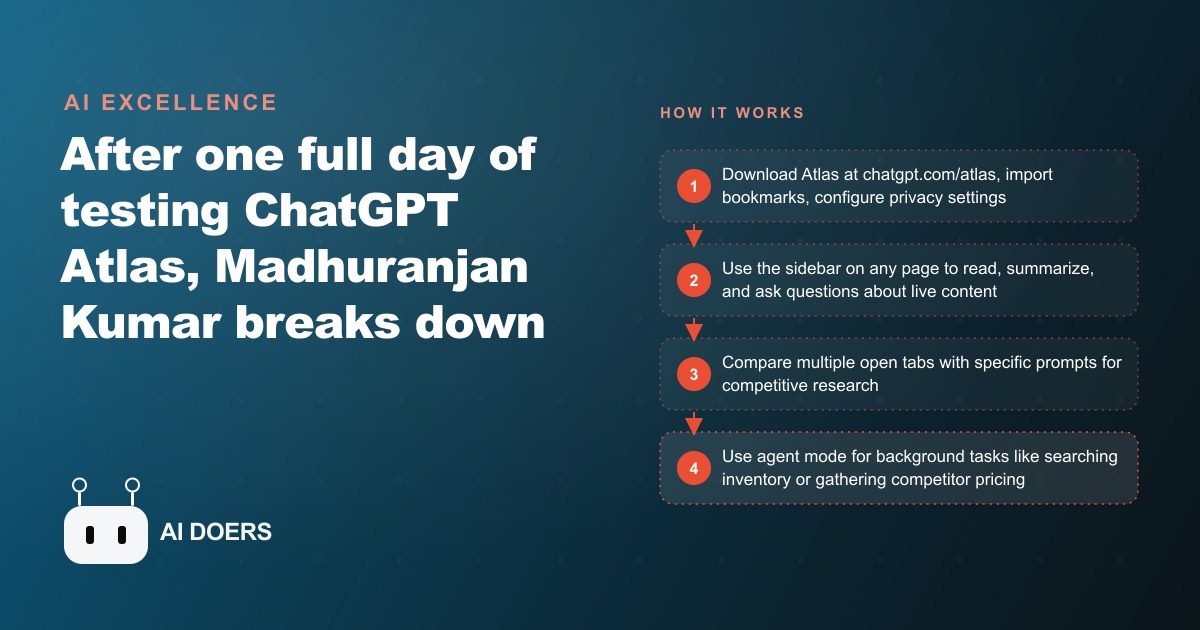
Atlas is the first browser I have tested where looking something up and getting AI help with what you found happen in the same tab at the same time, without copy-pasting a word.
I, Madhuranjan Kumar, have been putting Atlas through practical tests for car dealership research workflows specifically, because the browser-native AI model creates a genuinely different experience for the kind of competitive and financial research that dealership staff do every day. This is not a general-purpose review. This is a step-by-step account of how to get Atlas configured and useful for dealership-specific work, where it delivers real time savings, and where it is not yet worth the complexity.
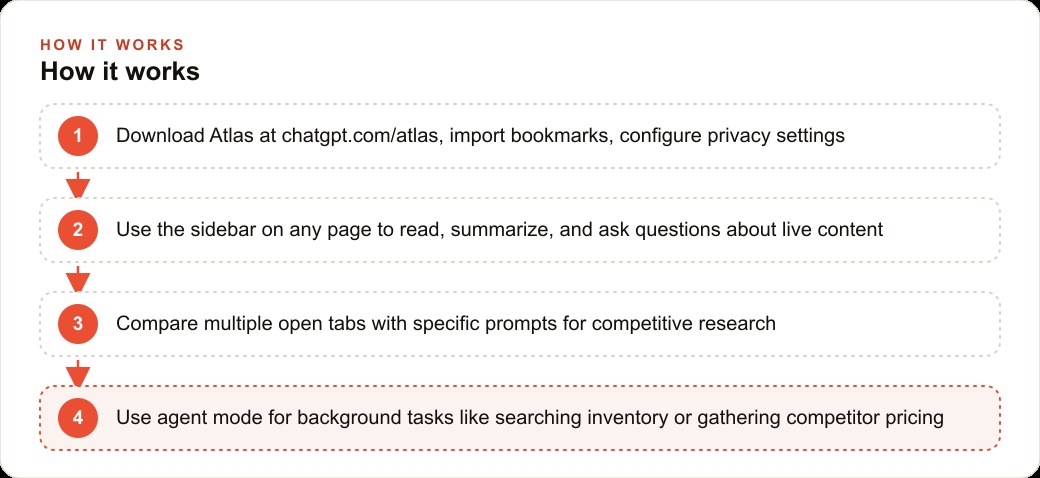
Download and configure Atlas before you use it for any real business research
Atlas is currently available as a separate download from OpenAI and installs alongside your existing browser. Do not conflate it with the ChatGPT web interface. They share models but the architecture is meaningfully different. In Atlas, the AI is embedded at the browser level, not inside a tab. This means it can read the content of whatever page you are on without you doing any copying, and it maintains context across tabs within a session.
The first thing to configure after installation is the default behavior of the AI sidebar. Out of the box, Atlas will attempt to summarize and comment on pages you visit automatically. For personal browsing this might be fine. For a busy dealership environment, you want that behavior turned off and replaced with on-demand activation. Find the settings panel and switch the sidebar to manual mode: it activates when you open it, not when you navigate to a page. This avoids the sidebar firing mid-conversation with a customer and displaying AI commentary on a competitor's pricing page.
The second configuration step is signing in with a ChatGPT account that has the appropriate plan. Basic features work on a free account. The research workflows I am describing, particularly tab comparison and multi-source synthesis, work best on Plus and are only fully unlocked at the Pro plan for agent-mode tasks. Decide at setup which tier you need based on the workflows in the sections below, rather than discovering the limitation mid-task.
Third, and this is not obvious: configure your frequently visited dealership pages as pinned tabs before your first real research session. Atlas builds stronger contextual awareness during a session when pages are actively open rather than freshly navigated to. Pinning the pages you visit daily means Atlas has already parsed their content when you open the sidebar to ask about them.
Learn what the URL bar does that a regular browser address bar does not
The Atlas URL bar is not just a navigation input. It is also an AI instruction field. You can type a URL and a natural language instruction in the same bar, and Atlas will navigate to the URL and execute the instruction on what it finds.
For a dealership finance manager, this changes how you interact with manufacturer incentive pages. Instead of opening the page, reading through it, identifying the relevant promotional rates, and manually noting them somewhere, you navigate to the OEM incentive page with an instruction to extract the current promotional financing rates for specific models and return them in a table. Atlas navigates, parses the page, and returns a structured summary without you reading through the whole document.
The practical limit of this: it works reliably on pages where the content is text-based and publicly accessible. It struggles with pages behind dealer login portals where the content requires authenticated sessions to load, and with pages that render their key content via dynamic JavaScript after load. Test any page you want to use this way before relying on it in front of a customer or in a high-stakes pricing conversation.
The URL bar behavior also works for competitive navigation. Enter a competitor's inventory page with an instruction like "list the current pricing on used pickup trucks under $35,000 on this page." Atlas returns a quick-parse list that is useful for a fast competitive check. It is not as thorough as a manual review, but for a rapid scan before a sales conversation, it is meaningfully faster than clicking through individual listings.
Build your first sidebar habit on the three pages you visit every day
The sidebar habit is the behavioral change that makes Atlas useful in practice rather than useful in demos. It requires identifying the three pages your staff visit most frequently, and building a standard sidebar interaction for each one.
For most dealerships, those three pages are the manufacturer inventory portal, the competitive pricing reference site you use most, and the F&I product rate sheet or lender portal. These are the pages where AI-assisted reading saves the most time because the content is dense, structured, and updated regularly.
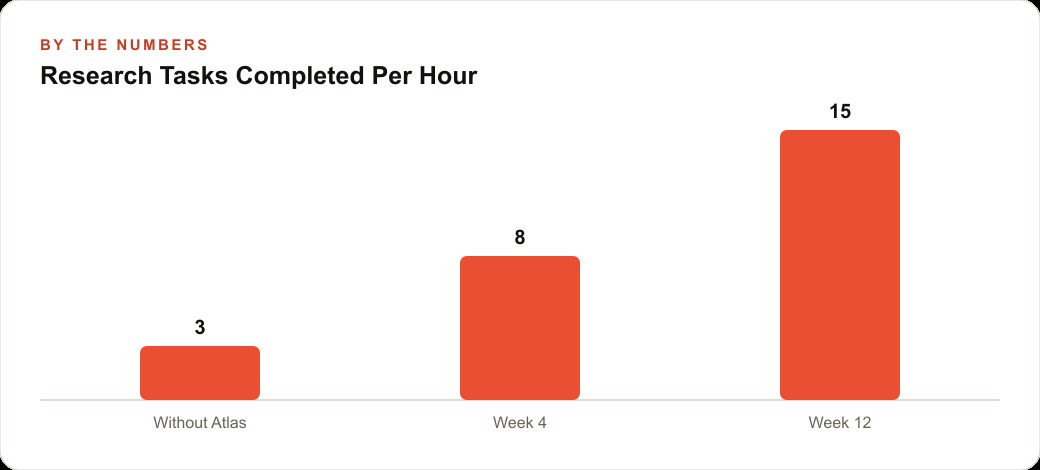
For the inventory portal: train the sidebar habit around a standard query about current days-on-lot distribution and any vehicles over sixty days. This is a check most managers run daily, and Atlas can surface it from the page content in thirty seconds rather than the two to three minutes of manual scanning it typically requires.
For the competitive pricing reference: train the habit around a query that compares a specific model's current listed prices across the three competitors you track most closely. The sidebar keeps that comparison current without requiring you to open multiple tabs and manually compare listings.
For the F&I rate sheet: train the habit around extracting the current top five promotional rates sorted by APR, which is a lookup a finance director often does multiple times per day when a customer is asking about payment options. Having a standard query means the answer is available in thirty seconds instead of ten to fifteen minutes of PDF reading.
The habits do not need to be complex. Simple, consistent queries run on the same pages every day are more valuable than elaborate multi-step prompts run occasionally.
Write standard prompts for your three most common research tasks before relying on the tool
The biggest operational mistake people make with browser-native AI is treating every research session as a fresh conversation. That approach means you spend part of every session re-establishing context, re-specifying the format you want, and re-defining the scope of what you are looking for.
Standard prompts solve this. Before you start relying on Atlas for real research, write out the exact prompt you will use for your three most common tasks, save them somewhere accessible, and paste them rather than writing fresh each time.
For a dealership, the three most common research tasks typically fall into these categories: competitive pricing comparisons for a specific segment, manufacturer incentive extraction for a specific model range, and used vehicle market pricing benchmarks for appraisal support.
Write your competitive pricing prompt in this structure: specify the segment, the trim level you are comparing, the geographic radius you care about, and the output format you want. Ask for a table with competitor name, vehicle year and trim, listed price, and days listed. Specifying the format saves one to two prompt iterations on every research session.
Write your incentive extraction prompt to specify the OEM, the model year, and to explicitly ask for APR promotional offers, lease residuals, and any cash-back programs separately. Without that specificity, Atlas tends to return a general narrative summary of the incentive page that requires follow-up clarification.
Write your appraisal benchmark prompt to specify the vehicle, condition tier you are assessing, and geographic market. Ask for a price range with high, median, and low endpoints based on the listings it finds on the pages you have open.
Having these three prompts written and ready cuts the overhead of each research session significantly. The tool becomes faster because you stop reinventing the instruction each time.
Test tab comparison with specific prompts before you trust it for competitive pricing work
Tab comparison is the Atlas feature most frequently highlighted in demos, and it is genuinely useful, but it needs to be tested with your specific use case before you rely on it in a pricing conversation or a customer-facing moment.
The feature lets you have multiple competitor inventory or pricing pages open simultaneously and ask Atlas to compare across all of them. The theoretical result is a synthesized view of what competitors are doing without manually cross-referencing tabs.
In practice, the reliability depends heavily on how the competing pages are structured. Pages with consistent, clearly labeled pricing fields return accurate comparisons. Pages with promotional banners, inline disclaimers, and price structures that require interpreting context around the number return less reliable comparisons, because Atlas sometimes parses the promotional price as the list price or vice versa.
Test this before you rely on it by running a comparison on pages you know well and checking the output against what you can manually verify. If the comparison is accurate on your standard pages, it is safe to use for rapid pre-conversation competitive checks. If it is inconsistent, limit its use to initial orientation rather than definitive pricing decisions.
A specific example of where tab comparison saves real time: a 150-car dealership in a competitive urban market. Sales staff previously took twenty to twenty-five minutes to manually pull competitor pricing from three or four sites and synthesize a recommendation for a customer asking "are your prices competitive on this truck." With Atlas tab comparison using a standard prompt: a structured comparison returned in under five minutes. Finance directors checking manufacturer rate sheets report a similar pattern: a summary of the top five promotional rates in thirty seconds instead of ten to fifteen minutes reading through a PDF. These are real productivity gains on tasks that happen daily.
Decide whether agent mode at the Pro plan rate earns its cost for your operation
Agent mode in Atlas, available at the Pro plan tier, extends the AI from reading pages you navigate to actively taking navigation steps on your behalf. You give it a research goal and it opens pages, reads them, follows links, and returns a synthesized result without you directing each step.
For a dealership research workflow, the clearest use case for agent mode is competitor inventory audits. You specify that you want to know what a named competitor currently has listed in a specific segment, at what prices, and with what mileage ranges, and the agent navigates their inventory page, applies the filters, reads through the results, and returns a structured summary.
This saves a researcher forty-five minutes to an hour on a task that most dealers run monthly or bi-weekly to stay current on competitive inventory. At the Pro plan price, the cost recovers quickly if the audit is running regularly.
The less compelling use case is using agent mode for tasks that a standard sidebar prompt handles adequately. If you are reading a page that is already open and asking for a summary, there is no reason to invoke agent mode. The additional cost at the Pro tier is only justified for multi-step research tasks where the agent is autonomously navigating between sources.
My recommendation for most dealerships: start with the Plus plan and build the sidebar habits and standard prompts described in the sections above. Run those habits for thirty days and measure where time is still being spent on research. If the remaining time sink is multi-source competitive audits or cross-referencing that requires navigating between many pages, the Pro upgrade for agent mode justifies the cost. If the standard habits have already solved the primary time sinks, the Plus plan is sufficient.
The tool earns its place in a dealership workflow through the daily habits, not through the most technically impressive features. Build the habits first, then decide whether the advanced features are worth the additional cost for your specific operation.
The honest summary of a month of testing Atlas for dealership research is this: the value is not in the headline features. It is in the mundane habits of opening the sidebar on the same three pages every day and asking the same well-specified questions. The tool earns its place by being consistently present and consistently useful for the work that happens every single day, not by being impressive in a demo. Build the habits first and let the advanced features earn their turn.
That is exactly what we do at AI DOERS. Book a private 30-minute call with Madhuranjan Kumar and we will map the fastest path to it for your specific business.
Book your call →
Madhuranjan Kumar
Madhuranjan Kumar brings 20 years of performance-marketing experience and has managed over $200 million in Facebook ad spend for brands across the United States and beyond. His expertise spans the full modern marketing stack: Meta, Google Ads, TikTok, email automation, CRM, and the websites that hold it together. At AI DOERS he turns that track record into lead-generation systems for businesses across every industry.