
Building an AI Voice Receptionist That Books, Reschedules, and Logs Calls
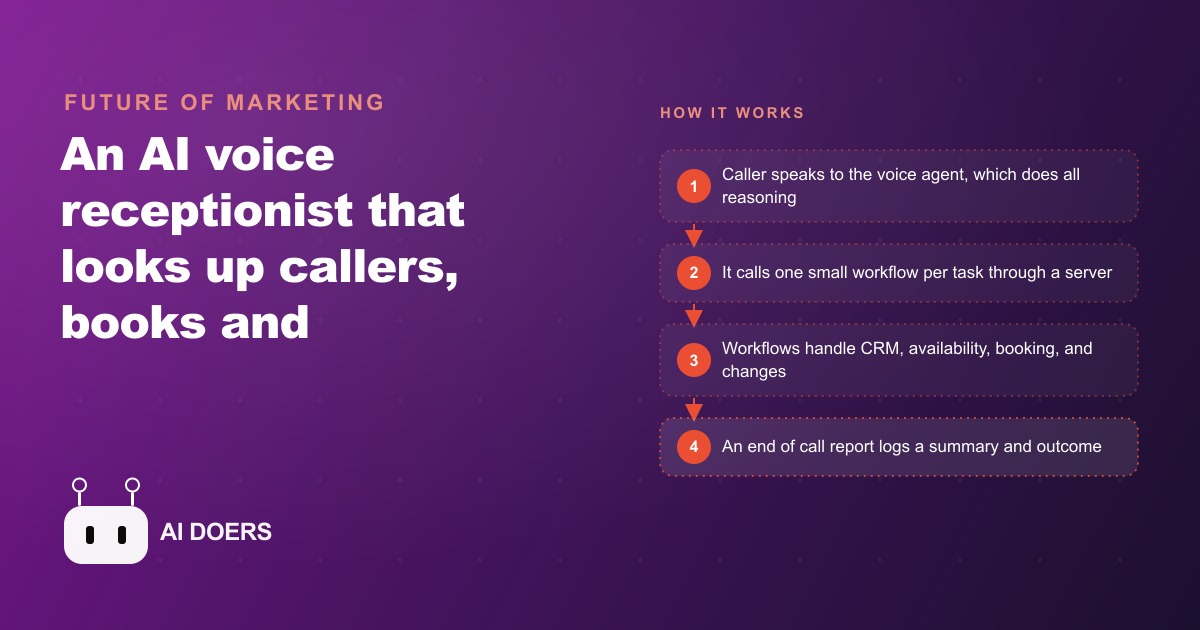
An AI receptionist that greets callers, looks them up, books and reschedules appointments from a knowledge base, transfers to a human when needed, and logs every call, all built on small single purpose workflows.

The receptionist that never sleeps is really two machines
Most people picture an AI voice receptionist as one clever robot on the other end of the phone. The more useful way to see it is as two machines bolted together. One machine talks and listens. The other quietly does the work. When I built a receptionist that could look up a caller, book and reschedule appointments, answer from a knowledge base, and hand off to a human, the entire design came down to keeping those two machines honest about their jobs. The voice layer is the mouth and ears. A set of small back end workflows are the hands. Get that separation right and the system feels calm and fast. Blur it and you get a slow, expensive tangle that stumbles on live calls.
I want to take this apart properly, because the interesting part is not that a computer can now hold a phone conversation. That is table stakes. The interesting part is the architecture underneath, and why the boring choices are the ones that make it reliable.
Why the reasoning belongs in exactly one place
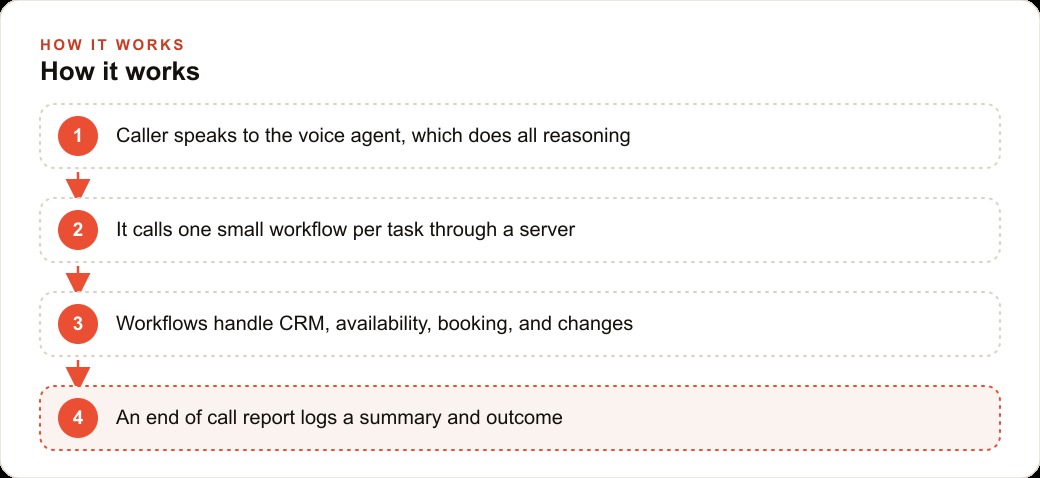
The single most important decision in a build like this is where the thinking happens. The voice layer is already a full reasoning agent. It understands what the caller wants, it decides which step to take next, and it phrases the reply. That is a lot of intelligence sitting at the front door.
The temptation is to add more intelligence in the back. You imagine a smart workflow that figures out the calendar, another that interprets messy customer requests, another that reasons about edge cases. It sounds thorough. It is actually a trap. If you put a second reasoning agent behind the first, you double three things you never want doubled on a live call: cost, latency, and the chance of a mistake. Two brains that have to agree are slower and less predictable than one brain giving a clear order to a set of obedient tools.
So the rule I follow is blunt. The voice layer does all the reasoning. The back end does none. Every workflow behind the scenes runs on rails with no AI inside it at all. The voice agent decides, and the workflow simply executes. This is the facet most first-time builders get wrong, and fixing it is often the difference between a receptionist that answers in half a second and one that leaves the caller listening to silence.
The wireframe is the blueprint, drawn before a single tool exists
A phone call is a branching tree, and you cannot write good instructions for a tree you have not drawn. Before I build anything, I sketch the whole conversation on paper. Does the caller already exist in the system or not. Do they want to book, change, or cancel. Do they have a general question. Are they upset and asking for a person. Each of those is a branch, and each branch has its own sub-branches.
Mapping that if this then that logic first does something quietly powerful. It turns the vague goal of build a receptionist into a concrete list of exactly what the agent must be able to do at every fork. When it comes time to write the system prompt, which is where most of the real work lives, you are no longer inventing behavior on the fly. You are transcribing a flow you already understand. I have watched builds fall apart because someone skipped this step and tried to prompt their way out of confusion later. The paper sketch is cheap. The confusion is expensive.
Small single-purpose workflows are the hands
Once the flow is clear, the back end becomes a set of tiny tools, each doing exactly one job. In my build there were seven of them: look up a client, create a new client, check availability, book an event, look up an existing appointment, update an appointment, and delete one. Notice how narrow each is. None of them tries to be clever. None of them decides anything. Look up a client takes an email and returns a record. Book an event takes a time and writes it to the calendar. That is the whole responsibility.
There is a real engineering reason for this discipline. A tool that does one thing responds fast and behaves predictably, which is exactly what you need when a human is holding the line waiting for an answer. A tool that tries to do five things has five ways to fail and five reasons to be slow. Keeping each workflow to a single job is the back end version of the same principle that governs a clean CRM and website stack, where each part has a defined role and nothing reaches across to do another part's work.
The server is the switchboard, not a pile of wires
With seven workflows, you face a wiring question. You could connect each one to the voice agent as its own separate tool, with its own parameters and its own configuration. That gets messy quickly and it makes changes painful. Instead, I expose all seven through a single server. The voice agent connects to that one server and sees all the tools behind it, each carrying a plain description of when it should be used.
This matters more than it sounds. Because every tool describes itself in plain language, the voice agent can read those descriptions alongside the live context of the call and pick the right one for the moment. The caller says they need to move their Thursday appointment, and the agent reasons its way to look up the appointment, then check availability, then update. You did not hardcode that sequence. You gave the agent a clear menu and let it choose. The switchboard model also means adding an eighth capability later is a matter of publishing one more tool with one more description, not rewiring the whole system.
The system prompt is the actual product
Here is the part that surprises people. The voice model and the workflows are commodities. The thing that determines whether the receptionist feels professional or amateur is the system prompt, and voice prompting is mostly prompt, test, listen, repeat.
A good prompt tells the agent to greet the caller, ask for an email so it can identify them, and say a short filler line like let me check on that before it calls a tool, so the caller never sits in dead silence while a lookup runs. It tells the agent to confirm the spelling of a name or the exact time before it saves anything, because a wrong letter in an email or a booking on the wrong day undoes all the goodwill. It spells out the availability and booking rules in detail, so the agent does not improvise a policy the business never agreed to. This is craft work. You read the transcripts, you hear the awkward moment, and you tighten one sentence in the prompt. Do that enough times and the receptionist starts to sound like it knows what it is doing, because in a sense it now does.
Truth is a design constraint, not a nice-to-have
Two rules protect the business from the classic failure mode of a chatty AI, which is confidently making things up. First, honesty about what it is. The receptionist opens by telling the caller it is an AI assistant. Calls will never be flawless. There will be interruptions and small etiquette stumbles, and being upfront about the nature of the agent is simply the right thing to do and sets the caller's expectations correctly.
Second, honesty about facts. For general questions, the agent is told to answer only from an uploaded policies and FAQ document, and never to invent information. If the answer is not in the source, the agent says so or offers a human. This is the same discipline that keeps a well run marketing operation trustworthy. When you scale content across SEO and organic search, you never let a tool fabricate a claim, and a voice agent that quotes a made-up price or invents a policy is doing exactly that on the phone. Constraining the agent to real sources is what makes its answers safe to rely on.
Logging turns calls into data you can act on
The final facet is memory. An end of call report sends a short summary and a structured outcome, like appointment booked or question answered, into a workflow that writes it to a sheet. Suddenly every call is tracked like any other automation in the business. The owner can see how many calls came in overnight, how many booked, how many needed a human, and what people kept asking about. A voicemail box gives you none of that. A logged receptionist gives you a running record you can actually manage from.
That record is worth more than it first appears, because it turns the phone from a black box into a source of data. If the log shows a spike of after-hours calls asking the same question, that is a signal to add the answer to the FAQ or to the website. If it shows a pattern of callers wanting a service the business does not yet offer, that is a demand signal the owner would otherwise never have seen. The receptionist stops being just a way to catch calls and becomes a quiet listening post on what customers actually want, and every logged outcome compounds into a clearer picture of the business over time.
What this looks like for a pest control company
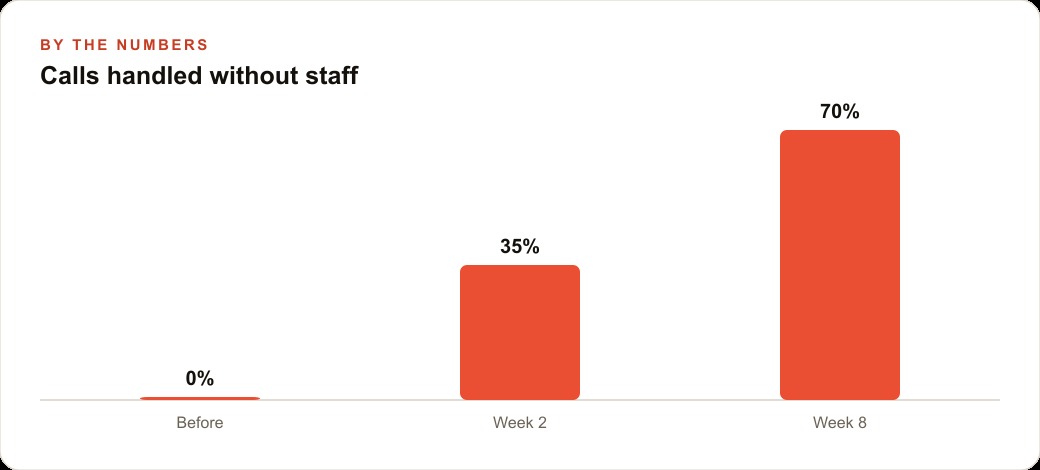
Let me make it concrete with an unnamed pest control company that fields a steady flow of calls about ant treatments, rodent inspections, and quarterly service visits. Before the build, the owner estimated the business missed roughly 30 calls a week after hours and on busy afternoons, and even a conservative close rate meant several booked jobs a month were simply lost to a ringing phone nobody answered. At an average job value in the low hundreds of dollars, that is real money walking away every month.
Here is how the two machines handle a real call. The agent greets the caller, says it is an AI assistant, and asks for an email. It runs the client lookup workflow. If the caller is new, it collects their details, confirms the spelling, and creates a CRM entry. Then it gathers intent. The caller wants a treatment scheduled, so the agent calls check availability, reads back two open slots, confirms the choice, and runs the booking workflow, which writes the appointment to the calendar and logs it. When a customer calls back to push a visit a day because of rain, the agent looks up the existing appointment, checks the new slot is free, and runs the update workflow so both the calendar and the log reflect the change. For a question about whether a treatment is pet safe, the agent answers only from the uploaded FAQ. For a frustrated caller who wants a person, a handoff tool routes them to a human line. After every call, the end of call report drops a one-line summary and an outcome into the sheet.
The illustrative payoff is straightforward. If capturing even most of those 30 missed calls turns into a handful of extra booked jobs a week, the receptionist pays for itself many times over, and the owner gains something they never had before, which is a clear nightly record of who called and what happened. The same captured contacts can feed follow-up campaigns later, so a quiet inquiry at 9 pm can become a reminder or an offer through Facebook and Instagram ad campaigns that reach the same person again.
The takeaway is the architecture, not the novelty
Strip away the excitement about a talking computer and what you are left with is a clean design pattern. Keep the reasoning in one place. Draw the conversation before you build it. Give the back end small, dumb, fast tools. Connect them through one switchboard. Pour your effort into the prompt. Constrain the agent to the truth. Log everything.
You can build a receptionist like this yourself with patience and a lot of testing, and understanding these facets is most of the battle. If you would rather have a polished, reliable phone agent set up for your business without the trial and error, that is the kind of system you can hand to an expert and simply review the finished result.
That is exactly what we do at AI DOERS. Book a private 30-minute call with Madhuranjan Kumar and we will map the fastest path to it for your specific business.
Book your call →
Madhuranjan Kumar
Madhuranjan Kumar brings 20 years of performance-marketing experience and has managed over $200 million in Facebook ad spend for brands across the United States and beyond. His expertise spans the full modern marketing stack: Meta, Google Ads, TikTok, email automation, CRM, and the websites that hold it together. At AI DOERS he turns that track record into lead-generation systems for businesses across every industry.