
Building a Real Mobile App From Your Phone, No Code Required
AI app builders now let you create a working mobile app from your phone, generating your own images, audio, and AI features as you go. Here is the workflow and how I would use it to launch a local services marketplace startup.

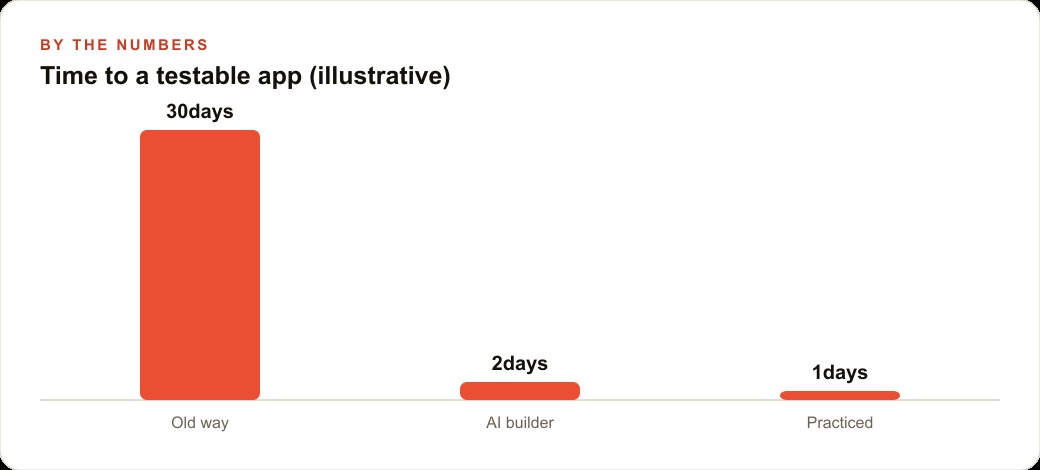
Thirty days used to be a fast timeline for getting a mobile app from idea to a testable build. AI app builders have compressed that to a single session, running on a phone, without writing a line of code. I am Madhuranjan Kumar, and what has changed is not just the speed. It is who can build the app at all. The technical barrier that kept most founders dependent on a developer for even a prototype has been removed, and what replaces it is a workflow that rewards clear thinking over coding ability.
The last barrier to mobile app development was the keyboard: now that is gone
For years, no-code tools promised to let non-technical founders build apps without programming. Most of them delivered on a narrow version of that promise: you could build something that looked like an app if you were willing to spend weeks learning the tool's specific logic, working within the constraints of its template library, and accepting the limitations baked into its editor. The result was rarely a real app. It was a form dressed up to look like one.
AI app builders are different because the interface is a conversation. You describe what you want, and the agent builds it. You do not need to find the right template, learn a drag-and-drop editor's quirks, or understand what a component library is. You say "I want a marketplace where users can browse local service providers by category" and the agent begins writing actual code that produces an actual app. The phone removes even the assumption that you need a laptop open. You can start building during a commute, refine it in the evening, and publish a shareable build before the day is over.
This matters most for founders and business owners who have been sitting on an app idea they assumed required a development budget to test. The idea no longer requires a team. It requires a session.
For businesses that are already running Meta ads to acquire customers, having a dedicated app rather than a mobile web page changes the retention and re-engagement picture significantly. The ability to build a testable version before committing advertising spend to it is a meaningful advantage.
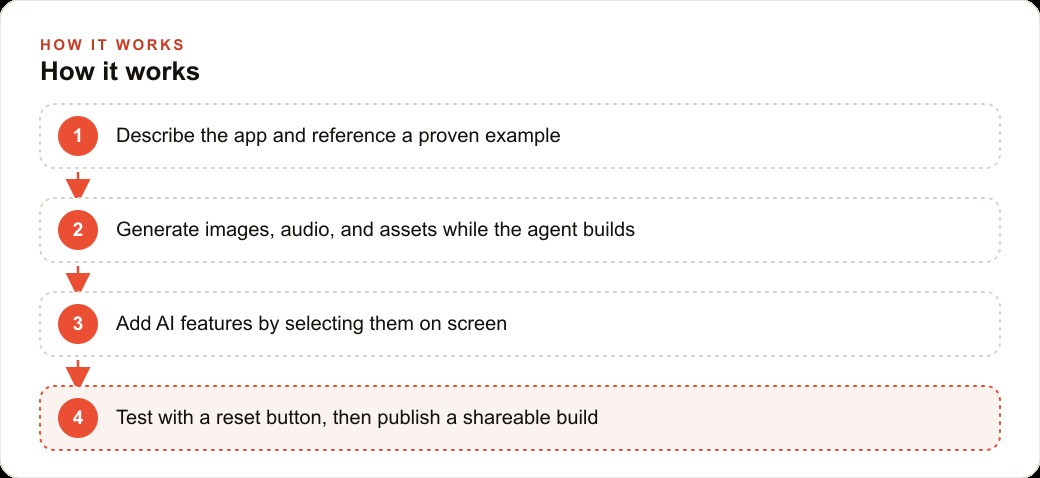
Onboarding first: why the first screen matters more than any feature
Every instinct in product development pushes toward features. The founder wants to build the search, the booking flow, the provider profiles, the rating system. The first screen feels like a formality. It is actually the most important part of the app, and building it last is one of the most consistent mistakes in mobile development.
Onboarding is the moment a new user decides whether the app is worth their time. If the first screen is confusing, slow, or asks for information the user does not understand why you need, they close the app and do not return. The app may have excellent features behind that first screen, but the user never reaches them. Retention data from consumer apps consistently shows that the majority of users who churn do so in the first session, and usually in the first few minutes of it.
The correct order is onboarding first, features later. In the AI app builder workflow, this means the first instruction to the agent focuses entirely on the entry experience: what a new user sees, what they are asked, how they are guided into the app. Polish that experience until it works clearly and feels right. Only then add the features behind it.
This sequencing also has a practical benefit in the builder workflow. A clean onboarding flow is the foundation the rest of the app is built on. Changing it later, after features have been added that reference the user state established in onboarding, is complicated. Getting it right first means everything built on top of it is built on solid ground.
Generating assets in parallel while the agent builds changes the session rhythm
In the old development model, design, content, and engineering were separate phases. The designer produced assets, handed them to the engineer, and the engineer integrated them. Each step waited for the previous one to finish.
In an AI app builder session, those phases collapse and can happen simultaneously. While the agent is writing the app code in response to your first prompt, you can start generating the visual assets the app will need: the logo, the category icons, the welcome screen illustration, the background image. You name each asset as it is created so the agent knows what to call it when it is time to place it. By the time the first version of the app structure is ready, many of the assets are ready too.
This changes the pacing of a session dramatically. In a traditional build, you would spend several hours building, then stop and wait for design work, then resume and integrate. In an AI builder session, both happen in parallel and the integration is largely automatic because the agent already knows the asset names. A session that would have taken several days of elapsed time in the old model can realistically produce a testable first version in an afternoon.
The reset button trick that separates builders who ship from ones who demo
One of the clearest differences between builders who actually ship and builders who produce endless demos is how they test. A builder testing their own app knows the app. They know which path through onboarding to take, which buttons do what, and where the feature they are proud of lives. They miss broken experiences because they navigate around them without realizing it.
A reset button solves this. It clears all stored user state and returns the app to the exact state a brand new user sees on first launch. With a reset button, the builder can run through the full new-user experience repeatedly, exactly as a real user would encounter it, catching broken screens, confusing prompts, and flows that do not complete correctly.
Building the reset button is a single prompt to the agent: add a reset function that clears all local data and takes the app back to the initial onboarding screen. It takes a few minutes to build and returns immediate value in every test session. The builders who skip it tend to ship apps that feel polished to them and broken to everyone else, because they never saw what a new user actually sees.
The concrete move: build one focused flow in a session before adding anything else
The most common failure mode in AI-builder sessions is scope expansion. The founder starts with a marketplace, then adds a messaging system, then decides it needs a payment flow, then realizes the provider profiles should include a booking calendar. By the end of the session, nothing works well because nothing was finished.
The builders who ship do the opposite. They pick one core flow, the single interaction that proves the app's value, and they finish it completely in the first session. For a marketplace, that flow might be: new user opens app, sees onboarding, browses provider categories, views a provider profile, and requests a service. That is the complete loop. Everything else is a second session.
This also changes how useful a web CRM or follow-up system becomes. A finished first flow produces real user interactions to track, real data on where users drop off, and real feedback from the first people who test it. An unfinished app with ten half-built features produces nothing useful.
Once that first flow is tested and working, the builder publishes a shareable build and puts it in front of real users the same day. Not a polished final version. Not a product launch. A real test that produces real learning, which is the only kind of learning that improves the second session.
The local services marketplace startup: from idea to testable build
The local services marketplace startup wanted to connect homeowners with trusted local providers for jobs ranging from plumbing to lawn care to handyman work. The founding team had no technical background. They had tried a no-code tool six months earlier and spent three weeks producing something that looked like a form.
In the AI builder session, the first instruction focused entirely on onboarding: a clean three-step flow asking for location, the type of service needed, and a contact email to receive matches. While the agent built that flow, the team generated four category icons and a simple wordmark logo in parallel, naming each one as it was created. By the time the onboarding was ready to test, the visual assets were ready to drop in.
The second prompt added the provider browse view: a clean list of providers filtered by the category selected in onboarding, each showing a name, a photo, a summary, and a call-to-action button to request the service. The third prompt built the provider profile page. The fourth added an AI chat feature, connected to a language model, that let users describe a job in plain words and received a categorized recommendation back.
A reset button was built as a dedicated prompt before any testing began. The team ran through the full new-user experience eleven times in thirty minutes, catching two broken transitions and a confusing prompt in the location step of onboarding. Both were fixed with follow-up prompts to the agent.
Illustratively, the old path for this startup would have been: write a brief, interview three developers, receive quotes over several days, negotiate, sign a contract, wait four to six weeks for a first testable version, then begin the feedback cycle. Total elapsed time to first real test: six to eight weeks minimum, with a cost typically between fifteen and thirty thousand dollars for a basic first version.
The AI builder path produced a testable build the same afternoon. The team published the shareable link, sent it to twenty homeowners and ten local service providers they knew personally, and had twelve responses with specific feedback within forty-eight hours. That feedback shaped the second session, which added a booking request form and a provider notification flow. The SEO content and marketing work began in parallel with those second-session improvements, because there was a real product to drive traffic toward.
The version built in the first session was not the final product. It was a real test with a real interface that real people used, and it cost an afternoon. That is the shift the AI app builder makes possible: the feedback cycle starts before a dollar of development budget is committed, which changes every decision that comes after.
The comparison that makes the time difference concrete: the old path for this startup would have involved writing a product brief, vetting three to five developers, waiting for quotes, negotiating terms, signing a contract, and then waiting four to six weeks minimum for a first testable build. Total elapsed time to first user feedback: two months on the short end, with a cost typically between fifteen and thirty thousand dollars for a basic first version. The AI builder path produced a shareable build the same afternoon the idea was properly scoped, and real user feedback within forty-eight hours.
That compression matters most in markets where the window for a specific idea closes quickly. A marketplace built around a seasonal service, a community-specific need, or a trend that is peaking now cannot afford a two-month build cycle before learning whether the core idea works. Getting ten real people through the app in the first week and seeing where they drop off or what they ask for next is information that improves the second session dramatically. The founder who has that information shapes a much better second version than the founder who spent the same two months building in isolation.
For founders who are also thinking about how the app fits into a broader web CRM and lead nurturing workflow, having a working testable app early also means the supporting infrastructure can be built in parallel rather than sequentially. The email capture from the onboarding flow, the notification system for provider alerts, and the follow-up sequence for users who browsed but did not request a service: all of that can be planned and begun while the second session of app development is still in progress, because there is a real app to plan around.
That is exactly what we do at AI DOERS. Book a private 30-minute call with Madhuranjan Kumar and we will map the fastest path to it for your specific business.
Book your call →
Madhuranjan Kumar
Madhuranjan Kumar brings 20 years of performance-marketing experience and has managed over $200 million in Facebook ad spend for brands across the United States and beyond. His expertise spans the full modern marketing stack: Meta, Google Ads, TikTok, email automation, CRM, and the websites that hold it together. At AI DOERS he turns that track record into lead-generation systems for businesses across every industry.