
Building a Native iOS App With AI in Hours, Not Months
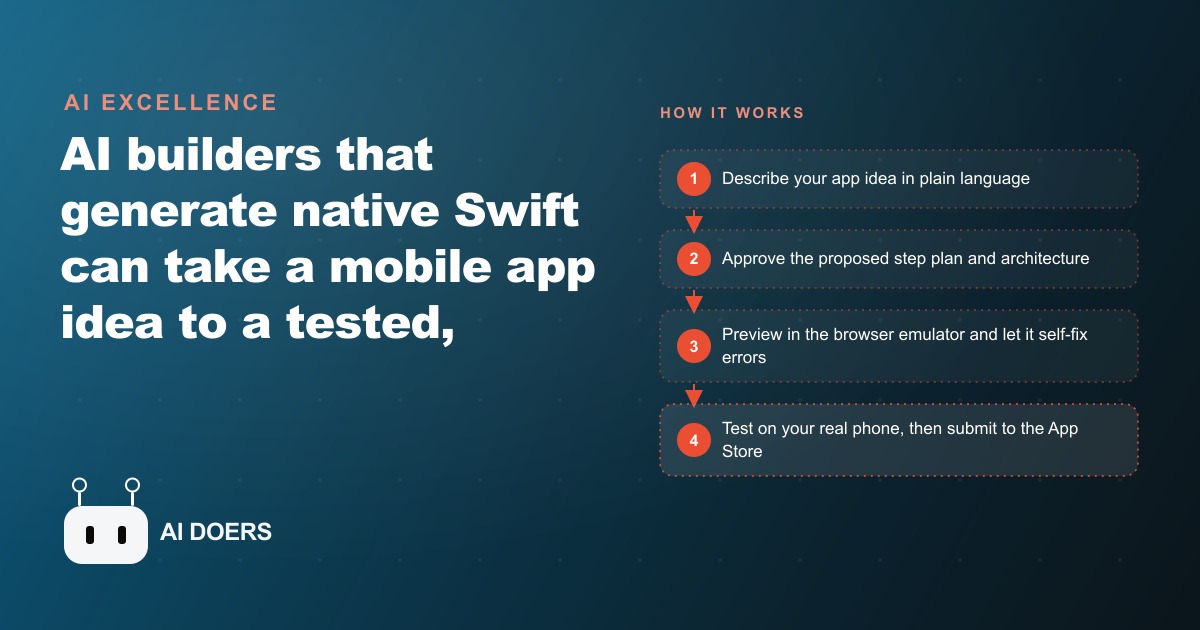
AI builders that generate native Swift can take a mobile app idea to a tested, App-Store-ready build in a couple of hours. The agent plans the steps, generates assets, runs an iPhone emulator in the browser, fixes its own errors, and lets you test on your real device before you submit.

A custom mobile app used to be a ten-month project and a five-figure invoice. I built one before large language models existed, and it swallowed most of a year. Today the same kind of app can go from a plain-language idea to a tested, App-Store-ready build in a single afternoon. I am Madhuranjan Kumar, and while nearly everyone is racing to build websites with AI, the mobile space is still wide open, which means the people quietly shipping real apps there are facing far thinner competition. This is a practical path to shipping one, written as the stages I would actually walk through, in order.
The goal here is one concrete outcome: a native iOS app that runs on a real iPhone and is ready to submit. Not a prototype, not a web page pretending to be an app. A real one. Follow the stages below and you can reach that outcome without writing code yourself, though you do need to make good decisions at each gate.
Write the idea as one clear paragraph before you touch a tool
Every good build starts with a boring document, and skipping it is the single most common reason these projects wander. Before you open any AI builder, write your app as one tight paragraph that answers three questions. What does the app do. Who is the person using it. What are the three or four features that actually matter. Resist the urge to list twenty features. The clearest apps do one job well, and the model will build a sharper first version if you hand it a sharp brief.
If your idea were a travel app, that paragraph might read like this. The app lets a traveler explore an interactive three-dimensional globe they rotate by dragging and zoom by pinching, drop pins on places they have been, attach photos to each pin, and log the trip with a short note. That is a real target with real requirements: it needs location permissions, photo uploads, and genuine three-dimensional rendering. It is far more than a habit tracker, and stating it precisely up front is what lets the planning stage do its job.
Choose the model that will do the thinking
On a paid plan, the better builders let you pick the model behind the build, and this choice matters more than people expect. The hardest part of any app is not typing the code, it is the plan and the architecture, the decisions about how the pieces fit together. So put your strongest reasoning model on that work. In the example I am drawing from, the builder offered a choice that included Anthropic's Opus and a high-tier GPT model, and the strong planning model was the right pick for architecture. Spend your best model where the thinking is dense, and you buy yourself a cleaner foundation for everything that follows.
The reason to insist on native Swift here, rather than a builder that wraps a website inside an app shell, is quality you can feel in your hand. Swift is the native language of the Apple ecosystem, and native code is why a finished app feels smooth on a real phone instead of laggy and obviously fake. When you evaluate a builder, this is the first thing to confirm. Native output or a web wrapper. It decides whether your app feels professional or feels like a shortcut.
Approve the plan before a single line of code exists
This is the stage that separates a build that lands from one that drifts, so treat it as a real gate rather than a formality. A good builder does not immediately start writing code when you paste your paragraph. It proposes a full breakdown of the app and an architecture for your approval first. In the travel-app example, the agent came back with a ten-step plan describing exactly how it intended to construct the globe, the pins, the photo handling, and the data storage.
Read that plan the way you would read a contractor's blueprint before they pour concrete. Does the step order make sense. Did it understand that pins need to persist between sessions. Did it account for the permissions the app will request. If something is wrong or missing, this is the cheapest possible moment to fix it, because nothing has been built yet. Approving a plan that matches what you actually pictured is the discipline that keeps an app with real features from wandering off course three hours later. Only approve when it matches your paragraph.
Let it build, preview in the browser, and use the self-fix button
Once you approve the plan, the loop gets fast and genuinely enjoyable to watch. The build produces its own supporting assets automatically, including an app icon, a logo, and, in the travel example, the map assets the globe needed. You can override any of them or upload your own branding if you already have a look you want, but you are not blocked waiting on a designer to start.
The preview is the part that still feels like magic. A full iPhone emulator runs right inside the browser with nothing to install, and you can switch between iPhone and iPad to check that your layouts hold on both. When the simulator hits an error, and it will, a single fix button hands the problem straight back to the agent, which reads the error and repairs itself. That self-correction is what keeps momentum. You are not dropped into a debugger trying to decode a stack trace. You click fix, the agent works through it, and the build keeps moving. Watch the previews as they update so you catch anything that looks wrong early, while it is still cheap to change.
Test on a real phone before you believe it works
An emulator is a great preview, but it is not proof. The real test is on hardware, and this stage is non-negotiable. A companion app connects your iPhone over USB and runs the build as a standalone app on your actual device, so you can behave exactly like a future user. In the travel example, that meant rotating the globe with a finger, dropping real pins, adding real photos, and logging a real trip, all on-device.
Do the same for your app. Exercise every one of the three or four features you named in your paragraph, and try to break them the way a distracted person on a train would. Tap too fast, background the app and come back, deny a permission and see what happens. Bugs that never surface in the emulator show up the instant real hardware, real network conditions, and real fingers get involved. If it holds together here, you have something worth submitting. If it does not, hand the specific failure back to the agent and iterate before you go anywhere near the App Store.
Submit, then let the built-in analytics tell you what to build next
When the build is stable on your device, it goes to the App Store through the normal submission flow. But the work does not end at submission, and one of the quiet advantages of these platforms is that they now show daily, weekly, and monthly active users right inside the build environment. Telemetry that used to require custom tracking code is simply there. Once your app is live, you can watch whether people actually open it, which features hold their attention, and where they drop off. That data is your roadmap for version two, and it turns guessing into observing.
A worked example: the gym that ships a retention app in an afternoon
Let me put the whole path together with an illustrative example. Picture a gym that wants members to show up more often and renew more reliably. Those two outcomes are the entire point of the app, so the paragraph writes itself: a class schedule with one-tap booking, a check-in streak the member can watch growing, a small library of short technique videos, and push reminders for the classes they already like.
I would run the strong planning model on the architecture, then read the ten-step plan the agent proposed and confirm it understood that streaks need to persist and that reminders depend on the member's booking history. Only then would I approve it. As it built, I would preview in the browser emulator and lean on the one-button fix whenever the simulator complained, never once opening a code editor. When it held together, I would load it onto a real iPhone over USB and act like a member: book a spin class, hit check-in, watch a short video, see the streak tick up by one. If that first version felt right, it goes to the App Store through the standard flow.
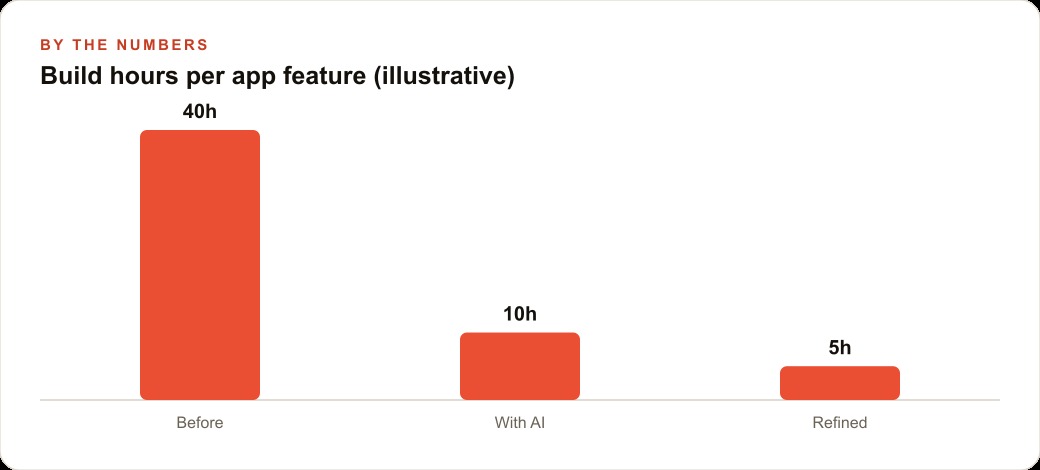
Now for the numbers, framed as illustration rather than a promise. The old way, a custom app like this might have been forty hours of developer time per major feature and a project that stretched across many months, which is exactly why most gyms never built one. With this workflow, the first build of a comparable feature might take closer to ten hours of guided effort, and a refined second pass closer to five, because the plan and the assets are already in place. The gym owner ends up with a member-retention tool they could never previously justify, delivered in an afternoon instead of a year. And once it is live, the active-user dashboard tells them which classes fill, whether members open the app, and where to improve, so their SEO and organic search content and their Facebook and Instagram ad campaigns can point straight at the app that keeps members coming back, while sign-ups and reminders flow through the gym's CRM and website stack without anyone rekeying data.
The short version of the playbook
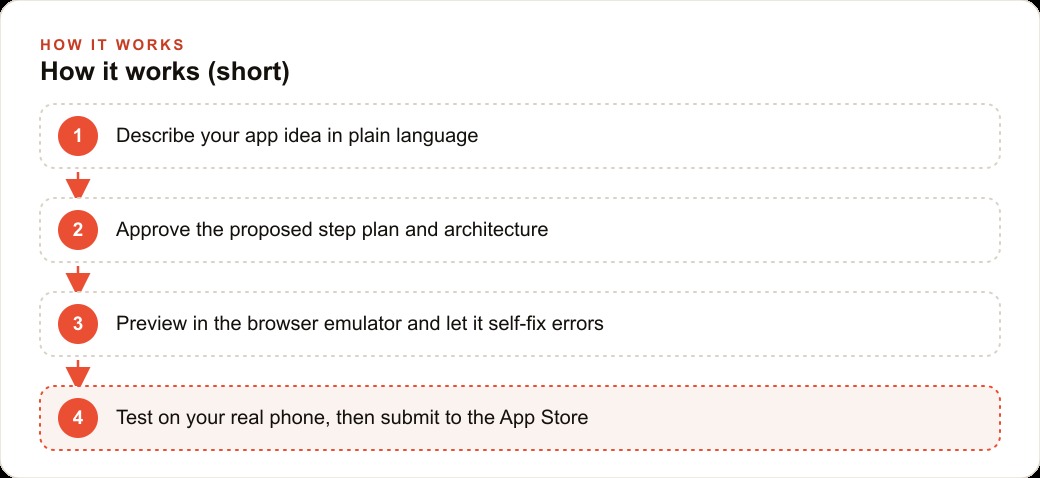
If you remember nothing else, remember the gates. Write the idea as one clear paragraph. Put your strongest model on the plan. Approve the architecture before any code exists. Build, preview, and self-fix in the browser. Test on a real phone before you celebrate. Submit, then let the analytics guide the next version. Each gate is a place where five minutes of judgment saves you an hour of rework, and together they are the difference between a demo and an app people keep.
Why the mobile gap is worth walking through right now
It is worth naming why this path is worth your time at all, because timing is most of the opportunity. The reason the mobile space is wide open is not that it is harder than web. It is that attention rushed elsewhere. Everyone learned they could spin up a website with AI, so that is where the crowd went, and the app stores were left comparatively quiet. That imbalance will not last. The same builders that make a native app buildable in an afternoon are getting easier and better each month, and the moment that becomes common knowledge the competition thickens. Right now, a focused business app faces far fewer rivals in its category than the equivalent website would, which means a modest app can stand out in a way a modest website no longer can.
There is also a durability point that the web crowd often misses. An app that a customer installs on their phone earns a place on the home screen and permission to send a notification, and both of those are direct lines back to that customer that a website simply does not get. A booking reminder that lands as a push notification is opened far more often than the same reminder buried in an inbox. So the app is not only easier to build than it used to be, it is a stronger retention asset than the web page it might replace, and that combination is exactly why the quiet builders are making real money while the noise is somewhere else. Treat the current gap as a window, not a permanent condition, and move while it is still open.
You can genuinely do a first version of this yourself in a single sitting, and I would encourage anyone with a clear idea to try it this week. If you would rather have someone shape the idea, run the right planning model, get the build clean on real hardware, and walk it all the way through App Store submission, that is exactly the kind of work I do for clients, and you can bring me in to handle it.
That is exactly what we do at AI DOERS. Book a private 30-minute call with Madhuranjan Kumar and we will map the fastest path to it for your specific business.
Book your call →
Madhuranjan Kumar
Madhuranjan Kumar brings 20 years of performance-marketing experience and has managed over $200 million in Facebook ad spend for brands across the United States and beyond. His expertise spans the full modern marketing stack: Meta, Google Ads, TikTok, email automation, CRM, and the websites that hold it together. At AI DOERS he turns that track record into lead-generation systems for businesses across every industry.