
How to Build and Deploy a Real Web App Using Claude Code With No Coding Background
Claude Code lets you describe an application in plain English and it builds the working software. Here is how a solo attorney, or any non-technical professional, can use it to build and deploy a custom tool in a weekend.


The attorney spent three to five days on every new client intake, playing phone tag, emailing PDFs, waiting for scanned returns, and manually naming files in a folder system that grew messier every month. I am Madhuranjan Kumar, and I want to walk through exactly what happened when a solo attorney with no prior coding experience decided to solve this problem using Claude Code over a weekend. Not because the technology is magic, but because the sequence of decisions, hesitations, breakdowns, and small victories in this build is more instructive than a polished tutorial about what went right.
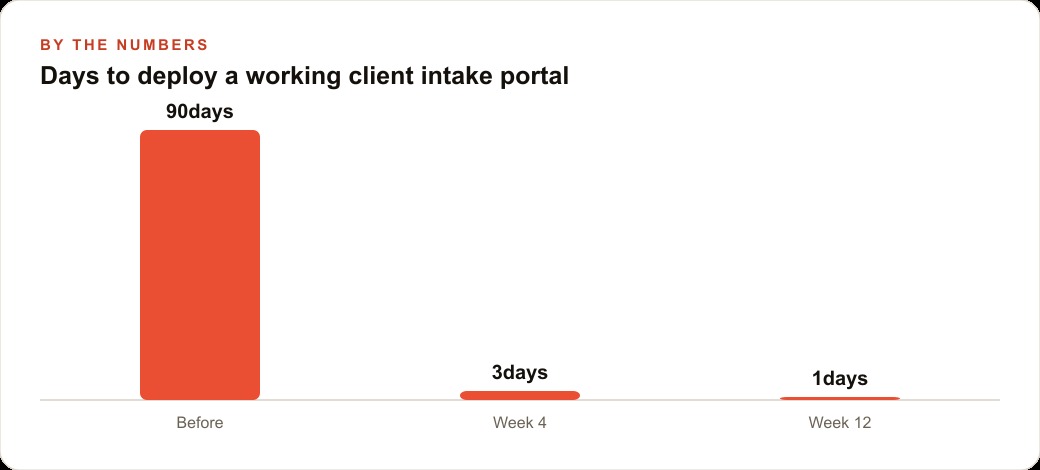
The intake bottleneck: three to five days from first contact to a complete file
The bottleneck was not unusual for a solo practice. A prospective client contacts the office. The attorney or assistant takes an initial call and decides the case is worth pursuing. The client is emailed a PDF intake form. The client prints the PDF, fills it in by hand, scans it, and emails it back. In many cases the client emails to ask which form to use, or emails to say the PDF did not open, or emails the form back with several questions unanswered because the handwriting question was ambiguous. Then someone on the office side enters the information from the scanned handwritten form into the case management system.
Total elapsed time from first contact to a complete, filed, entered intake: three to five days on average. In cases where the client was slow to respond or the form came back incomplete, a week was not unusual. During that window, a competing firm that responded faster sometimes captured the client.
The attorney had looked at commercial intake platforms. Most required a monthly subscription between $150 and $400 per month, added features the practice did not need, and created a new vendor relationship to manage. The specific requirements were simple: a web form that collected client information, accepted document uploads, stored submissions securely, notified the attorney by email, and saved the record to a folder organized by case type. Nothing in that list required a $300 per month SaaS subscription. It required a simple web application.
The problem was that the attorney did not know how to build one. That problem turned out to be less prohibitive than expected.
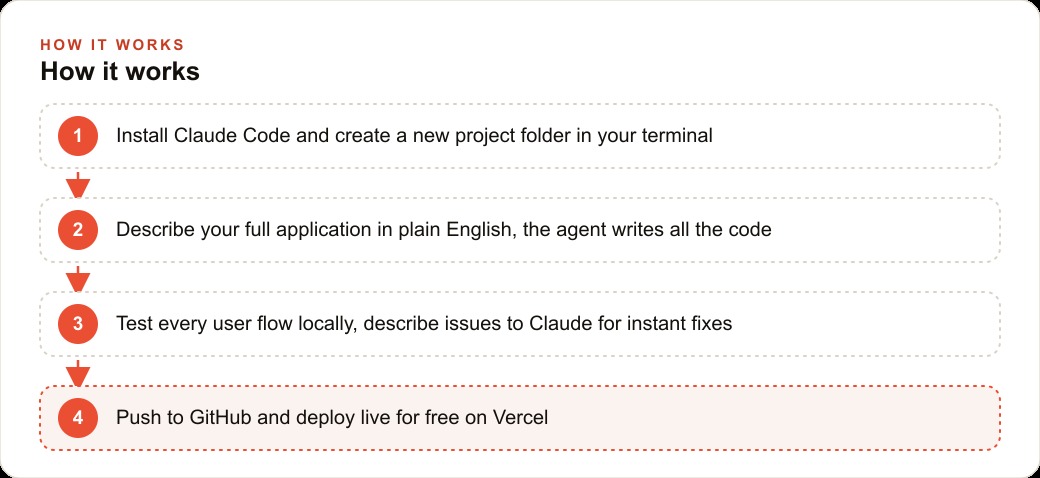
Writing the brief before opening the terminal
The decision that made the build go well was the one made before opening any AI tool: writing a brief. The attorney spent approximately two hours on Friday evening writing a document that described the problem, the specific intake questions required for each case type, the document types clients needed to upload, where submitted forms should be stored, and what the attorney expected to see in the notification email when a new intake arrived.
This brief was not a technical specification. It did not describe database schemas, API routes, or file storage systems. It described the problem from the perspective of someone using the system: "When a client submits the form, I want to receive an email immediately that includes their name, their case type, and a link to their uploaded documents. I want the documents stored in a folder named with the client's last name and today's date."
The brief also described constraints: free hosting was preferred, the system should not require ongoing technical maintenance, submitted data should be stored somewhere the attorney could access without logging into a development platform, and the system should work on mobile browsers because many clients would complete the intake on their phone.
Writing this document before opening Claude Code had two effects. First, it gave the attorney a clear picture of what success looked like, which made it possible to evaluate whether the build was on track at each stage. Second, it produced a document that could be pasted directly into Claude Code as the initial prompt, which meant the first session started with complete context rather than developing requirements in conversation. The brief became the foundation of the build.
Watching the agent build the application in one session
The first session with Claude Code lasted approximately four hours. The attorney pasted the brief, confirmed the technology stack suggestion from the agent (Next.js for the frontend and API, Vercel for hosting, Vercel Blob storage for document uploads, email via Resend), and then watched the agent work through the build.
What the attorney observed during that session was different from what most people expect from AI coding tools. The agent did not produce a finished application from the brief in a single output. It built sequentially, narrating the decisions as it went. It created the form component first, then the API route to handle form submission, then the file upload integration, then the email notification, then the folder organization logic. At each step it described what it was doing and why, which gave the attorney enough context to follow the reasoning without needing to understand the code itself.
There were three moments where the agent paused and asked a clarifying question. The first was about authentication: should the submission page be publicly accessible or should it require a password or link? The attorney had not considered this. After a brief conversation about the tradeoff between accessibility and security, the decision was a unique link per client rather than a publicly accessible URL. The agent implemented this with a token-based URL that expired after 72 hours.
The second clarification was about document storage organization: should documents be organized by case type, by client name, or by submission date? The brief had mentioned client name and date but had not specified the hierarchy. The attorney preferred case type at the top level, then client name, then date. The agent updated the folder structure logic accordingly.
The third clarification was about the notification email format. The agent had drafted an email template and asked whether the attorney wanted the client's uploaded documents attached to the email or linked. Attachments were preferred for quick review. The agent modified the notification logic to attach files under 10MB and link larger files.
By the end of the four-hour session, the agent had produced a working application. Working in the sense that it ran locally and all the components were present. Not working in the sense that everything functioned correctly under all conditions.
First test: four things broke and none of them required touching code
The attorney tested the application by filling in the form as a client and submitting it. Four things did not work as expected.
The first: the document upload failed silently on files larger than 4.5MB. The form submitted, the success message displayed, but the document was not saved. The attorney reported this to Claude Code by describing what happened: "I uploaded a PDF that was 6MB and the form said it submitted successfully but the file is not in the storage folder." The agent identified the Vercel Blob upload limit on the free tier, increased the limit configuration, and explained that files above 500MB would require a paid tier.
The second: the notification email arrived without the document attachment for the test submission. The agent diagnosed this as a sequencing issue: the email was being sent before the file upload confirmation was received, so the attachment path was not yet available when the email went out. The agent restructured the operation order.
The third: the unique link generated for the test client expired before the attorney could share it with a test user, because the 72-hour expiration was calculated from link generation time rather than first-access time. The attorney described this behavior and the agent updated the expiration logic to calculate from first access rather than generation.
The fourth: on mobile, the document upload button was not visible because it appeared below the fold on smaller screens and the form did not scroll to it correctly. The agent adjusted the mobile layout.
None of these fixes required the attorney to understand why the problem occurred or how to write the correction. The attorney described what they observed, the agent diagnosed the cause and applied the fix, and the attorney retested. The entire correction cycle for all four issues took approximately 90 minutes. The application worked correctly on all test cases after the corrections.
Pushing to GitHub and going live on Vercel in under twenty minutes
The attorney had a GitHub account from a previous professional context but had never pushed a project to it. The agent walked through each step: initializing a repository in the project folder, creating a repository on GitHub through the web interface, adding the remote, and pushing the initial commit. The steps took approximately eight minutes.
Connecting the GitHub repository to Vercel for automatic deployment took approximately twelve minutes. The agent provided the specific steps for the Vercel dashboard, explained what each configuration option meant in plain terms, and flagged that environment variables, specifically the storage credentials and email API key, needed to be added in the Vercel dashboard rather than committed to the repository. The attorney followed each step.
When the deployment completed, the application was live at a Vercel-generated URL. The attorney accessed it on their phone, submitted a test intake with a document upload, and received the notification email with the attachment within 45 seconds of submission. The file appeared in the storage folder organized correctly by case type and client name.
Total time from starting the Vercel setup to first successful live submission: 20 minutes. Total cost for the live deployment: $0. Vercel's free tier covers the usage level appropriate for a solo practice intake portal. The document storage cost on Vercel Blob is approximately $0.023 per GB per month. For a practice receiving 20 to 30 intakes per month with typical document sizes, the monthly storage cost is under $1.
Three months of practice with the portal running
Three months after the build weekend, the attorney reported the following. Intake time from first client contact to complete filed record: under one hour in most cases, because the client completes the web form directly and the attorney receives the organized notification immediately. The three-to-five-day cycle is gone.
Staff time previously spent on intake coordination, primarily the follow-up calls and emails to retrieve missing information or resend the PDF, dropped by an estimated three to four hours per week. At the attorney's billing rate for staff time, which runs between $40 and $60 per hour for administrative functions, that recovery represents $120 to $240 per week in saved administrative cost. Over the three months since deployment: between $1,440 and $2,880 in recovered staff time.
The tool cost for the build: $20 per month for Claude Pro access during the build weekend, now dropped to $0 because the portal runs on free infrastructure without requiring ongoing AI tool access. Vercel hosting: $0. Storage: under $1 per month. Total ongoing cost: under $1 per month.
Two cases arrived in the first month where clients submitted the intake form, the attorney responded within an hour, and the clients specifically mentioned that the speed of the response was a factor in choosing to proceed. One of those clients mentioned that they had also contacted another firm and had not heard back after three days. Both clients retained.
The attorney added one feature in month two after identifying a pattern in submissions: clients frequently left the "opposing party name" field blank because they did not know how to spell it or were unsure of the legal entity name. A brief note was added to the form field explaining that an approximate name was sufficient and would be verified before filing. The submission completeness rate improved from 71 percent to 93 percent on that field.
This is what a successful first build looks like when it is done thoughtfully: not a perfect product on day one, but a working system that improves through real use because the build process was documented, the agent is available to apply corrections, and the person using the system understands it well enough to recognize what needs to change. The legal expertise did not become unnecessary. The attorney still makes every substantive decision about every case. The build simply removed 15 hours per week of administrative friction from the path between an initial inquiry and a retained client.
That is exactly what we do at AI DOERS. Book a private 30-minute call with Madhuranjan Kumar and we will map the fastest path to it for your specific business.
Book your call →
Madhuranjan Kumar
Madhuranjan Kumar brings 20 years of performance-marketing experience and has managed over $200 million in Facebook ad spend for brands across the United States and beyond. His expertise spans the full modern marketing stack: Meta, Google Ads, TikTok, email automation, CRM, and the websites that hold it together. At AI DOERS he turns that track record into lead-generation systems for businesses across every industry.