
How to Build a No Code AI Agent and Control It From a Phone App
You can build a real AI agent on a visual canvas and drive it from an app on your phone, with zero lines of code. Here is how it works and how I would use it to run the back office of a roofing company.

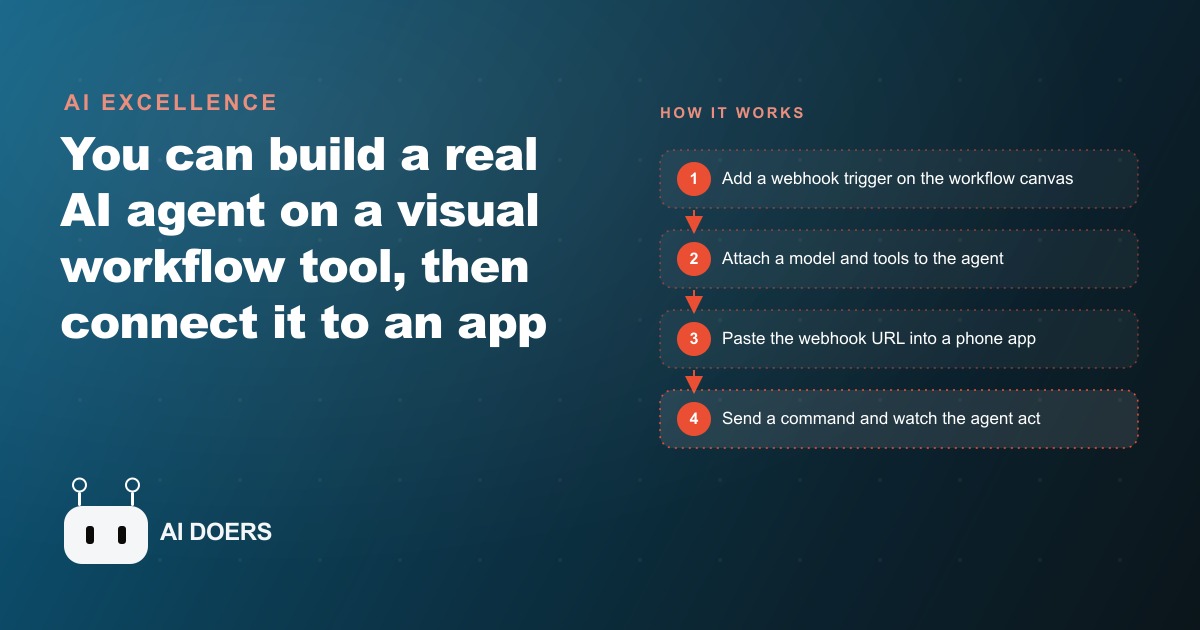
The most interesting shift in software right now is not that AI can write code. It is that a small business owner can now build a working AI employee without touching code at all, then carry that employee around in their pocket. I watched this stop being a party trick and start being a real operating tool the moment a typed sentence on a phone booked a calendar event, updated a shared task list, and messaged a teammate, all from one command, all without a single line written by hand. That is the whole argument of this piece. The barrier to owning a genuinely useful agent has collapsed, and the people who move first will quietly out operate the ones still copying details between five browser tabs.
Let me be precise about what I mean, because the phrase AI agent gets thrown around loosely. An agent is not a chatbot that answers questions. It is a chat model wired to a set of tools, given the freedom to decide which of those tools to use and in what order. That word decide is the entire difference. Old automation followed one fixed path: if this happens, do exactly that, every time, forever. An agent reads your actual request and reasons about it. Tell it to schedule a site visit and let the estimator know, and it works out on its own that it needs the calendar tool and the messaging tool, then runs them in sequence. You are not scripting steps. You are hiring judgment.
What used to make this the exclusive territory of developers was plumbing. Connecting a model to a calendar, a notes app, and a team messenger meant authentication, API calls, error handling, hosting. Now a visual workflow canvas absorbs all of that. You drag in the pieces, connect them with lines, and the messy parts happen underneath where you never have to look. I want to walk through how the loop actually fits together, because once you see the shape of it, the rest of this article stops sounding like a promise and starts sounding like a Tuesday afternoon project.
The loop that makes an agent controllable from a phone
Every workflow begins with a trigger, and the simplest trigger to reason about is a webhook. A webhook is just a URL. When something sends data to that URL, the workflow wakes up and runs. That single idea is what makes the phone control possible, because a URL can be called from anywhere, by anything, including a small app on your phone. So the architecture is honestly not complicated: the phone sends text to a URL, the URL wakes the agent, the agent does its work and sends a reply back to the phone.
Behind the webhook sits the agent itself, and you give it three things. First, a chat model, which is the brain that reads the message and decides what to do. Second, an optional memory, so it can hold context across a short conversation instead of forgetting everything between messages. Third, and most important, a collection of tools. A tool is just a capability you hand the agent: a calendar it can write events into, a notes or task app it can add items to, a team messenger it can post into. Each of these needs a credential to connect to your real account, and here is a detail that matters more than it sounds. You add each credential once. Enter your calendar login a single time and every future workflow can use it. You never wire the same key in twice, which is exactly the kind of friction that used to make people give up on the second project.
Then there is the part that turns a demo into a tool you carry: the phone app. You do not hand code this. You describe the app you want in plain language and let an AI build it, an approach people now call vibe coding, and you drop the webhook URL into it. Now typing a command on your phone sends that text to the agent and shows you its reply. The app is deliberately dumb. It is a text box and a send button. All the intelligence lives in the workflow behind the URL, which is why you can rebuild or expand the agent later without ever touching the app again.
Templates and the debug view are the parts nobody tells you about
There are two practical truths that separate people who ship one of these from people who stall out. The first is that you should almost never build from a blank canvas. You start from a template. Someone has already assembled a working agent with a calendar, a notes tool, and a messenger attached, and shared it as a block of JSON. You paste that block onto your canvas and the entire agent materializes, tools already wired, ready for you to point at your own accounts. That single move skips the hardest, most discouraging hour of the whole process, the hour where nothing works yet and you cannot tell why.
The second truth is that your first few runs will fail, and that is completely normal, not a sign you did it wrong. Failures almost always come from data arriving in a slightly different shape than the agent expected. This is where the execution view earns its keep. It shows you each run step by step, so instead of a vague error you see the exact field that came through, maybe labeled something like body message when the agent was looking for message. The fix is not code. You drag that field into the prompt, it lights up green, and the agent runs. Learning to read that execution view is the actual skill here. It is the difference between staring at a broken workflow and calmly pointing the agent at the right piece of data.
When the runs are clean, you make one last move. You flip the workflow from test mode to active, which gives you a production URL. Now you can hit it any time, from any phone, without pressing a test button first. That flip is the moment your afternoon experiment becomes something the whole team can lean on.
A roofing company that turned one text message into three actions
Abstractions are easy to nod along to and hard to act on, so let me ground all of this in a business I would genuinely build for. Imagine a roofing company. The office is one or two people, and they spend a shocking share of the day being a relay: a crew lead calls in a new inspection, and someone at a desk retypes it into the calendar, then retypes it into a message to the estimator, then retypes it into a follow up list. Three systems, same information, entered by hand three times, all day long.
Here is the agent I would build for them. A crew lead standing on a roof opens the company app and types one sentence: new inspection at 14 Oak Street tomorrow at nine, send the estimate to the estimator, and add it to the follow up list. That text hits the webhook. The agent reads it and, on its own, does three separate things. It creates the calendar event for tomorrow at nine. It posts a message to the estimator on the team channel. And it adds the lead to the shared task list. Nobody at the office retypes anything, because the office was never in the loop.
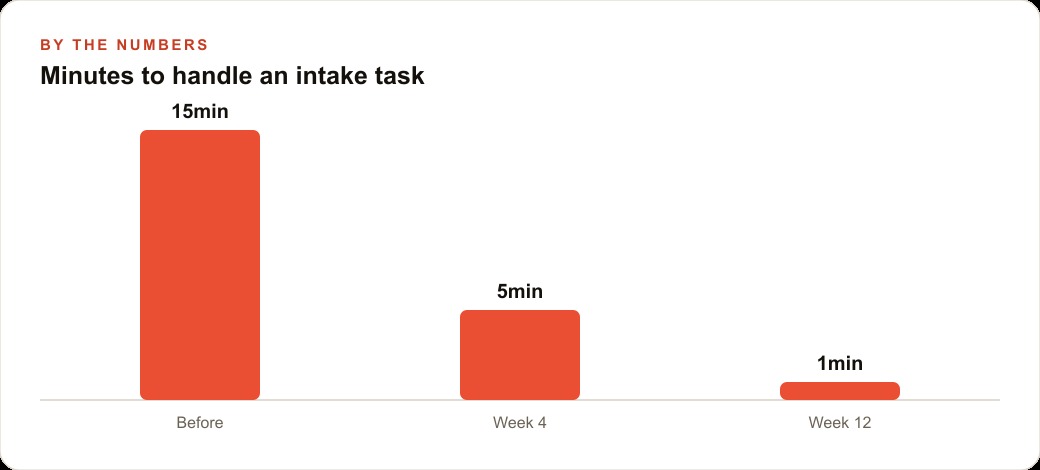
Now the numbers, and I want to be clear these are illustrative, meant to show the shape of the payoff, not a report from a specific client. Say that intake relay currently takes the office about fifteen minutes per job once you count the interruption, the retyping, and the inevitable follow up call to fix a detail that got dropped. In the first month of running the agent, as the team learns to trust it and phrase requests cleanly, that drops to around five minutes per job, because a human still glances at each one to confirm. By the third month, with the workflow solid and the crews comfortable, it settles near one minute of human attention per job, just a quick check that the agent got it right. If that company handles twelve intakes on a busy day, you have moved from three hours of relay work down to roughly twelve minutes. That reclaimed time does not vanish. It goes into calling homeowners back faster, which is the single thing that wins more roofing jobs.
Building it is not a saga. I would start from a template so the calendar, notes, and messaging tools arrive already attached, then point them at the company's real accounts, which is maybe ten or fifteen minutes of clicking through logins. The phone app is a couple of vibe coded prompts, shaped to sound like how the crews actually talk. During setup I would keep the execution view open, and the first time a run failed because the message field came through as body message, I would drag it into the prompt until it lit green, then move on. Flip it to a production URL and the crews can fire it from any site, any time.
The reason the agent beats a rigid automation here is that crews do not speak in clean forms. One lead types a tidy request. Another rambles. A third mentions a damaged gutter halfway through the sentence. A fixed script chokes on that variety, but an agent reasons about the message, pulls out the address, the time, and the person to notify, and ignores the noise. And it grows without a rebuild. When the company is ready, I hand the same agent one more tool, maybe one that texts the homeowner a confirmation, or one that logs the materials used, and the agent simply gains a new ability it can choose to reach for. Each new capability is another node on the canvas, not a new project.
The tools got easy, so the value moved to judgment
This is the honest part, and it is why I do not think no code agents put anyone out of work so much as they move where the work matters. The building blocks really are friendly now. Dragging a webhook, attaching a model, pasting a template: none of that is hard. What is hard is judgment. Choosing which trigger fits the job. Deciding which tasks are actually safe to hand to an agent and which need a human eye. Formatting the data so the agent reads it reliably on the tenth run, not just the demo run. Knowing when to keep a person in the loop for a confirmation and when to let it run fully on its own. These are the questions that surface right after the first demo works and everyone gets excited, and they are exactly where most self built agents quietly break down a week later.
That same judgment is what carries over to everything else a business runs. The instinct for what to automate, what to measure, and where a human touch still wins is the same instinct behind a well structured Facebook and Instagram ad campaigns account, a disciplined Google Ads setup, and a content plan that actually earns SEO and organic search traffic. An agent that files a lead is only worth building if that lead then lands somewhere it gets worked, which is why the back office agent and the CRM and website stack behind it are really one system, not two. The tool is the easy half. Wiring it into how a business actually makes money is the half that pays.
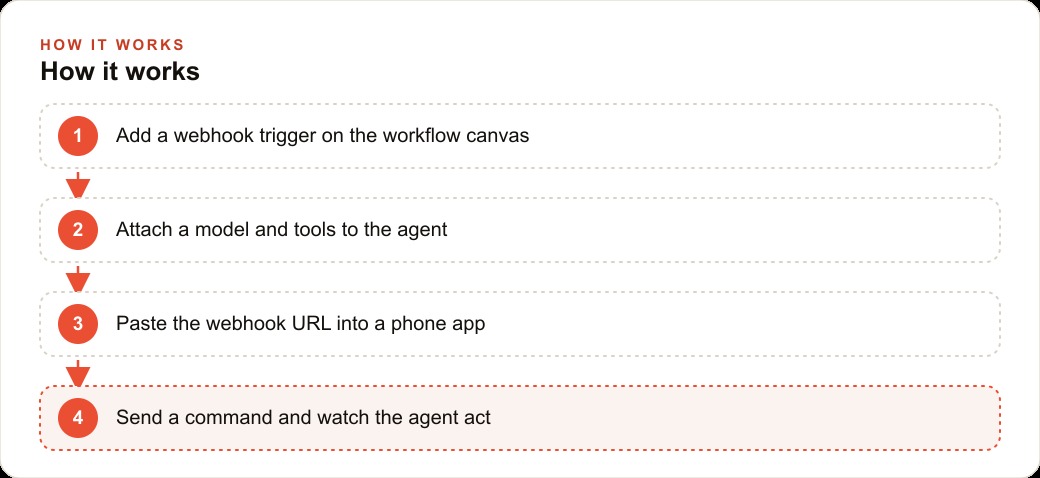
So take the do it yourself path if you want to learn it in your own hands. Start with one workflow and one clear job. Add a webhook, attach a model and only the tools that job needs, add your credentials once, and paste a template instead of starting cold. Connect the URL to a simple phone app, use the execution view to fix the first few mismatches, and flip it live when it runs clean. You will learn more in one working agent than in a week of reading about them. And if you would rather skip the trial and error and have the whole thing handed over already running, that is a reasonable choice too, because the fastest way to get the time back is to have someone who has built these for real businesses set it up right the first time.
That is exactly what we do at AI DOERS. Book a private 30-minute call with Madhuranjan Kumar and we will map the fastest path to it for your specific business.
Book your call →
Madhuranjan Kumar
Madhuranjan Kumar brings 20 years of performance-marketing experience and has managed over $200 million in Facebook ad spend for brands across the United States and beyond. His expertise spans the full modern marketing stack: Meta, Google Ads, TikTok, email automation, CRM, and the websites that hold it together. At AI DOERS he turns that track record into lead-generation systems for businesses across every industry.