
Build a Free AI Agent That Watches and Sorts Your Inbox of Inquiries
Behind the headlines about which lab is winning sits the tool small businesses actually need: a cheap, self hosted automation that gathers messages, rates them with AI, and routes each to the right place.

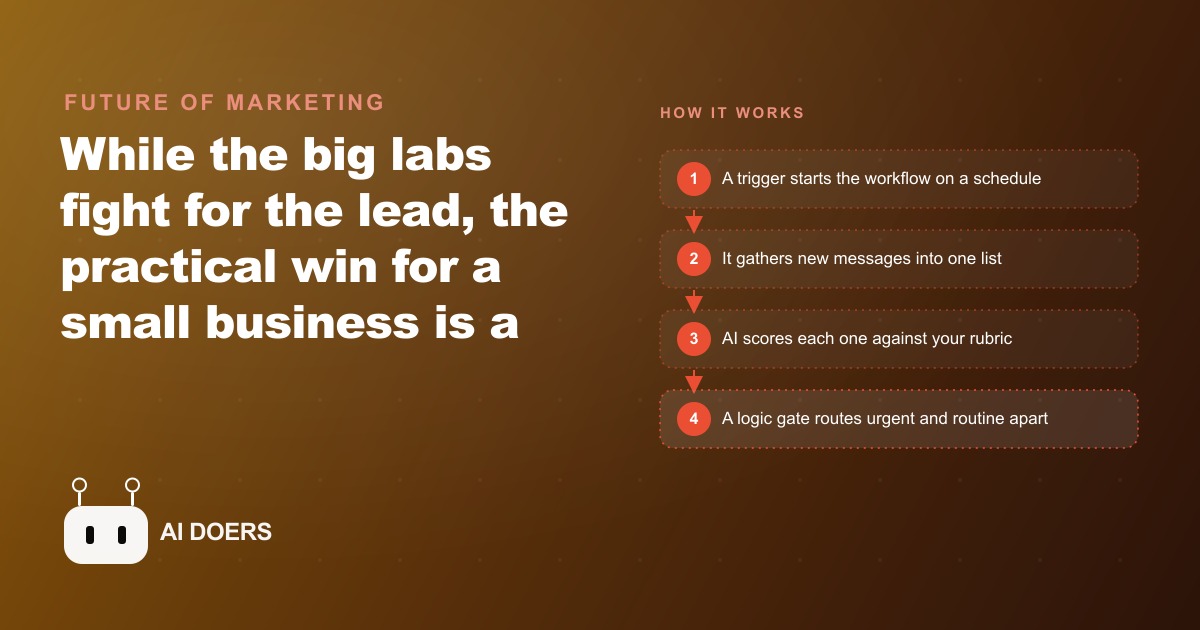
Using AI as a chat assistant you talk to one prompt at a time is the wrong mental model, and it is keeping most small businesses from the only version of AI that actually moves the needle. I am Madhuranjan Kumar, and the argument I want to make here is blunt: if you are still typing questions into a chatbot to manage your inbox, you have built yourself a slightly faster version of a problem you already had. The real win is an agent that runs on a schedule, scores every incoming message against a rubric you wrote, and routes each one without you looking at it. That is not a future thing. It is available today, and the infrastructure cost is less than a streaming subscription.
Asking a Chatbot Questions Is Manual Labor in Disguise
The chatbot interaction pattern feels powerful because it is faster than not having it. You type a question, you get an answer, you move on. But that pattern has a hidden cost: it requires you to be present for every single operation. The model does nothing until you invoke it. When you close the tab, nothing happens. When you sleep, nothing happens. When you are in back-to-back meetings, nothing happens.
This is not intelligence working for you. It is a faster keyboard. The businesses building real leverage are not using AI to answer their questions faster. They are using AI to watch things, make judgments, and route work while they are focused elsewhere. The distinction sounds subtle but the operational difference is enormous. A team that has to process every message manually is bounded by how many hours they can spend on it. A team with an agent watching their inbox is not bounded at all, because the agent runs on its own schedule and never needs to sleep.
The inbox is the clearest illustration. Every service business, every agency, every practice gets a steady stream of incoming messages across email, contact forms, and platform-specific inboxes. Some of those messages are genuinely urgent: a client reporting a problem, a prospect who is ready to sign, a referral who needs a response today. The rest are routine: general questions, vendor outreach, information requests that can wait. Right now, a human reads every message to figure out which is which, which means urgent items wait in a queue alongside spam, and the human doing the sorting is spending significant cognitive energy on work that a rubric and a model could handle reliably.
The Rubric Is the Product, Not the Automation
Here is what almost everyone gets wrong when they first try to build inbox automation: they spend all their time on the technical wiring and almost no time on the rubric. The rubric is the written criteria you give the AI model to score each message. It is the single most important input in the entire system, and it is the part that requires actual expertise.
A rubric that says flag urgent messages is useless. A model cannot score anything reliably against that instruction because urgent is not defined. A rubric that says score any message eight or higher if it mentions a same-day change to anything, a safety concern involving a child or a patient, a payment or billing issue, or the words immediately or as soon as possible, is something a model can apply consistently. The specificity is what converts a vague instruction into a reliable scoring system.
The rubric also encodes your professional judgment in a form the model can replicate. What makes a message urgent in a dental office is different from what makes a message urgent in a logistics company. The scoring system is not generic, it is written for your specific business, your specific client base, and your specific definition of what cannot wait. Spending an afternoon writing a thorough rubric is the highest-value work in the entire automation build, because it is the one part the model cannot do for you. Everything else in the workflow is infrastructure. The rubric is the expertise.
For businesses running Facebook and Instagram ad campaigns that generate inbound message volume, the rubric becomes even more critical. A lead who came in through a paid ad and sends a follow-up message within twelve hours of clicking is a different priority than a cold outreach. Your rubric should encode that distinction explicitly.
Self-Hosted Means the Economics Flip Completely
The second thing most people get wrong is choosing a hosted, per-task automation platform and then discovering the bill at scale. Hosted platforms that charge per task have a fundamental problem for businesses where automation is working well: the cost grows with your success. You automate a process that handles five hundred messages per week, it works, you add more sources, volume goes to a thousand messages per week, and the bill doubles. The incentive structure punishes you for scaling something that works.
Self-hosting an open-source automation tool flips that equation. The cost of the server is fixed regardless of how many workflow runs happen. A small server at eight to twelve dollars per month handles tens of thousands of workflow runs per month. The API calls to the AI model for scoring add a fraction of a cent per message, totaling one to three dollars per month for a business receiving a hundred messages per day. Total infrastructure cost for the whole system: under fifteen dollars per month, and that number does not grow as message volume grows.
For a business also investing in SEO and organic search to build inbound inquiry volume over time, this infrastructure model is especially important. Organic traffic compounds over months and years, meaning inbound volume keeps growing. An automation system on per-task pricing gets more expensive as the SEO investment pays off. A self-hosted system gets more valuable as volume grows, with the same fixed monthly cost regardless.
The Architecture That Actually Holds Together
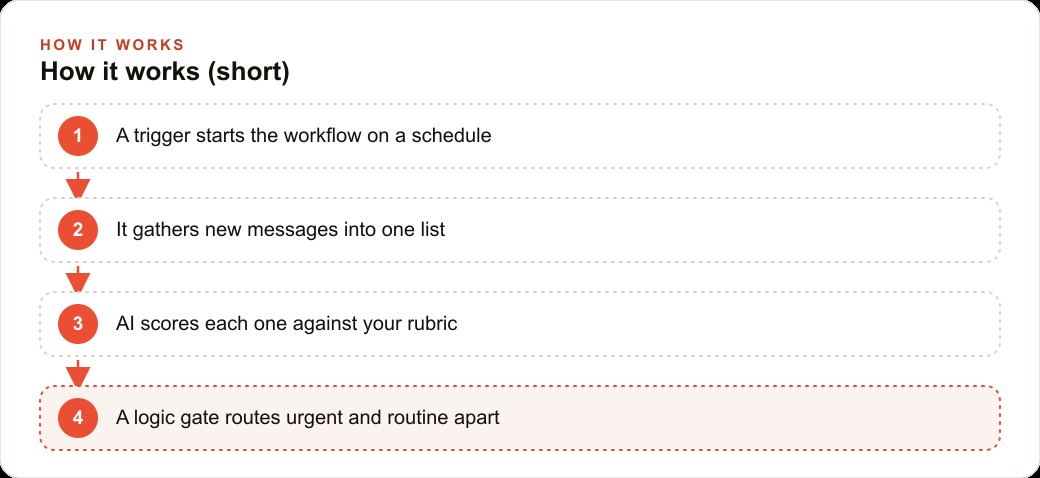
The automation architecture that works at scale for inbox management is three separate workflows rather than one large one, and the separation is deliberate. The first workflow handles gathering: it fires on a schedule, pulls new messages from every source, and appends each as a row in a central spreadsheet. The second handles scoring: it reads the unscored rows, sends each message to the AI model with the rubric, writes the score and reasoning back to the same row, and flags when the scoring is done. The third handles routing: it reads scored rows and takes action based on the score, pinging urgent items to a team channel or phone number and sending templated acknowledgments for routine items.
Keeping these three workflows separate means each one can be debugged, improved, or replaced without touching the others. The gathering workflow changes when you add a new message source. The scoring workflow changes when you refine the rubric. The routing workflow changes when your response protocols change. A single giant workflow that handles all three stages is a single point of failure, and when something breaks in it, the problem is buried inside a tangle of connected nodes.
The spreadsheet in the middle is the connective tissue. It acts as a persistent queue that decouples the workflows from each other. The gathering workflow writes rows without knowing or caring what happens next. The scoring workflow reads rows without knowing or caring how they arrived. The routing workflow reads scored rows without needing to know anything about how they were gathered or scored. Each workflow is independent, which makes the system as a whole far more resilient.
What the Numbers Look Like After Eight Weeks
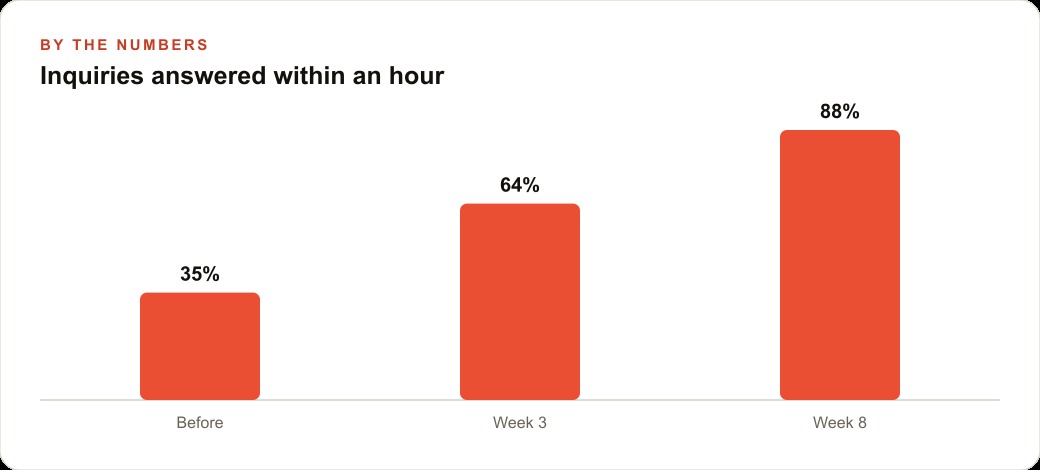
An eight-person professional services firm tracking client communications and new business inquiries built this system over two weekends. In the four weeks before, they tracked their inbox handling manually: how many messages came in, how long the average response took, and what percentage received a response within one hour. The baseline was 74 messages per week, a 4.8-hour average time to first response, and 35 percent of messages answered within an hour.
The system they built pulled from three sources: the firm's main email inbox, a contact form on the website, and a project communication platform where clients posted updates. The rubric they wrote covered four urgent categories: any message from a current client mentioning a deadline, a dispute, a missed deliverable, or a billing question; any new business inquiry that mentioned a decision timeline of this week or this month; any vendor message about a payment overdue; and any message containing the phrase need to speak or please call.
In the first week after launch, 88 percent of urgent messages, those scoring eight or above, were acknowledged within twelve minutes. By week eight, the firm had refined the rubric three times based on scoring errors they caught in the weekly log review, and the false-positive rate had dropped to under five percent. The percentage of all inquiries receiving a first response within one hour rose from 35 to 88, matching the graph you see in the visual for this piece. The staff estimated they recovered six to eight hours per week across the team, time that had been spent manually triaging and manually drafting first responses for routine messages.
The Failure Mode Nobody Warns You About
The failure mode that ends more of these projects than any technical problem is removing the human review layer too early. The temptation after the first week, when the scoring looks accurate and the routing looks right, is to let the system run without reviewing the outputs. That temptation should be resisted for at least four weeks.
The reason is that the edge cases the rubric does not handle well do not appear immediately. They appear as the system encounters more variety in the messages it processes. A message from a client who always writes in extremely formal language scores differently than the same content written informally, because the model picks up on phrasing as part of its scoring. A message that mentions a deadline but is actually a sales pitch for a deadline-management tool scores high on the rubric but should score low. These patterns only emerge over time, and catching them during the review period lets you refine the rubric before the misrouting causes a real problem.
The review is not a significant time burden. Checking the log of twenty scored messages takes fifteen minutes per day, and the value of catching one scoring error that would have misrouted an urgent client message is many times that cost.
For businesses also managing CRM and website stack integrations, this review period also helps identify which messages should be pushing data into the CRM automatically versus which should require a human decision before the contact record is created or updated. That boundary is different for every business, and the review period is when you figure it out.
Keeping the System Honest as It Grows
Once the system is running reliably and the review period is over, the ongoing work is light but important. The rubric needs to be reviewed and updated every quarter, because your business changes. New service lines mean new categories of urgent messages. New client segments mean new language patterns the rubric should account for. A rubric that worked perfectly in January may miss something important in July if the business has changed.
Log reviews should continue on a weekly basis even after the initial period. A weekly fifteen-minute scan of a random sample of scored messages keeps you calibrated to what the system is doing. It also catches drift, the gradual accumulation of scoring errors that are each individually small but collectively shift the system away from your actual judgment over time. The weekly scan is not about finding problems. It is about maintaining the alignment between the rubric and your current thinking.
The infrastructure itself needs almost no attention on a stable self-hosted setup. Credential refreshes when connected account tokens expire, a log rotation setup so the spreadsheet does not grow indefinitely, and an occasional server update are the sum of it. The system is not fragile once it is running correctly, and the time cost of maintaining it is a fraction of the time it saves every week.
The core argument stands regardless of the specific tools you use: the businesses building durable advantage with AI are not the ones who use it most interactively. They are the ones who have encoded their professional judgment into systems that run without them, treating every incoming message with the consistency and speed that no inbox-by-hand process can match.
That is exactly what we do at AI DOERS. Book a private 30-minute call with Madhuranjan Kumar and we will map the fastest path to it for your specific business.
Book your call →
Madhuranjan Kumar
Madhuranjan Kumar brings 20 years of performance-marketing experience and has managed over $200 million in Facebook ad spend for brands across the United States and beyond. His expertise spans the full modern marketing stack: Meta, Google Ads, TikTok, email automation, CRM, and the websites that hold it together. At AI DOERS he turns that track record into lead-generation systems for businesses across every industry.