
A Complete Beginner's Guide to Making Viral AI Videos With Veo 3 in 2025
Veo 3's pricing structure, the free Perplexity shortcut, and a proven image-to-video workflow make high-quality AI video achievable for any business without a production budget.

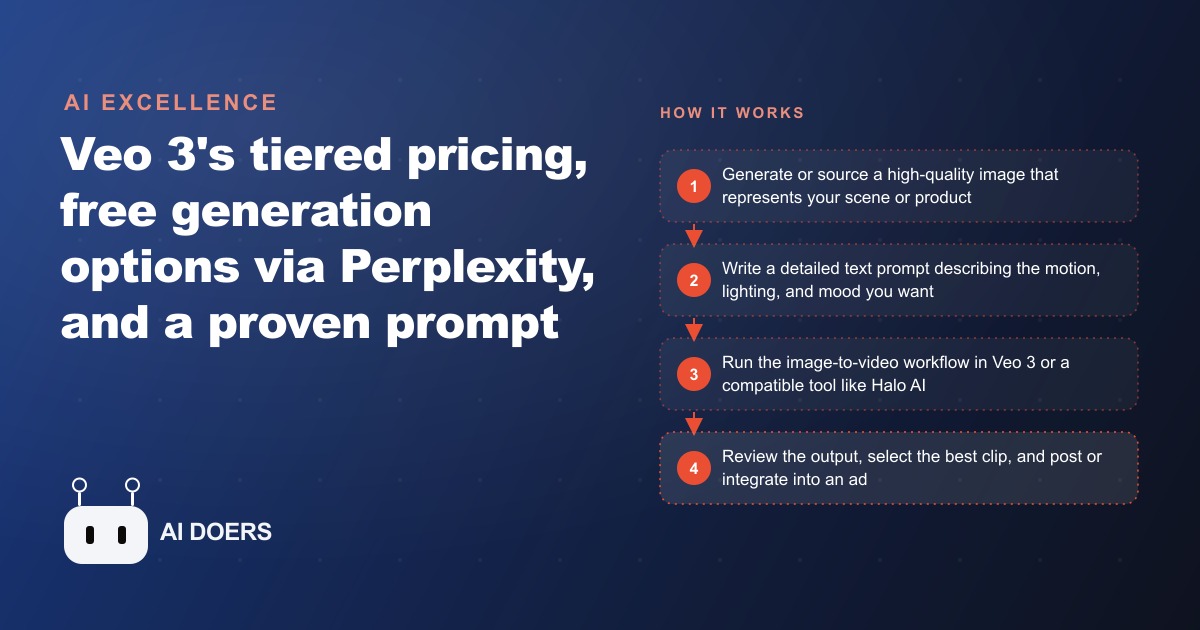
The thing that makes Veo 3 matter is not that it makes video. Plenty of tools made AI video before it. The thing that matters is that Veo 3 crossed a specific quality line, the point where a clip no longer screams "this is AI," and for a business trying to fill a content calendar without a production budget, crossing that line changes everything.
I want to take this tool apart properly, because the surface-level advice about it is mostly noise. The real question is not "can it make a cool clip," it is "which parts of this are actually useful for a business, what do they cost, and where do they fall short." Google's third-generation video model rewards that kind of close look, because its strengths and its limits are both specific and both matter to how you should use it.
The two upgrades that pushed Veo 3 over the line
Two improvements separate Veo 3 from the tools that came before it, and understanding them tells you exactly what it is good for. The first is audio synchronization. Earlier AI video produced silent or clumsily dubbed clips where any sound felt bolted on afterward. Veo 3 generates the dialogue, the ambient sound, and the music at the same time as the picture, so the audio and the image feel like they were created together. That is the difference between a clip that plays like a real piece of footage and one that plays like a tech demo.
The second is character consistency. The most maddening limitation of older models was that a person who looked one way in the first shot looked like a different person in the next, which made it impossible to build a recognizable presenter or a repeating brand character. Veo 3 holds a character's appearance together meaningfully better. It is still not flawless across long sequences, and you should not expect a perfectly stable character through a two-minute scene, but for the short clips a business actually posts, it is good enough to be usable. Those two upgrades together are why Veo 3 clips can now sit inside a paid ad or an organic post without the obvious tells that used to give AI video away.
The pricing tiers are a decision, not a formality
Veo 3 sits behind three price points, and choosing the wrong one wastes money in one direction or capability in the other. There is a free trial that gives you a limited number of generations, which is enough to decide whether the tool fits your use case at all. There is a Pro plan at around twenty dollars a month that includes a faster Veo variant at a resolution suited to social media, with a few generations a day, bundled with Google's other AI features. And there is an Ultra plan in the low hundreds per month with the full model, higher resolution, and more daily generations.
For most small and medium businesses, the Pro tier is the correct entry point, and it is worth being clear about why. A few generations a day is plenty for a consistent content calendar if you plan your sessions rather than generating on impulse. The resolution is fine for social platforms, where nearly everything is watched on a phone. The Ultra tier only makes sense for an agency producing client work at volume or a creator whose whole business depends on high output. Paying for Ultra to post three Reels a week is burning money; staying on the free trial when you are trying to publish twice a week will leave you rationed and frustrated. Match the tier to the actual volume you intend to produce.
There is also a free side door worth knowing about. The Perplexity assistant on the platform formerly called Twitter can, at least at the time of writing, grant free Veo generations if you ask it directly with a video request, which lets you test real output before committing to any paid plan. This is not a permanent, guaranteed feature and it may change, so treat it as a way to get your first results at no cost rather than a reliable pipeline. But for an owner who wants proof before spending anything, it is a genuine option.
Why starting from an image beats starting from text
This is the single most important technique for getting usable output, and it is the part most beginners skip. When you prompt purely from text, you are asking the model to invent everything at once: the composition, the lighting, the character's face, the setting, and the motion. The more variables the model has to guess simultaneously, the more likely some of them miss what you pictured, and the result is high variance. Some clips are excellent, some are garbage, and you cannot predict which you will get on any given run.
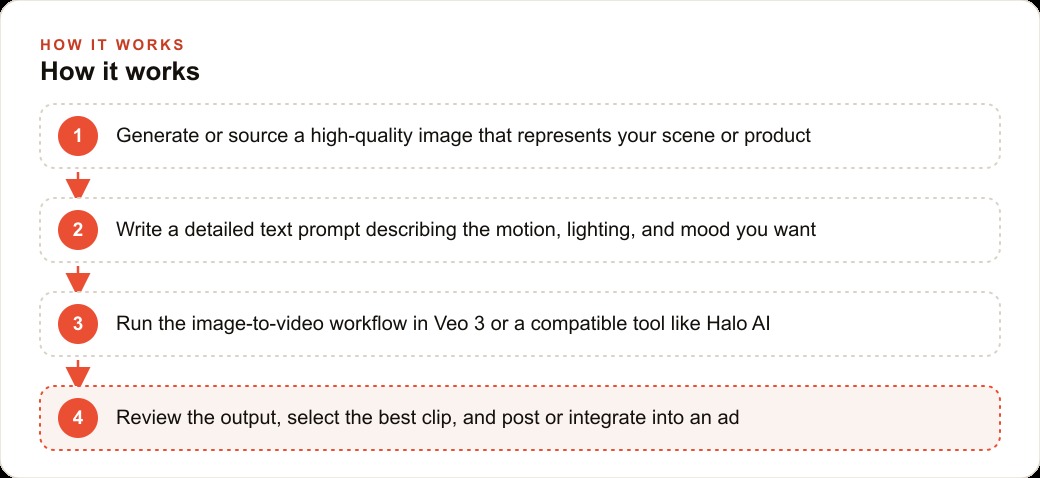
The image-to-video workflow removes most of that variance by handing the model a fixed starting point. When you upload an image, you have already locked the composition, the lighting, the appearance, and the style. The model's job shrinks from inventing a scene to animating one, and the usable rate per session climbs sharply. For a business with a physical product this is close to magic: photograph the product against a clean background, run it through Veo with a simple motion instruction like being rotated slowly or being placed on a table by a hand, and you get product video that would otherwise have needed a videographer and a prop setup. The product is real because it began as a photo. Only the motion is generated. For businesses without a physical product, generating a source image first, through a tool like Leonardo AI, whose cheapest paid plan runs around ten dollars a month and offers generous daily credits, gives you the same controlled starting point before you ever open this breakdown model.
The prompt archetypes that travel on social media
Not all prompts perform equally, and the pattern in what goes viral is instructive. Cinematic, dramatic, over-directed prompts tend to underperform. What travels is specific and slightly absurd: costume characters doing mundane everyday tasks, AI-generated people caught in natural candid moments, product demos with exaggerated physics. The reason is that these formats surprise the viewer while staying legible, and surprise plus legibility is the engine of shares. A business with any creative appetite can adapt these formats to its own world, and the ones that lean into the specific-and-slightly-strange register consistently outperform the ones that try to look like a polished commercial.
It is also worth knowing that Veo is not the only option. Alternatives such as Halo AI lean into real-world physics and natural motion, which makes them a useful complement for product demonstrations and outdoor scenes where believable movement matters more than cinematic flourish. Testing has also suggested that certain models hold character identity across clips more reliably than others, so if consistency across a series is your priority, it is worth comparing a couple of tools rather than assuming the most famous one wins for your specific need.
Which businesses get the fastest return, and why
Any business whose social presence has been capped by the cost of video production is an immediate candidate. That includes clinics and med spas showing their environment and experience, fitness studios previewing classes and instructors, restaurants showing preparation and atmosphere, e-commerce brands needing product demonstrations, and real estate teams needing listing content faster than a videographer can be scheduled. The common thread is that all of these businesses need a steady stream of video, and all of them were previously priced out of producing it at the volume the platforms reward.
For a med spa specifically the timing is useful, because the ambient content, the clinic environment, the treatment-room atmosphere, the general brand feel, can all be illustrated with AI video without touching the sensitive claims that require real before-and-after photography and medical review. That lets a practice build a consistent visual presence for its Reels and Stories without booking a monthly professional shoot. The same clips that fill the organic feed can also feed Facebook and Instagram ad campaigns, where fresh video creative is one of the strongest levers for keeping cost per lead down, since the platform rewards new, engaging video over recycled static images.
A worked example: a med spa builds a video calendar for the cost of a lunch
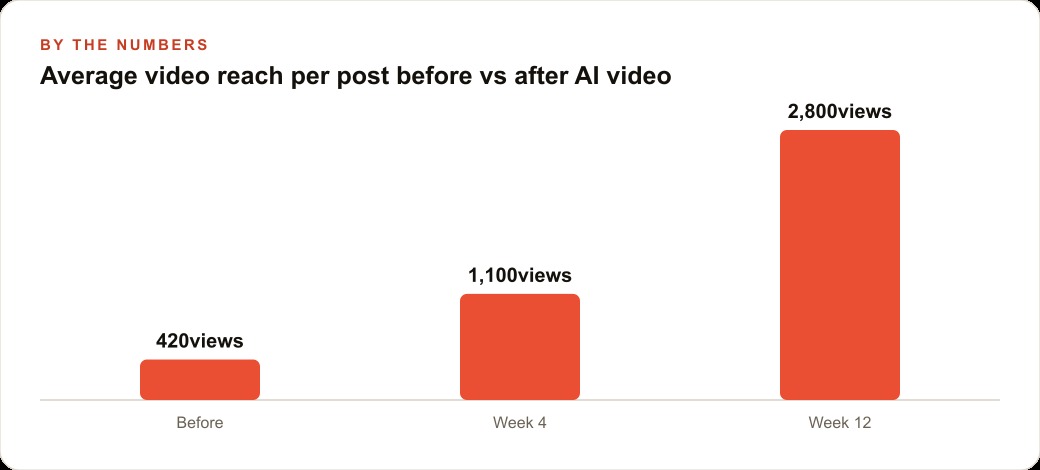
Consider a med spa with two injectors and a front-desk coordinator who runs the social media in her spare hours. The practice posts three times a week, all static images, and sees average reach of roughly four hundred to six hundred per post. The goal is to add video without hiring a content creator. In week one she uses the free trial to generate three test clips: a clean, minimalist treatment room, a product being set on a marble countertop, and a window with soft light filtering through. These are ambient environment clips with no people and no treatment claims, which keeps them clear of most advertising-policy trouble. She picks the best one and posts it as a Reel.
In week two she moves to the Pro plan and sets a simple rhythm: one ambient clip early in the week, one product-in-motion clip midweek. She pre-generates in batches of three on a Sunday, which takes about forty-five minutes including writing the prompts and reviewing the output, so she is not spending daily time on it. By around week four this breakdown posts are pulling roughly two to three times the reach of the static posts, in line with how the platforms favor video, and her time investment is about two hours a week rather than the six to eight that comparable custom photography would demand.
Over twelve weeks the practice publishes around two dozen video posts. Taking a modest doubling of reach as illustrative, each post now reaches perhaps eight hundred to twelve hundred people instead of a few hundred. If even two additional new patients a month can be attributed to the stronger content, and a new patient is worth a few hundred dollars or more in lifetime value, that is a few thousand dollars a month of value standing against a tool cost of about twenty dollars. The full stack behind this, the Veo Pro plan, a cheap image generator for source images, a free editor for trimming and text, and a free voiceover tier, comes to roughly thirty dollars a month total. That is the regular, high-volume content calendar that would otherwise cost a social agency well over a thousand dollars a month.
The mistakes that ruin the output, and the ones that ruin the strategy
On the production side, the most common mistake is cramming too much into one prompt. Veo does best with one clear action in one clear setting; a prompt trying to stage a person, a procedure, a room, and a lighting mood all at once has too many variables and tends to produce a mess. Describe less, get more. The second production mistake is judging the tool by its worst outputs. Every session produces some unusable clips; the honest measure is the usable rate and the quality of your best clips per session, which for a practiced image-to-video user should be two or three keepers out of five.
On the strategy side, the biggest mistake is skipping platform policy. The major platforms have rules requiring disclosure of AI-generated content in certain contexts, especially around health and medical treatments, so review the current policies for your industry before running AI video in paid campaigns. The second strategic mistake is treating video as a novelty rather than a system. Single-post experiments produce misleading data because the algorithms reward consistency; commit to at least two posts a week for four weeks before you judge results. And the deeper mistake is producing content that goes nowhere. Video that does not connect to a next step is entertainment, not marketing. The clips should point viewers toward a booking, and the leads they generate should land in your CRM and website stack where follow-up actually happens. That same library of clips, transcribed and repurposed, also strengthens SEO and organic search, so a single afternoon of generation pays off across more than one channel.
The bottom line for a business without a production budget
Veo 3 matters because it crossed the quality line that makes AI video usable in real marketing, and because its pricing puts that capability within reach of any business willing to spend an afternoon learning it. Start on the free trial, use the image-to-video workflow to control your output, match the paid tier to the volume you actually intend to post, and treat video as a consistent system rather than a one-off experiment. Point every clip at a next step and let the content compound.
You can run this entire operation yourself, and for many owners that is the right call. If you would rather have the content strategy built alongside the tool stack, so this breakdown you produce connects directly to leads and bookings rather than just collecting views, that is worth a focused conversation. The tools have removed the production budget as an excuse. What remains is the judgment about what to make and where to point it, and that is where the real advantage now lives.
That is exactly what we do at AI DOERS. Book a private 30-minute call with Madhuranjan Kumar and we will map the fastest path to it for your specific business.
Book your call →
Madhuranjan Kumar
Madhuranjan Kumar brings 20 years of performance-marketing experience and has managed over $200 million in Facebook ad spend for brands across the United States and beyond. His expertise spans the full modern marketing stack: Meta, Google Ads, TikTok, email automation, CRM, and the websites that hold it together. At AI DOERS he turns that track record into lead-generation systems for businesses across every industry.