
Anthropic Shipped 74 Releases in 52 Days. Here Is What Actually Matters.
Most of the 74 updates are for coders, but a handful reach everyone, and the standout is Claude computer use: Claude can now point, click, and type on your machine, and you can trigger it from your phone with Dispatch.

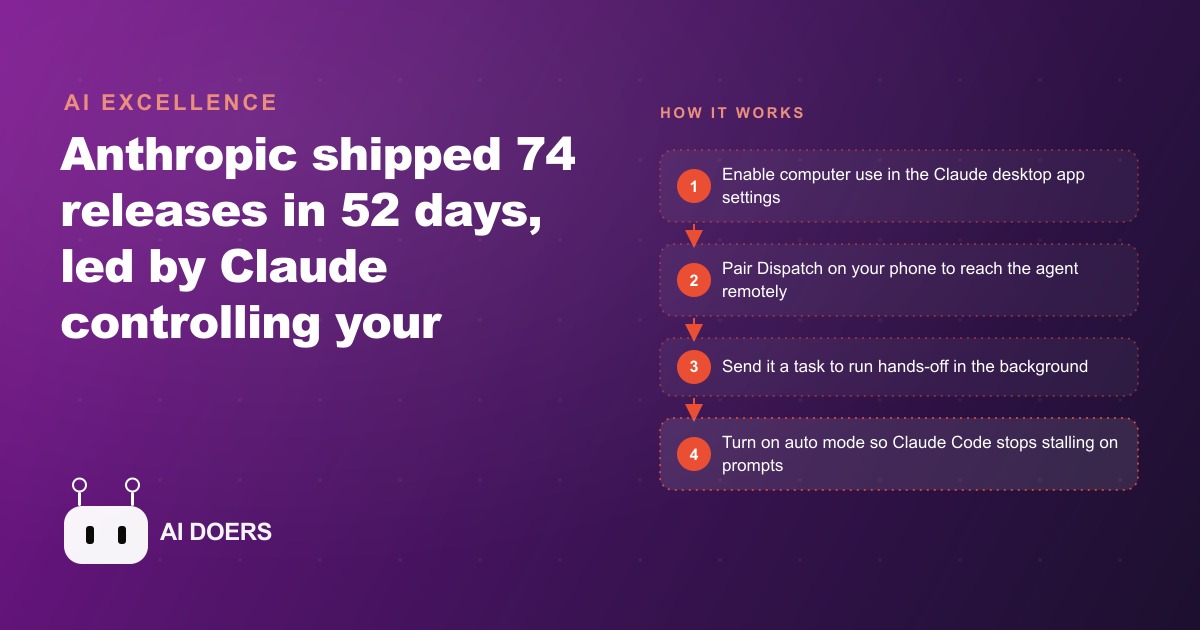
Anthropic published 74 releases across 52 days. I am Madhuranjan Kumar, and when I read through the full release calendar that Product Compass compiled, my first reaction was that the pace itself is the story before any individual feature. That is roughly one shipping event per working day without a break, and it signals that Anthropic is operating in a mode where the product surface is being expanded continuously rather than in discrete quarterly releases. But pace is not the same as significance, so I want to be direct about which features in this stretch actually change what a business can do today, and which ones are infrastructure that most owners will never notice.
Most of the 74 updates are targeted at developers. A handful reach every type of user. One of them points clearly at where the entire AI industry is heading, and understanding that one feature is worth more than a surface summary of all 74 combined.
Computer use is the move that matters most in this stretch
The standout release is Claude computer use, which rolled out inside Claude Co-work and Claude Code on the 23rd. Computer use lets Claude point, click, type, open applications, and navigate software using your actual mouse and keyboard, with no integration, no API, and no special support from the software it is controlling. While it is running, your screen glows orange and a status message tells you Claude is operating the machine. You go fully hands-off until the task completes.
The significance is not just about speed or convenience. It is about scope. Every previous automation approach required the target application to expose some integration point: an API, a connector, a documented webhook, a third-party integration. Computer use requires nothing from the target software at all. Claude sees the screen the way you do and acts on what it sees. That means any application visible on a screen is, in principle, something an agent can now operate. Legacy software that has never exposed a developer interface. Industry-specific platforms that no general automation tool has bothered to connect. Accounting tools running on a desktop. PDF-heavy workflows that live entirely in local applications. All of them become reachable to an agent for the first time, without any new integration work.
The practical implication for a small business is significant. The businesses that have been locked out of automation because their core tools are old, niche, or closed are no longer locked out. If it shows on a screen, an agent can be pointed at it.
The Dispatch pairing turns delegation into something you can do from anywhere
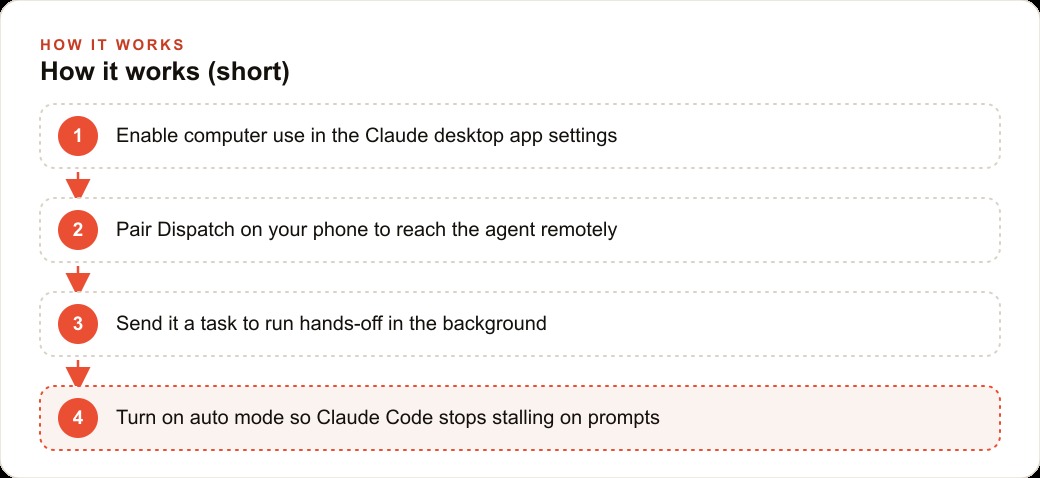
Computer use on its own requires you to be at the machine to start a task. Dispatch changes that equation. Dispatch is a pairing between your phone and your desktop Claude instance that lets you send tasks to your computer from the Claude mobile app while you are anywhere. You message your machine a task, and it navigates the screens and completes the workflow in the background while you are commuting, in a meeting, or asleep.
One documented test had the system take roughly five minutes to open DaVinci Resolve, navigate to the color page, and locate a specific button. That is slow compared to a person who knows the software. But the relevant comparison is not between the agent and a skilled user at the keyboard. The relevant comparison is between an agent completing the task unattended, at any hour, while the operator focuses elsewhere, versus that task simply not happening until the person sits down and does it themselves. When you frame it that way, five minutes at any hour for any screen workflow looks entirely different.
The speed will improve. The unattended execution is the feature that matters right now. An operator who can send three recurring screen tasks to their desktop from their phone, run them each morning before arriving at the office, and walk in to find them done has effectively extended their working capacity without adding a single hour to the schedule.
To enable it: open the Claude desktop app, go to Settings, find the General section under the desktop app options, and turn on computer use. A paid plan is required, at minimum the twenty-dollar tier. Pair Dispatch separately from the mobile app.
Auto mode stops Claude Code from babysitting itself
A second release in the same window addresses a frustrating pattern in long Claude Code sessions. Auto mode stops the agent from pausing to request permission for harmless terminal commands and routine web searches. Before this change, a session where the developer stepped away while a build or test ran would frequently stall on an approval prompt for something entirely benign: installing a dependency, running a quick lookup, executing a test suite. Auto mode keeps the session building instead of stalling on prompts that are not genuine decision points.
For anyone running Claude Code through multi-step coding tasks or build pipelines, this is a practical quality-of-life improvement that changes the economics of longer autonomous sessions. A build that previously needed someone present to approve each routine command can now run cleanly to completion. The developer focuses on the work that genuinely requires judgment rather than supervising commands that are not in question.
Projects arrived in Claude Co-work during the same period, allowing users to organize work with custom instructions and attached files so the agent carries persistent context for each project rather than starting blank every session. For teams with recurring client projects, active product builds, or ongoing workflows that span multiple sessions, Projects is the change that has the most compounding value over time. Each session on a project starts informed rather than requiring the same context to be re-established from scratch.
Google's memory migration removes the last excuse to stay loyal to one AI
One pattern running across the industry right now is the active competition to lower switching costs between AI platforms. Google shipped Gemini 3.1 Flash Live during the same week, introducing real-time voice conversation, screen sharing, and webcam input during sessions. The screen sharing use case is practically relevant: it can watch your screen while you work in unfamiliar software and walk you through it verbally in real time, which is a meaningfully different type of assistance than a typed question-and-answer exchange.
More important from a market-dynamics perspective is Gemini's memory migration feature, which lets you import your conversation history, preferences, and learned patterns from other AI apps directly into Gemini. Anthropic did something similar earlier, and Google is now copying the playbook directly. The intent is transparent: if switching to a new AI platform means losing months of accumulated context about your preferences, workflows, and communication style, that accumulated context functions as a switching cost. By offering import tooling, Google is explicitly trying to remove that friction and make the case that starting fresh does not mean starting from zero.
For a business owner currently using one AI platform heavily, this shift matters. Platform loyalty based on sunk context is about to become a weaker argument for staying put than it used to be. When context can migrate, the question becomes which platform serves your current needs most effectively, not which platform has accumulated the most history about you.
OpenAI shutting down Sora is a sharper signal than it looks
OpenAI announced it is shutting down the Sora app, its video generator, and the associated API, to concentrate resources on chat and coding models. The Disney partnership ended at essentially the same moment the Sora news broke. When a well-resourced lab shuts down a launched product, the story is not primarily about that product. It is a signal about where the lab believes the real sustainable value sits.
Right now every major lab, when forced to make hard resource-allocation decisions, is choosing agents that act on computers over side tools that generate specific media types. Sora was a media generator. Claude computer use, Gemini screen sharing, and auto-mode Claude Code are all forms of agents acting on machines and taking actions in the world. That convergence across independent labs, each making the same prioritization choice under resource pressure, is a signal worth taking seriously.
For a business owner trying to figure out which AI capabilities to invest time in learning, this convergence is useful information. The capabilities getting funded and staffed right now across every major lab are the ones that let AI handle screen-based work and autonomous task execution. The adjacent creative media features are getting deprioritized when they compete for engineering attention with the core agent direction. Investing time now in understanding and implementing agent-based automation is a better use of learning effort than becoming expert in AI media tools that face uncertain roadmaps.
Mistral's open-weights TTS changes the voice-clone math overnight
Mistral released an open-weights text-to-speech model that clones a voice from as little as three seconds of reference audio. It runs locally on your own hardware. It captures accent, inflection, and speaking rhythm. Because it is open-weights, you can deploy it without per-use API fees and without sending voice samples to a third-party server.
Suno 5.5 also shipped in the same window with the ability to train your own voice into generated songs. Google's Lyria 3 Pro can now generate up to three-minute full-track compositions with structured sections. The audio generation space moved considerably in a single week.
The Mistral release has the clearest business implication for a small operation. Any workflow that currently involves recording voice-overs manually, creating audio for ads, producing consistent-voice content at volume, or building a recognizable voice presence across channels now has a local, free-to-run option that did not exist before this release. A solo operator can record their voice once, train the model on that sample, and use it to produce audio content at any volume without booking studio time or paying per-minute API fees.
The other side of that capability is worth acknowledging plainly. Three seconds of audio from any recorded call, interview, public video, or social post featuring someone's voice is now enough to produce a working voice clone. That context is relevant for business owners who handle sensitive conversations by phone or video, and for anyone who treats recorded communication as private.
The concrete move for a business this week
Among the significant releases in this window, three produce the most reliable near-term return for a small or medium business that is not primarily a software company.
First: enable computer use in the Claude desktop app, confirm you are on a paid plan, and pair Dispatch on your phone. Then identify the single screen workflow in your business that a team member currently does by hand on a predictable schedule. Pulling numbers from a dashboard and pasting them into a report. Renaming and filing a batch of downloaded exports. Updating records in a tool that has no API. Running a pre-launch checklist. Start with that one task. Run it unattended two or three times and watch how the agent handles it before trusting it with anything consequential. The goal in week one is calibration, not full automation.
To make the business case concrete: a team member spending thirty minutes a day, five days a week, on a screen workflow that follows the same path every time is spending over 125 hours per year on navigation rather than judgment. If computer use handles that task reliably four days out of five, that is roughly 100 hours per year returned to higher-value work. At any reasonable cost estimate for a competent employee, the payback on a twenty-dollar subscription and a few hours of setup is immediate.
Second: if your team uses Claude Code for development work, turn on auto mode today. It takes thirty seconds and immediately stops the most common frustration in longer autonomous coding sessions. Third: if your operation has recurring projects with consistent context needs, set up Projects in Claude Co-work and load the relevant documents and instructions so every session on that project starts informed rather than blank. These three changes together, computer use with Dispatch, auto mode, and Projects, represent the practical version of the 74 in 52 story applied to an actual business.
Three things about this pace worth keeping in mind
The 74-in-52 pace tells me three things that I think are worth holding as context for every AI announcement that follows.
The first is that the product roadmap is being written in real time, not from a fixed plan. Features are shipping as they become usable rather than after being polished into a complete release. That means the best way to track what is genuinely ready is to watch what they actually ship and test it immediately, not to wait for a marketed version to arrive.
The second is that most announcements in a release window this dense will not be relevant to your business right now. Choosing two or three features to actually implement and ignoring the rest is a more productive response to a 74-feature release than trying to evaluate all 74. The features worth acting on are the ones where you can write down a specific task in your business that the feature could handle, right now, without additional infrastructure.
The third is that the direction of travel is increasingly clear. Every lab is converging on agents that act on computers and take autonomous actions, not on better chat assistants. Computer use with Dispatch is the most concrete version of that direction available to a business right now. Getting comfortable with it in one specific use case, while it is still new, is preparation for a landscape where this kind of delegation becomes routine and the businesses that have not built the habit will be starting from zero.
That is exactly what we do at AI DOERS. Book a private 30-minute call with Madhuranjan Kumar and we will map the fastest path to it for your specific business.
Book your call →
Madhuranjan Kumar
Madhuranjan Kumar brings 20 years of performance-marketing experience and has managed over $200 million in Facebook ad spend for brands across the United States and beyond. His expertise spans the full modern marketing stack: Meta, Google Ads, TikTok, email automation, CRM, and the websites that hold it together. At AI DOERS he turns that track record into lead-generation systems for businesses across every industry.