
How to Build an AI Agent That Browses the Web Like a Human
A vision model paired with a browser automation tool can navigate sites, scrape data, and click through links on its own. Here is how it works and how a travel agency could use it.

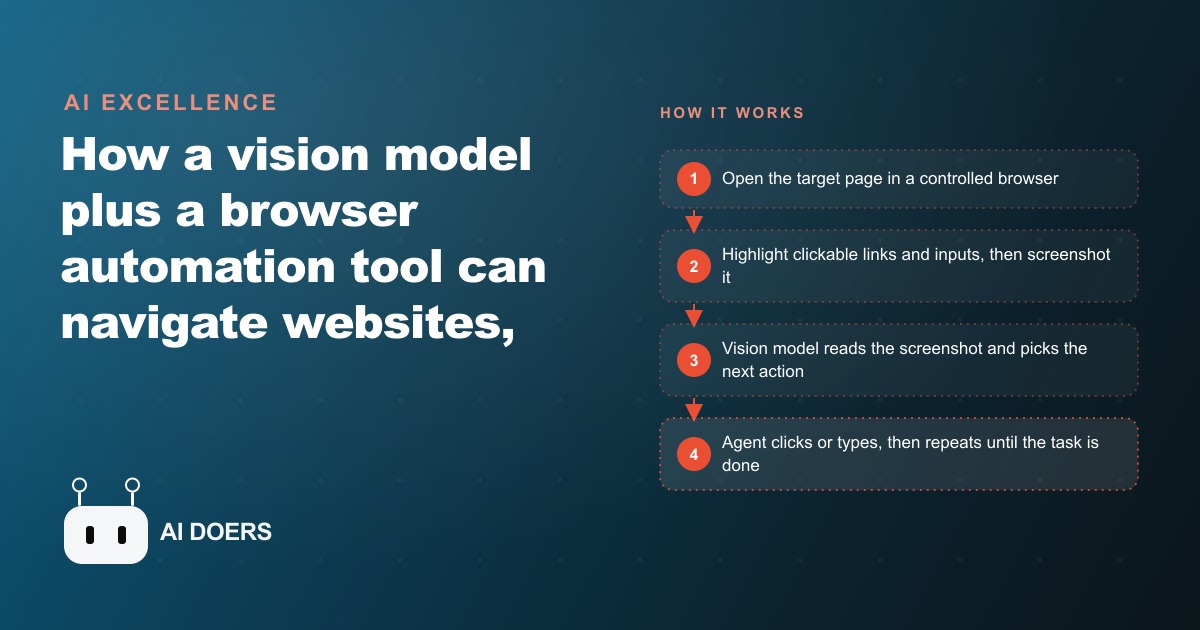
The standard rule of thumb for scraping is that every site needs its own script, and every script breaks the first time the site redesigns. A vision-based web agent throws out that rule entirely.
Traditional browser automation works by targeting specific elements in a page's underlying code structure. A scraper is told to find the button with a particular class name, the price inside a labeled container, the third row of a specific table. This works until the site updates. A redesign renames CSS classes, restructures the navigation, or relocates a key data field, and the scraper fails immediately. Someone must diagnose the break, locate the new element paths, rewrite the selector rules, and retest. In any environment where multiple target sites update their designs on their own schedules, this maintenance cycle does not end.
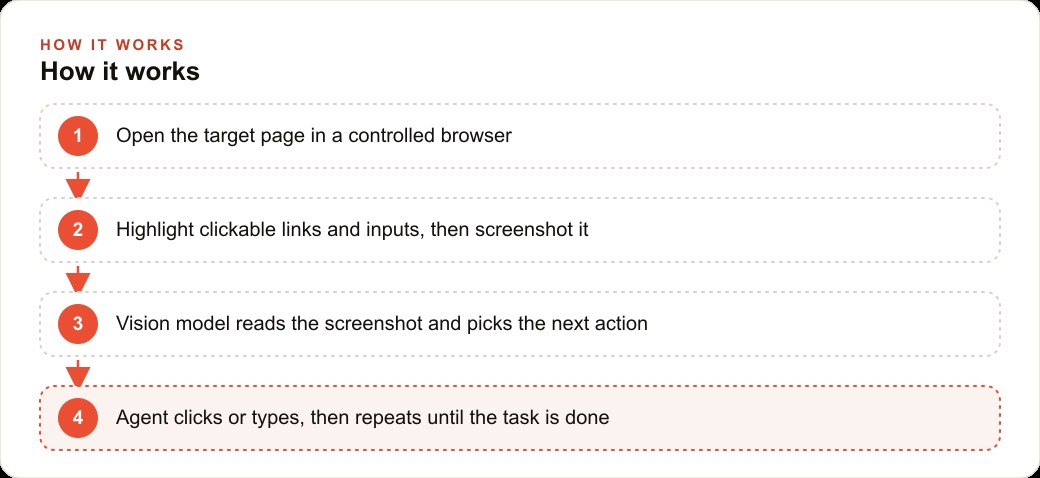
A screenshot-based web agent processes the page differently at every level. It takes a picture of the current state of the page, marks every visible button, link, and input field with a highlight, and sends that annotated image to a vision model. The model reads the page the way a person would, identifies what is on screen, and decides what to do next based on what it sees. The button that moved from the top-right to the center of the page is still the button that says "Search," and the model finds it in its new location. That difference in how the page is interpreted is what makes the seven capabilities below both possible and reliably useful in practice.
Madhuranjan Kumar has deployed this kind of agent for clients doing competitive research, supplier monitoring, and travel destination comparisons. The seven items below represent what this architecture can do that selector-based automation cannot replicate, and why that difference matters when your workflows depend on consistent output from sites you do not control.
1. Reads a redesigned page without being reprogrammed
Layout changes are the most common reason automation workflows break and require fixing. A supplier updates its product catalog page. A booking platform reorganizes its search results. A competitor moves their pricing table into a new section of their site. Any scraper targeting elements by their position in the HTML must be updated as soon as any of these changes lands, which means finding the breaks, rewriting the selector rules, and running tests before the workflow is usable again.
A vision-based agent reads the page from a picture and identifies information by its visual context: the label next to a number, the heading above a table, the text on a button. When the price field moves from the left column to the header of the page, the agent locates the price because it reads the label "Price" wherever that label appears on screen. The agent does not need to be told that the layout changed. It sees the current page and works with what is there.
This removes the primary maintenance burden of conventional automation. A site can redesign its interface multiple times and the agent continues producing accurate output without a developer reviewing selectors and issuing updates. For businesses that depend on monitoring the same set of sites week after week over months, this resilience is one of the highest-value properties the architecture offers. The agent adapts at the moment it reads each page, treating every visit as a fresh observation rather than a check against a fixed expected structure.
The downstream effect on operations is significant. A team that previously budgeted developer time for scraper maintenance after any major site redesign can redirect that time entirely. The agent's adaptability is not absolute, and some site changes, particularly those involving new authentication requirements or radically different navigation patterns, still benefit from a prompt review. But the routine layout adjustments that cause the most frequent failures in conventional automation are handled without intervention.
2. Navigates logged-in portals that block traditional scrapers
Conventional scraping tools operate as anonymous visitors. They send requests the way an unidentified browser would and receive only what an anonymous user would see. Supplier portals, professional directories, booking systems with member pricing, and platforms that personalize content based on account status are effectively inaccessible to anonymous scrapers. The useful information lives behind the login page.
A vision-based agent runs inside a real browser that can hold a persistent authenticated session. Session cookies are stored exactly as they are in a human user's browser. When the agent opens a portal page, the browser is already authenticated, and the agent sees the account-specific content: member pricing tables, restricted inventory levels, and the personalized interface that only logged-in users access.
This is not a technical workaround. It replicates the most basic human workflow: log in once, browse with full account access. The practical result is that an entire category of sites previously inaccessible to automation becomes navigable by the agent on the same terms it is navigable to the human who manages the account. The only requirements are that the account legitimately belongs to the operator and that automated navigation within your own account is permitted under the site's terms of service, which most supplier and business portals allow.
For businesses that regularly pull pricing or stock levels from supplier portals that require login, this single capability alone can eliminate hours of manual checking per week. The information is the same information the team would access manually. The agent retrieves it on schedule rather than requiring a person to log in, navigate, and record the data by hand.
3. Follows links across multiple pages to reach buried information
Information is rarely on the first page a search returns. A product search produces a list. Each item on the list links to a detail page. The detail page might have a specifications tab, a delivery timeline section, and a link to a compliance datasheet. Assembling a complete picture of one item requires following a chain of three or four linked pages in sequence.
Traditional scrapers handle single-page extraction efficiently but require substantial engineering to chain multiple pages. Each step in the chain needs its own rule: which link to click on page one, what to wait for on page two, which field contains the target data on page three. Writing and maintaining these chains across multiple sites with different page structures multiplies the engineering effort and creates multiple points of failure.
A vision-based agent treats multi-page navigation as a natural part of completing a goal. The instruction is outcome-based: "Find the minimum order quantity and lead time for each product on this list." The agent starts on the relevant search page, identifies each listing, follows each link in sequence, navigates to the appropriate sub-section of each detail page, reads the information, and compiles the results. When different products have different page structures, the agent adjusts its path at each step because it reads each page fresh and decides what to do next based on current content rather than a predetermined sequence.
The result is that tasks which previously required a human to click through product pages one by one can be handed to an agent that runs through the full list without supervision. The agent returns a structured summary of what it found, and the human reviews the output rather than performing the navigation manually.
4. Switches to an alternative source when the first one blocks it
Some sites use active bot detection, rate limiting, or CAPTCHA challenges to prevent automated access. When a traditional scraper encounters one of these defenses, it typically stalls or fails without notice. The research task does not complete, and the failure may not be discovered until a human checks the output and finds it incomplete.
A vision-based agent can be configured with fallback behavior written as a plain instruction: if you encounter a CAPTCHA page or an access-denied message, switch to the designated secondary source and continue the task there, noting which source was used. The agent recognizes these blocking signals from what the page looks like, the same way a human researcher would notice a CAPTCHA and decide to try a different site.
For research tasks where consistent output matters more than pulling data from a single preferred source, this fallback capability means the agent returns useful results even when primary sites are temporarily inaccessible. A pricing comparison drawn from a mix of primary and secondary sources is far more useful than one that stops partway through because one site presented a challenge. The agent includes a source note alongside each data point so the reviewer knows where the information came from and can apply any appropriate context.
5. Extracts clean structured data from chaotic, unstructured page layouts
Many pages that contain valuable information do not present it in a clean, predictable structure. Prices appear inside sentences. Specifications are distributed across collapsed tabs and footnote sections. Availability is stated in a status message that uses slightly different wording on each page across the same site.
Traditional scrapers work by structural position. A price inside a labeled form field with a known class name is extractable. The same price embedded in a paragraph of marketing copy is not, without writing a custom parser for that specific layout. Maintaining custom parsers across multiple sites with inconsistent formatting is ongoing work.
A vision model reads for meaning rather than for position. It identifies the price because it understands what a price looks like and what text typically surrounds one, not because it queries a specific element in the HTML. The same model that extracts a price from a labeled field can extract it from a paragraph, a table header, or a callout block without separate handling for each layout variation.
The output is also typically cleaner than what conventional scrapers produce. Scrapers often capture surrounding whitespace, adjacent characters, or HTML markup fragments along with the target value. A vision model returns the semantic content: the price as a number, the availability as a readable status, the specification as a clear description. The cleanup required downstream is reduced, which adds up significantly when hundreds of records are processed in a single research run.
6. Handles multi-step tasks that require reading before clicking
Some web research tasks are not pure data extraction. They require judgment: reading a section of a page, evaluating what was read against a criterion, and deciding whether to proceed or move on. Checking whether a supplier's return policy meets a minimum acceptable standard before recording them as a vetted source. Confirming that a service package includes a required feature before logging it as a candidate option. Reading product copy to verify a compliance certification is mentioned before flagging the item for further review.
Traditional automation cannot evaluate content against criteria written in natural language. A conditional branch in a scraper script can test whether a field contains an exact value, but it cannot read a paragraph and determine whether the paragraph satisfies a requirement stated in plain terms.
A vision-based agent can do this because the goal statement can include conditions: "Only add this supplier to the list if their stated minimum order quantity is 50 units or fewer." The agent reads the relevant section of each supplier's page, evaluates what it finds against the condition, and includes or skips each item based on that reading. Tasks that previously required a human to read each item and apply judgment before recording a result are now reachable with an agent given clearly stated evaluation criteria.
This changes the category of work that agents can handle. Research tasks that involve selection and filtering based on content, not just extraction of values, can now be delegated. The agent returns a filtered list with notes on why each item was included or excluded, and the human reviews that reasoning rather than doing the reading and filtering manually.
7. Recovers from a wrong click without stopping the whole task
Web navigation produces occasional errors even under careful operation. A click lands on an advertisement placed near the intended link. A page redirects unexpectedly to a different section. A button that appeared to confirm an action actually navigated backward. A human researcher notices these errors in seconds and corrects course without interrupting the broader task. A traditional automation script, encountering an unexpected page state, throws an error and halts the entire workflow.
A vision-based agent is configured to describe what it sees before taking each action. When a click produces an unexpected page, the model reads the next screenshot, recognizes that the current state does not match what the task requires, and navigates back rather than continuing blindly. The task proceeds with a correction note rather than a full stop requiring human intervention.
This recovery behavior changes the operational profile of the agent substantially. A tool that handles normal web navigation messiness without stopping can be trusted to run unattended across long research sequences. A tool that halts on every unexpected state requires someone available to restart it after each failure. For a research run covering dozens or hundreds of items over several hours, that difference determines whether the agent can run overnight and return complete results by morning or requires constant supervision.
The recovery is not unlimited. Genuinely broken sites, pages that never load, or login walls that appear without warning still require a human to review the session. But the routine mis-clicks and unexpected redirects that make conventional automation unreliable in production are handled gracefully, and that reliability is what makes the agent trustworthy enough to deploy on tasks the team depends on daily.
The travel agency that recovered 12 hours of research time per week
The clearest picture of what these seven capabilities produce in practice comes from a travel agency that Madhuranjan Kumar helped configure a web agent for ongoing destination research.
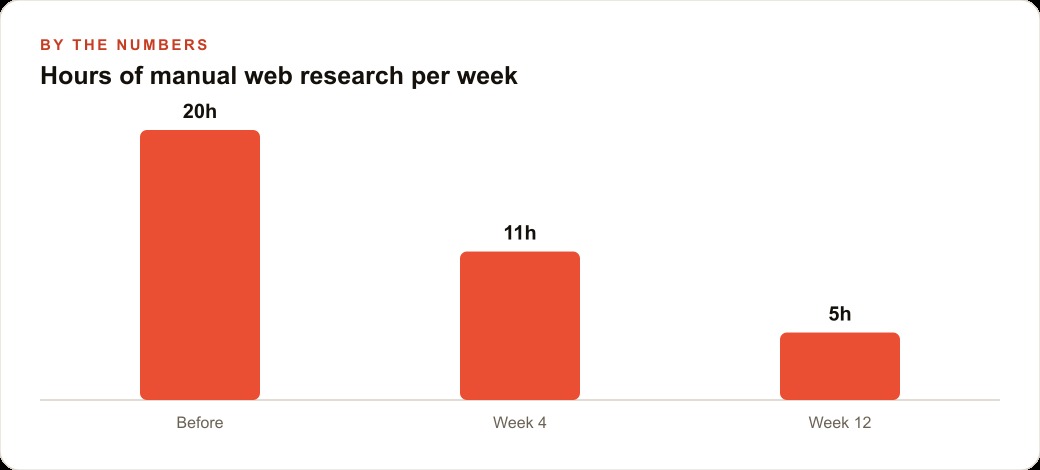
The agency specialized in beach holidays and maintained a list of ten core destination markets it sold to clients most frequently. Every week the team spent approximately 12 hours checking prices and availability across five booking sites, pulling accommodation details and current package options to prepare for client conversations. The five sites had substantially different page layouts and data presentation styles, several required an authenticated session to show real member pricing, and the relevant data for any one destination was typically spread across three to four linked pages per site.
A screenshot-based agent was configured with a clear goal statement covering all ten destinations across the five sites, instructed to log current pricing for the standard package formats the agency sold most regularly and to flag any price movement exceeding 15 percent from the previous weekly check. The agent ran in a browser authenticated with the agency's own accounts on each platform.
In the first week, the agent completed the full research cycle in under two hours of automated run time, producing structured output that had previously required 12 hours of manual research time to compile. The team reviewed the results and used them directly in client preparation without any additional data gathering. Over the following two months, three of the five target sites updated their page layouts. The agent returned accurate results through each of those redesigns without any code changes, locating the same data fields in their new positions by reading each updated page visually.
The 12 hours recovered per week did not disappear. The team redirected that capacity toward client-facing work: refining destination recommendations, developing more detailed comparison materials for client presentations, and following up on leads that had been deferred during research-heavy weeks. Within six weeks the agency was handling a noticeably higher volume of active client inquiries with the same team size.
The specific numbers from any given deployment depend on the volume of target sites, task complexity, and team structure involved. The structural advantage that drives the time recovery is consistent: an agent that adapts to layout changes and navigates authenticated portals without maintenance cycles removes the bottleneck that manual web research creates, and the recovered capacity can be redirected toward work that requires human judgment and relationship-building rather than clicking and copying.
That is exactly what we do at AI DOERS. Book a private 30-minute call with Madhuranjan Kumar and we will map the fastest path to it for your specific business.
Book your call →
Madhuranjan Kumar
Madhuranjan Kumar brings 20 years of performance-marketing experience and has managed over $200 million in Facebook ad spend for brands across the United States and beyond. His expertise spans the full modern marketing stack: Meta, Google Ads, TikTok, email automation, CRM, and the websites that hold it together. At AI DOERS he turns that track record into lead-generation systems for businesses across every industry.