
AI That Controls Your Computer: A Practical Look for Business Owners
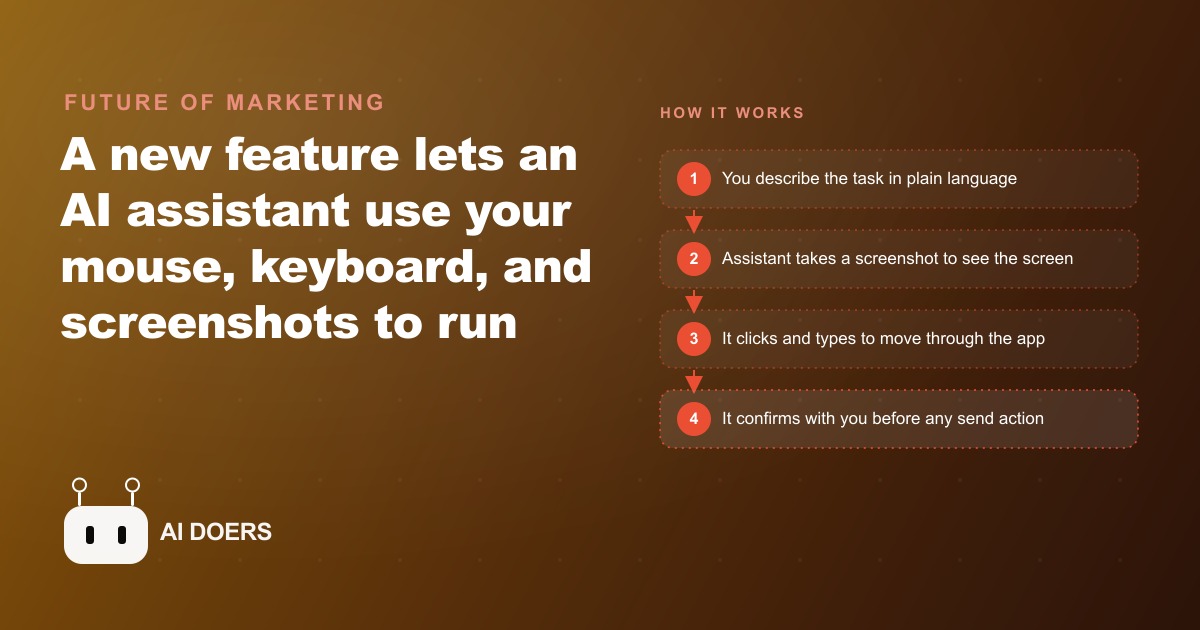
A new capability lets an AI assistant operate your desktop apps with its own mouse and keyboard, run tasks while you are away, and take direction from your phone.

The conventional wisdom on AI computer use is that letting software drive your mouse and keyboard is a recipe for accidents. I am Madhuranjan Kumar, and I want to argue the opposite: the businesses that refuse to let AI touch their desktop are actually the ones accepting the larger, less visible risk. Here is why.
The conventional wisdom: giving AI access to your desktop is an accident waiting to happen
The concern is understandable. An AI agent that can click buttons, type in fields, and submit forms has the ability to send emails you did not approve, delete files you wanted to keep, or trigger actions in legacy systems that have no easy undo. Every horror story about automation gone wrong involves a bot that acted on a system it did not fully understand, in a sequence that a human reviewer would have caught.
That risk is real. The question is not whether it exists but whether it is larger than the risk on the other side of the comparison. And the comparison is not between AI computer use and a perfect manual process. It is between AI computer use and what the business currently does: a human doing the same repetitive desktop tasks, daily, without fail, across an entire working week.
The truer risk: the manual clicking you tolerate is costing more than you think
The businesses most commonly cited as unsuitable for AI computer use are the ones running older operational software with no modern API, no integration points, and no way for external tools to connect programmatically. Scheduling systems purchased five years ago. Billing platforms that never added a developer API. Practice management software that exports PDFs but nothing else.
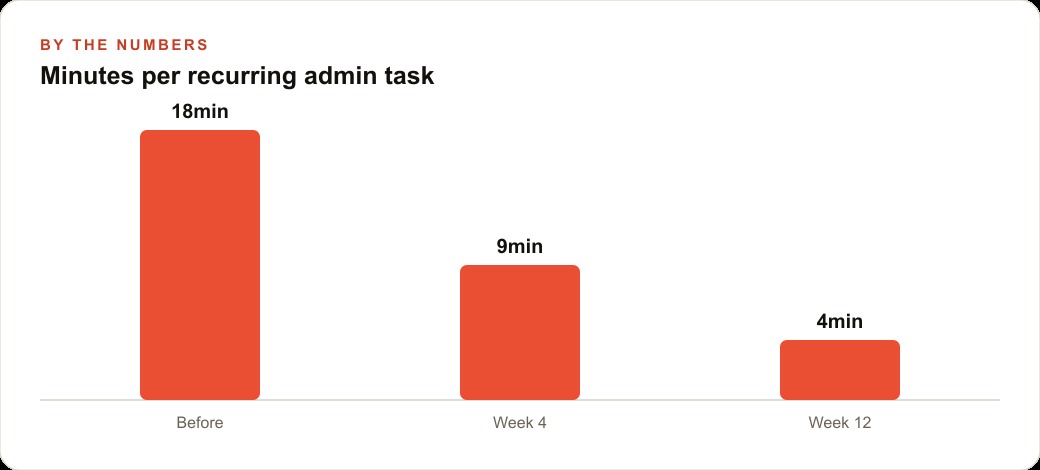
These are exactly the businesses paying the highest manual labor cost for their desktop work. A front desk person who runs the same eight-step sequence in a legacy scheduling tool every morning, copying data from a form into a separate system, moving files between folders, attaching documents and sending them to specific recipients, is doing work that an AI agent running in computer-use mode could handle completely. The business that refuses computer use on grounds of risk is paying a full-time human to do repetitive, error-prone clicking that produces lower value than the same person doing anything else.
The manual process also has its own failure modes. A tired staff member skips a step. A new hire runs the sequence in the wrong order. A file gets moved to the wrong folder because the naming convention is not perfectly memorized. These errors happen silently, accumulate over time, and often surface only when something downstream is missing or incorrect. The perception that the manual process is inherently safer than the automated one rarely survives honest accounting of how often it actually goes wrong.
What the confirmation step does to the fear
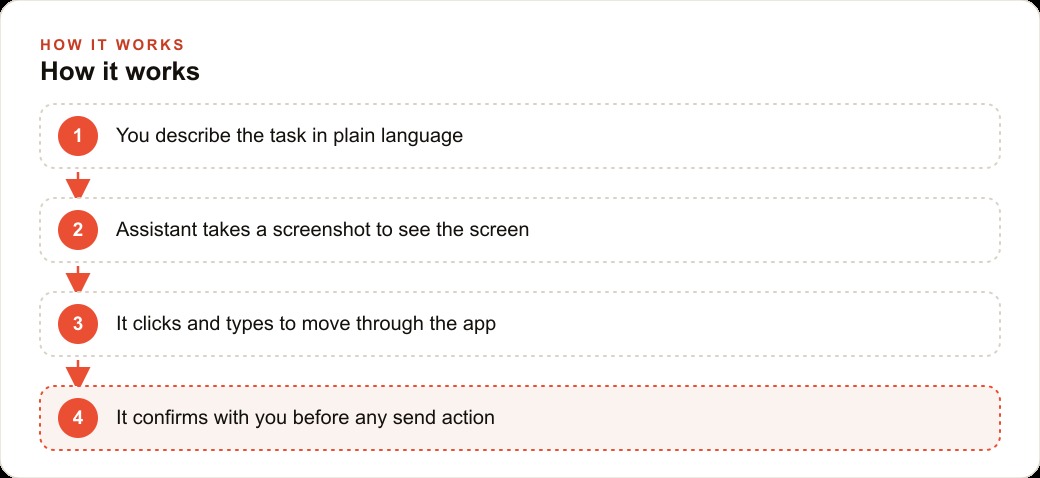
The feature that most undercuts the "AI will act without permission" concern is the confirmation step. Before any consequential action, any send, any submit, any action that affects another person or a shared file, the AI agent pauses and asks for explicit approval. The agent can see the screen, read the field values, plan the sequence, and navigate all the way to the point of no return. It then stops and waits.
This is not a limitation of the technology. It is a deliberate design choice that reflects a mature understanding of how AI agents should operate in high-stakes environments. The agent handles the mechanical work of getting to the confirmation point, and the human handles the judgment of whether to proceed. The division of labor is precise: AI does the navigation, human makes the decision.
For a chiropractic clinic using computer use to handle its morning file organization and appointment summary workflow, the confirmation step means the office manager receives a notification when the day's documents are organized and the summary is ready to send, approves it from a phone with one tap, and the message goes out. The agent did the clicking. The manager made the call. Neither the speed advantage nor the human oversight was sacrificed.
The confirmation step also creates a natural audit trail. Every consequential action that passed a human review leaves a trace in the session log. For businesses in regulated industries where operational transparency matters, this audit trail is an advantage, not a liability.
The apps with no API are the real opening for this technology
For businesses running software that has no clean integration point, computer use is not a nice-to-have feature. It is the only available path to automation that does not require replacing the software.
Consider the billing platform that exports PDF invoices but offers no API endpoint. The accounting team currently opens the platform every morning, navigates to the previous day's completed jobs, exports each invoice, saves them to the correct client folder in the shared drive, and sends the collection to the accounting service. That sequence is fully defined, fully repeatable, and entirely mechanical. It is also currently handled by a person who would rather be doing something else.
Computer use handles this by operating at the screen level rather than the API level. The agent sees the platform the way a person sees it, takes a screenshot to understand what is on screen, identifies the correct navigation path, and executes the steps. It does not need an API endpoint because it does not use one. It uses the same interface the human uses, driven by its own vision of the screen rather than by a programmatic connection.
This matters enormously for the small business landscape because a very large proportion of the operational software that small businesses depend on was built before modern API standards and has never been updated to add them. The AI agent that can operate these systems without requiring a rebuild or a replacement is solving a real constraint that many businesses have quietly accepted as permanent.
Remote triggering from a phone flips the whole value proposition
The feature that moves computer use from a useful automation tool to a fundamentally different operating model is the ability to trigger jobs from a phone while the agent runs on a computer in the office.
The standard objection to automating desktop tasks is that it requires the computer to be present and attended. If the owner is on a job site, they cannot run the morning file sequence. If the manager is out sick, the billing export does not happen. The workflow that depends on a specific person being physically at a specific computer is fragile by design.
Remote triggering removes that dependency. The owner sends a message from the job site describing the task. The agent runs the sequence on the office computer. The owner receives a confirmation notification when the task completes or a pause notification when the confirmation step is reached. The entire sequence happens without the owner being in the room, without delegating the work to another staff member, and without the task waiting until tomorrow.
For a pest control company whose owner spends most of the day in the field, the ability to trigger administrative tasks remotely while maintaining approval authority over consequential actions is a structural change in how the business operates. Administrative work that currently waits for the owner to return to the office in the evening can now be processed during a ten-minute lunch break from a phone. The operational day extends and the bottleneck that required physical presence shifts to one that requires only a phone notification. For businesses also running meta-ads campaigns that generate inbound inquiries requiring prompt administrative follow-through, the faster processing cycle directly improves conversion on that paid traffic.
The right attitude toward early-stage capability is not avoidance, it is deliberate testing
Computer use is in an early preview stage, and the appropriate response to early-stage capability is deliberate testing rather than either wholesale adoption or wholesale avoidance. Start with one small, safe, fully defined task. Prove the tool on that task. Learn where it excels and where it needs the confirmation step or a more precise initial description.
The businesses that build operational knowledge of this capability while it is still early will have a clear picture of which of their workflows it handles reliably, months before competitors begin exploring it. That institutional knowledge is worth building now rather than scrambling for it when the technology becomes mainstream and the competitive window closes.
The businesses that avoid it on the grounds of risk are not avoiding risk. They are choosing the familiar risk of manual, error-prone, human-dependent desktop work over the manageable risk of a tested, confirmation-gated, scope-limited AI agent. That is a legitimate choice. It is not the conservative choice the conventional wisdom suggests. The CRM and website stack improvements that become possible when routine data entry and document routing move off the human workload are not theoretical gains. They are operational hours that go back to the work the business actually exists to do.
The integration challenge that stops most computer use deployments
The practical adoption barrier for computer use in business contexts is not the capability demonstration. It is the integration work that connects the agent's output to the business's existing workflow. An agent that can extract information from a UI and enter it into another system is performing a useful task. An agent whose output then needs to be manually reviewed and transferred into yet another system has only partially replaced the human workflow.
The integrations that make computer use economically valuable are the ones that create end-to-end automation of a workflow rather than automation of one step within a workflow that still requires human hands to complete. Building those end-to-end integrations requires understanding the full workflow, not just the step that the AI is most obviously suited to automate.
For a business running customer relationship management alongside lead generation from advertising campaigns, the computer use case that creates end-to-end value is an agent that monitors the advertising platform for new leads, extracts the lead information, enters it into the CRM, and triggers the first step of the follow-up sequence, all without human intervention. Each individual step of this workflow is a computer use task. The value comes from connecting them into a single automated sequence.
The validation protocol that prevents errors from compounding in automated workflows
Any automated workflow that involves multiple steps carries a compounding error risk: an error in step one produces incorrect input for step two, which amplifies the error through every subsequent step. A computer use agent that misreads a field value in step one and enters incorrect data into a downstream system creates a data quality problem that may not be discovered until many steps later, when the cost of correcting it is higher than it would have been if caught at the source.
The validation protocol that addresses this is checkpoints: explicit comparisons between the input state and the expected output state at defined points in the workflow. The agent extracts information, the validation checkpoint confirms the extracted values match the expected format and range, and only after that confirmation does the agent proceed to the next step.
Checkpoints slow down the automation, but they slow it down by a predictable and controlled amount. The alternative, allowing errors to compound through an unvalidated multi-step workflow, creates unpredictable failure modes that are expensive to diagnose and correct after the fact.
For any computer use deployment handling data that feeds downstream business decisions, whether that is lead data feeding a CRM follow-up workflow or performance data feeding a reporting process that informs advertising budget allocation, the validation checkpoint architecture is the difference between automation that is trustworthy enough to run unattended and automation that requires human oversight at each step to catch the errors that the validation would have caught automatically.
The cost accounting that justifies computer use investment
Computer use capabilities currently require AI model inference at each decision point in the workflow. The inference cost per decision is higher than for text-only tasks because the model is processing screenshots as well as text. For high-frequency workflows, the inference cost can be significant relative to the labor cost it replaces.
The cost accounting that justifies computer use investment correctly compares the total cost of ownership of the automated solution against the fully-loaded cost of the manual alternative, including not just the labor time but the error rate and error correction cost, the training cost for new staff, the variability in throughput, and the marginal cost of scaling volume.
For most repetitive, well-defined data workflows, the fully-loaded manual cost is higher than the inference cost of a well-designed computer use automation by a margin that grows with volume. The investment justification is strongest for workflows with high volume, high error sensitivity, and significant training burden. It is weakest for low-volume, low-sensitivity workflows where the setup cost of the computer use agent exceeds the manual labor it replaces.
That is exactly what we do at AI DOERS. Book a private 30-minute call with Madhuranjan Kumar and we will map the fastest path to it for your specific business.
Book your call →
Madhuranjan Kumar
Madhuranjan Kumar brings 20 years of performance-marketing experience and has managed over $200 million in Facebook ad spend for brands across the United States and beyond. His expertise spans the full modern marketing stack: Meta, Google Ads, TikTok, email automation, CRM, and the websites that hold it together. At AI DOERS he turns that track record into lead-generation systems for businesses across every industry.