
How This Week's AI Releases Help Electricians Work Smarter and Win More Jobs
Claude's new file creation features, ByteDance's image editing model, updated ChatGPT memory controls, and VO3's price cuts collectively give small electrical contracting businesses tools that were out of reach six months ago.


Seven AI updates landed in the same week and at least four of them change the daily math of running a small electrical contracting business. Claude can now generate a real downloadable Excel file from a plain-language job description. ByteDance released a reference-based image editing model that competes with the best tools on the market at a cost of cents per image. Google cut VO3 pricing and added vertical video support. ChatGPT added project-level memory controls that keep client contexts separate. AirPods Pro 3 introduced live language translation between two speakers. NotebookLM added a debate audio format that argues both sides of uploaded content. And Claude models arrived inside Microsoft 365 Copilot, meaning Excel, Word, and Outlook users get a stronger AI assistant without switching platforms.
One more development worth noting: the Oakland Ballers baseball team let an AI system manage an entire game, calling the starting lineup, pitching changes, and substitutions based on data. The AI's decisions led to a win. The story matters for small business owners because scheduling, crew allocation, and job routing in a contracting operation follow the same data-driven optimization patterns. The tools that enabled that baseball decision are increasingly accessible to anyone running a service business.
For an electrician billing at $90 to $120 per hour, the relevant question is not which of these tools is most impressive. It is which ones recover the most billable time or win the most inbound jobs at the lowest cost to adopt. This playbook answers that question with a specific sequence and specific numbers.
Enable Claude's File Creation Feature Before the Next Estimate Lands in Your Inbox
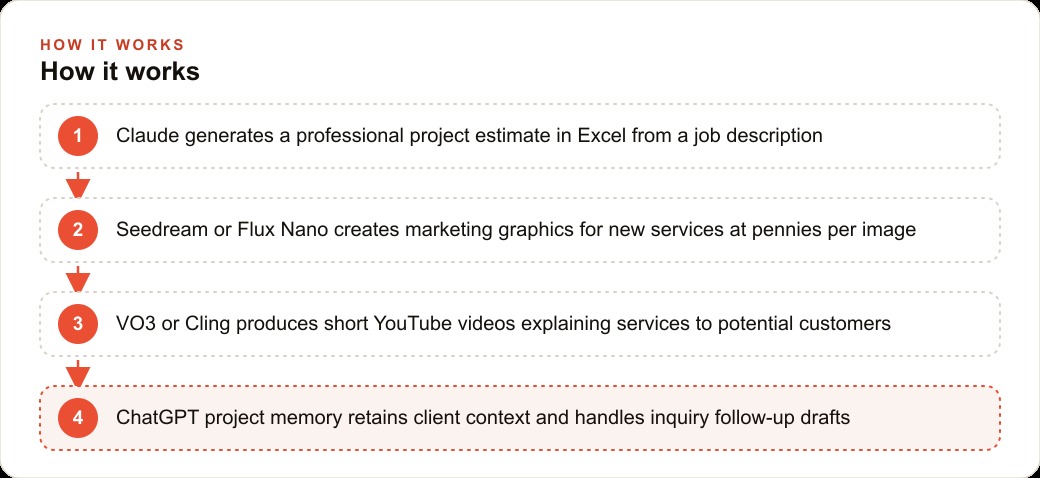
Claude's file creation feature is live now under experimental settings. The activation sequence has two steps: toggle the feature on in Claude's settings under experimental features, then open a new chat session. Activating the toggle in an existing chat does not enable the feature for that session. The new chat is required.
With the feature active, describe a project estimate in plain language and Claude generates a real Excel file you can download, open in Excel or Google Sheets, and edit. The output is not a formatted text block describing what a spreadsheet would contain. It is an actual file with column headers, formula cells, labeled rows, and calculated totals.
For an electrician, the immediate application is estimate production. A residential panel upgrade, an EV charger installation, and a whole-home rewire each have consistent components: labor hours by task, material costs by line item, permit fees, markup percentage, and a grand total. Describing those components to Claude and asking it to build an Excel estimate template takes one conversation. The resulting file can be saved, used for the next real job, and adjusted in minutes rather than rebuilt from scratch each time.
The time recovered per estimate matters at scale. If the current manual process takes 45 minutes per estimate and Claude's template reduces that to 10 minutes of adjustment, 35 minutes are recovered per estimate. At a billing rate of $90 to $120 per hour, 35 minutes of recovered time is worth $52 to $70 per estimate. An electrician who produces eight estimates per week recovers $416 to $560 in potential billable time weekly, or roughly $1,600 to $2,200 per month, from this one change alone. The Claude Pro subscription that enables the feature costs $20 per month.
Build Your Master Estimate Template in a Single Conversation and Save It
The template is the lever. A one-time 20-minute conversation that produces a well-structured master estimate template for your most common job type compounds across every estimate you produce from that point forward.
The conversation structure that works: describe the job type in detail, name the cost components in the order they appear on your actual estimates, give Claude your current labor rates and typical hour ranges per task, give it your standard markup percentage, and ask it to build a formatted Excel file with formulas that calculate totals automatically. Download the file, verify every formula is correct, adjust any line items that do not match your actual supplier pricing or local permit costs, and save it as your master template.
From the master template, each new estimate of the same type takes five to ten minutes: update the material quantities, adjust the labor hours for any job-specific factors, enter the current permit fee for the jurisdiction, and the total updates automatically. The structure is already there. The formula logic is already verified. You are adjusting numbers inside a proven framework rather than rebuilding the architecture each time.
The same approach extends to change orders and completion summaries. Both have repeating structures that lend themselves to a master template. Build each one once, save it, and the document production overhead across your entire project lifecycle drops sharply. Claude inside Microsoft 365 Copilot brings this same capability to users who work primarily in Excel itself, without needing a separate Claude session.
Set Up a Weekly Job-Photo Content Habit Using This Week's Image Tools
ByteDance's Seedream 4.0 accepts reference images alongside a text instruction and produces a composite output suitable for marketing graphics. Flux Nano operates on a similar model at comparable pricing. Both are available at a few cents per image, making the economics of consistent job-photo content essentially zero outside the time it takes to take the photos.
The habit that makes this work: take one clear photo of each completed job before leaving the site. The shot should show the finished panel, outlet, fixture, or installation clearly. A clear photo of real completed work is the raw material for every content application downstream.
Once per week, take the best job photo from the previous seven days, use Seedream or Flux Nano to add your business name and contact number as a text overlay, write a three-sentence Google Business Profile post describing the job and its benefit to the homeowner, and post it the same day.
Google Business Profile posting frequency is one of the strongest local search signals for a trades business. An electrician who posts weekly with real job photos and location-relevant copy typically sees local search impressions grow meaningfully within 60 to 90 days. That improved visibility costs nothing in ongoing ad spend and compounds over time. The marginal cost per post is the few cents for image generation.
The same job photo can produce a short Instagram caption or a Facebook post in a second Claude conversation. One photo taken on site becomes three to four pieces of content in under 30 minutes of total work, most of it AI-assisted. NotebookLM's new debate audio format is not directly relevant to job-photo content, but it does offer a useful alternative for technical decision-making: upload the pros and cons of different wiring approaches or panel brands, and the debate format surfaces trade-offs that a flat summary would miss.
Assign Each Major Client a Separate ChatGPT Project Folder Before the Memory Bleeds Across Jobs
ChatGPT's project-level memory control limits what the AI remembers to only what happened inside a specific project folder. Without this separation, context from a large commercial client's ongoing work can appear in responses meant for a small residential customer inquiry, producing inaccurate or confusing drafts.
The setup takes two minutes per client: create a project folder with the client's name, and conduct any AI-assisted drafting for that client inside that folder. Change orders, follow-up emails, scope clarifications, and maintenance reminders for a large ongoing client all go in that client's folder. The AI's contextual memory for that folder becomes progressively more useful as more of the client's project history accumulates there.
For an electrician managing a few large commercial accounts alongside residential work, this separation keeps the AI's output sharp without re-explaining project context at the start of every conversation. The first few exchanges in a client's folder provide the context. Subsequent conversations inherit it.
This is particularly valuable when drafting technical follow-up communications. An email explaining why a panel upgrade requires a load calculation addendum should reference that specific client's panel size, the jurisdiction's code requirements for this job, and the cost breakdown already discussed. With project memory active in the right folder, the AI has all of that context and produces a draft that reads like it came from someone who has been on the job throughout.
Test a Short-Form Service Video Using the Current VO3 Pricing Window
Google's VO3 added vertical video support and cut pricing in the same update. The pricing reduction makes professional-quality short-form video accessible for a few dollars per video minute. For a service business, that changes the economics of video marketing from a production budget line item to a routine tool spend.
For an electrician, the right starting point is a 45 to 60 second vertical video explaining one specific service clearly. EV charger installation works well: it is a service with strong consumer interest, a clear visual output, and a price point where a well-explained video can address the most common concerns before the inquiry arrives.
This breakdown structure that works for service trades: open with the result the homeowner wants rather than the technical process, show or describe the installation in its most appealing form, state the one reason most homeowners hesitate to book, and close with the specific action to take. Sixty seconds is enough. Longer videos on a specific service topic lose the viewer before the call to action.
Posting the same vertical file to Google Business Profile, Instagram Reels, and YouTube Shorts costs no additional production effort. One production session produces three platform posts. AirPods Pro 3's live translation feature is worth noting here for electricians who work in markets with significant Spanish-speaking residential customers: real-time translation during an in-home estimate removes the communication barrier that often loses that job to a competitor.
The goal during this pricing window is to build a library of five to eight service-specific videos. Once built, that library runs as organic content indefinitely and keeps producing inbound inquiries without ongoing cost.
Run a Four-Week Baseline Before Adding the Next Tool to the Stack
The temptation after a week of significant AI releases is to adopt every relevant tool simultaneously. That approach produces a situation where no tool is being used consistently enough to generate a measurable result, and the combined adoption overhead displaces the billable time you were trying to recover.
The correct sequence is one tool at a time, measured over a four-week baseline before the next tool enters the workflow.
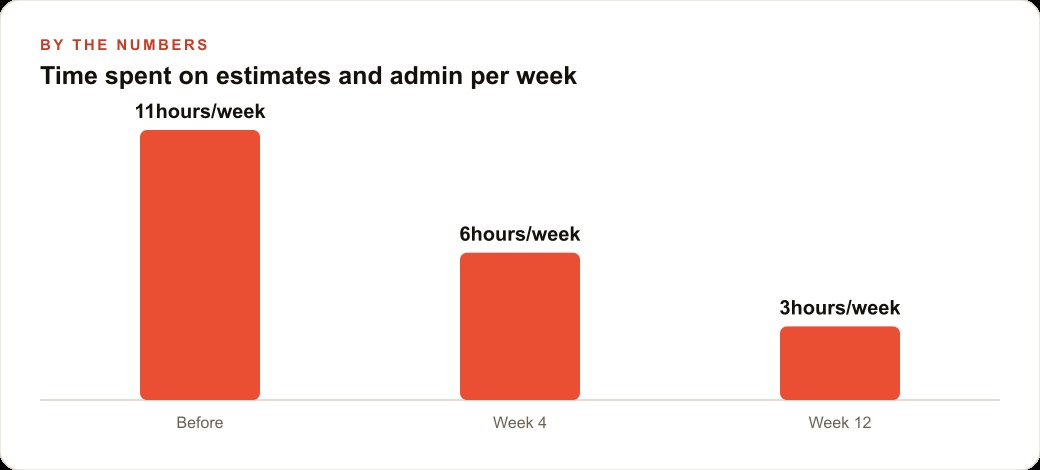
The measurement for the estimate template is straightforward: track estimate production time per job before and after for four weeks. The measurement for the Google Business Profile posting habit is profile views and inbound call volume week over week. The measurement for ChatGPT project memory is the number of context-setting exchanges needed at the start of a drafting session. The measurement for short-form video is inquiry volume for the specific service covered, compared to the same period before.
Here is what those numbers look like in practice for a realistic electrician operation. The operator bills at $100 per hour and currently produces eight estimates per week, each taking 45 minutes. Switching to the Claude template reduces each estimate to 10 minutes of adjustment. That is 35 minutes recovered per estimate, or 4.7 hours per week. At $100 per hour, that is $467 in recovered billable capacity per week, or roughly $1,870 per month. The template costs one conversation to build and $20 per month to maintain through the Claude Pro subscription.
The Google Business Profile posting habit, maintained consistently for 90 days, typically produces a 20 to 40 percent increase in profile-driven calls for a business that was posting infrequently or inconsistently before. For an electrician averaging 12 inbound calls per month from profile searches, that is two to five additional calls per month. At a conversion rate of 40 percent and an average job value of $800, two additional converted jobs per month from improved visibility is $1,600 in incremental monthly revenue against a zero ongoing cost.
The full tool stack described in this playbook carries a total monthly cost of $45 to $55: Claude Pro at $20, ChatGPT Plus at $20, image generation API usage at under $5 per month, and VO3 video generation at a few dollars per production session. Monthly billable time recovered from estimate automation alone exceeds $1,500 at the conservative end. The return on the tool spend is approximately 30 to 1 from a single workflow improvement, before accounting for any revenue generated by improved marketing visibility.
Add each tool only after you have a four-week baseline on the previous one. The tools compound when each is embedded in the workflow as a reliable habit. They dilute each other when they are all being learned simultaneously. Madhuranjan Kumar works with trades businesses on this kind of tool adoption and workflow integration. Start with the estimate template this week, measure the result, and add the next step from there.
That is exactly what we do at AI DOERS. Book a private 30-minute call with Madhuranjan Kumar and we will map the fastest path to it for your specific business.
Book your call →
Madhuranjan Kumar
Madhuranjan Kumar brings 20 years of performance-marketing experience and has managed over $200 million in Facebook ad spend for brands across the United States and beyond. His expertise spans the full modern marketing stack: Meta, Google Ads, TikTok, email automation, CRM, and the websites that hold it together. At AI DOERS he turns that track record into lead-generation systems for businesses across every industry.