
How to Make Your AI Chatbot Answer With Images, Not Just Text
Most knowledge bots reply in flat text and throw away your screenshots. Here is how to keep the images in the answer, with a worked example for an accounting firm.

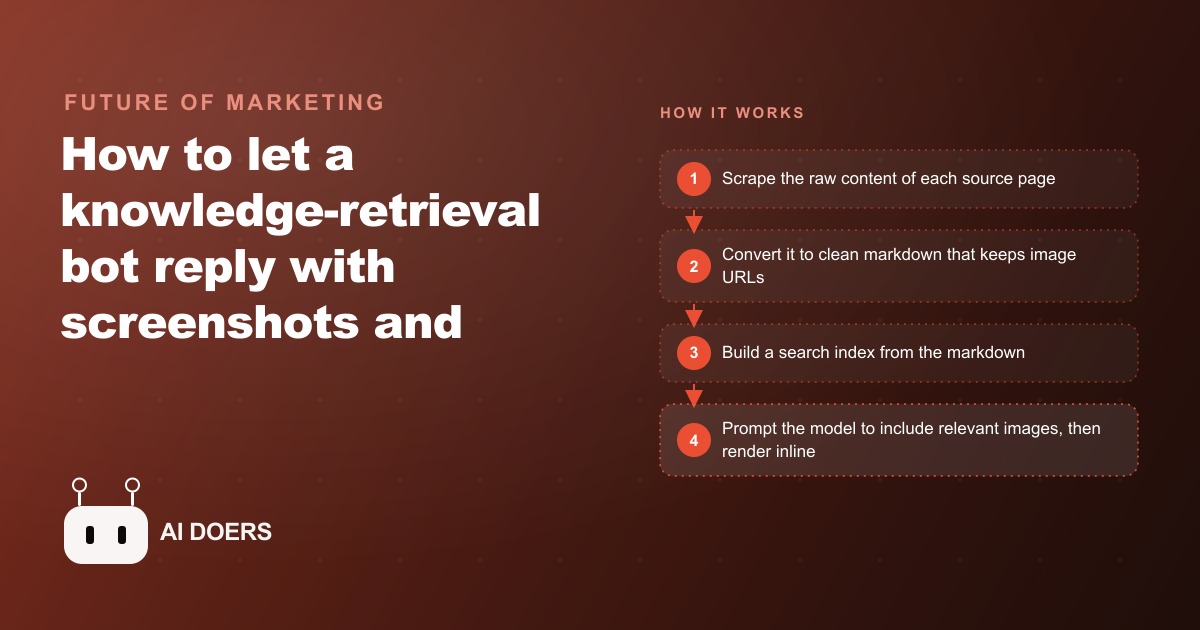
There is a strange gap between how people actually explain things and how their chatbots explain things. When a senior colleague helps a newer teammate, they almost never read a paragraph out loud. They point at a screen. They circle a button. They pull up the diagram that makes the whole thing click in two seconds. Yet the moment we hand that same knowledge to an AI assistant, it starts talking in flat sentences and forgets that pictures exist. I am Madhuranjan Kumar, and this is the piece of the retrieval puzzle that almost nobody sets up correctly, even though it is the difference between a bot people tolerate and a bot people trust.
Why text-only bots quietly lose half the answer
Most "chat with your documents" assistants feel underwhelming for a reason that has nothing to do with the model being weak. The model is fine. The problem is that the answer format was decided long before the model ever saw the question. These bots reply in words only, so even when the perfect explanation is a labeled screenshot sitting inside your own help doc, the bot cannot reach for it. It paraphrases the picture instead of showing the picture, and a paraphrase of a screenshot is always worse than the screenshot.
Think about how much of real business knowledge is visual. A process guide is mostly annotated screens. A product manual is mostly diagrams. A settings walkthrough is mostly arrows pointing at the exact toggle. When a bot answers those questions with a wall of prose, it is not giving you a smaller version of the answer. It is giving you a translation into a weaker language. People then re-read, get confused, and go ask a human anyway, which defeats the entire reason the bot existed. The text-only bot does not save the time you hoped it would, because the fastest possible answer was a picture and you never let the bot hand it over.
The moment your images get thrown away
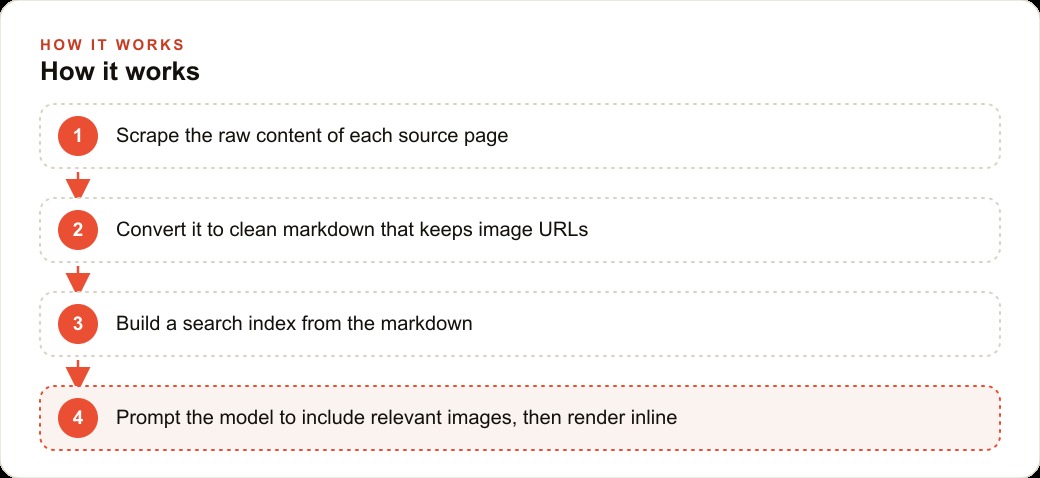
Here is the part that surprises people. Your images are usually discarded before the model is even involved. Almost every retrieval pipeline starts by cleaning the source. It takes a web page or a PDF, strips out the layout, the scripts, the navigation, and the noise, and reduces everything to plain readable text. That cleaning step is genuinely useful, because raw HTML is chaos and models focus better on tidy input. But most cleaning tools treat images as noise too. They delete the image tags, drop the links, and keep only the words around them.
So by the time your content reaches the search index, the pictures are gone. Not hidden, not unranked, actually gone. The bot never had them. This is why so many teams assume image answers require some exotic vision model or an expensive rebuild, when the real fix is much earlier and much simpler. You do not need the bot to generate images or understand images. You just need to stop throwing away the images you already made. The failure is a plumbing failure at the front door, not an intelligence failure at the model.
Once you see it this way, the whole project changes shape. The goal is not "teach the AI to be visual." The goal is "preserve the visuals through a pipeline that was built to delete them."
Markdown is the format that keeps the picture attached
The format that solves this cleanly is markdown. Markdown is a lightweight way of writing formatted text using a few simple symbols, and its quiet superpower here is that it treats an image as a first-class piece of content rather than as decoration. An image in markdown is just a short line that carries the picture's address right alongside the words. When you convert a source page into markdown with links and images switched on instead of stripped out, the text and the visuals travel together as one clean block.
That togetherness is the entire trick. Because the image link rides inside the same markdown the model reads, the model can hand that link back inside its answer without doing anything clever. And markdown is already the native tongue of modern chat interfaces. ChatGPT renders tables, code, and formatting from markdown every day, so a front end that speaks markdown will happily turn an image line into an actual rendered picture on the screen. You are not inventing a new display system. You are using the one your users already stare at.
The mental model I keep coming back to is this: raw HTML is a house with the furniture nailed to the walls, plain text is the house after a fire, and markdown is the house packed neatly into labeled boxes. When you move the knowledge into markdown boxes, the pictures come along in their own labeled box instead of being left behind in the ashes.
The relative-path trap that breaks image links
Now for the sharp edge that catches almost everyone on their first attempt. You do the conversion correctly, you keep the image lines, you feel good, and then the pictures show up broken. The cause is almost always relative paths. Many websites do not write the full address of an image. Instead of the complete web location, they write a shorthand that only makes sense relative to the page it lives on, something that quietly assumes "start from where this page already is."
That shorthand works fine while the image sits on its home page. But the instant you lift it out and drop it into your search index, the page it was relative to is gone, so the shorthand points at nothing. The image line survives, the address inside it is useless, and your bot confidently returns a picture that will never load. It looks like the whole approach failed when actually one small rewrite was missing.
The cleanup step therefore needs a deliberate repair pass. Before anything gets indexed, walk through every image reference and turn every partial address into a full working one, gluing the shorthand back onto the site's real base location so each link stands on its own two feet. It is unglamorous work, and it is exactly the kind of detail that separates a demo that looks great on stage from a system that actually holds up when a real employee asks a real question on a Tuesday afternoon.
Telling the model to show, not just tell
Suppose you have now preserved the images and fixed every path. You still have to ask for the visuals on purpose, because a model left to its own habits will drift back toward pure prose. Even with pictures sitting right there in the retrieved content, if your instructions only say "answer the question," the model will usually answer in words and ignore the image lines entirely. Politeness of prose is its default setting.
So the instruction has to be explicit. Tell the model to answer only from the retrieved content, and tell it that when a relevant image or link appears in that content, it should include it in the reply. That one added sentence changes the behavior completely, because now the model treats the picture as part of a good answer rather than as background material. And because the answer comes back as markdown, the final rendering step turns those image lines into real inline pictures on the user's screen. The person sees the diagram, not a sentence describing the diagram.
This pairing matters. Preserving the image without prompting for it gives you a bot that could show pictures but chooses not to. Prompting for images without preserving them gives you a bot that wants to show pictures but has none. You need both halves working together, and when they do, the effect feels almost magical, even though every piece of it is boring on its own.
Where PDFs still fight back
Honesty time, because this is where people waste weekends. Web pages are the friendly case. Their images are already addressable, they live on the open web, and the conversion tools handle them well. PDFs are the stubborn case. Most PDF loaders read the text and quietly ignore the images baked into the page, so the very screenshots you care about vanish during loading with no warning. The libraries that extract images out of PDFs cleanly tend to be heavier and often sit behind a price tag, which is a lot to take on for a first version.
My advice is to start where the leverage is highest and the friction is lowest. Begin with web-based sources, your help center, your internal wiki, your knowledge base, because that path covers most of the real need for a fraction of the effort. Prove the value there, let people feel what a picture-answering bot is like, and only then decide whether the PDF-heavy corner of your documentation is worth the extra machinery. A working system on your web docs beats a perfect plan for your PDFs that never ships.
A firm that answers with the screenshot, not the scroll
Let me make this concrete with an accounting firm, because their world is unusually visual and unusually repetitive. This firm keeps meticulous internal guides for every recurring task: reconciling an account, filing a particular return, onboarding a new client into the bookkeeping software. Every guide is stuffed with annotated screenshots, arrows and boxes drawn over the exact fields, because that is genuinely the clearest way to teach the work. Real effort went into those pictures.
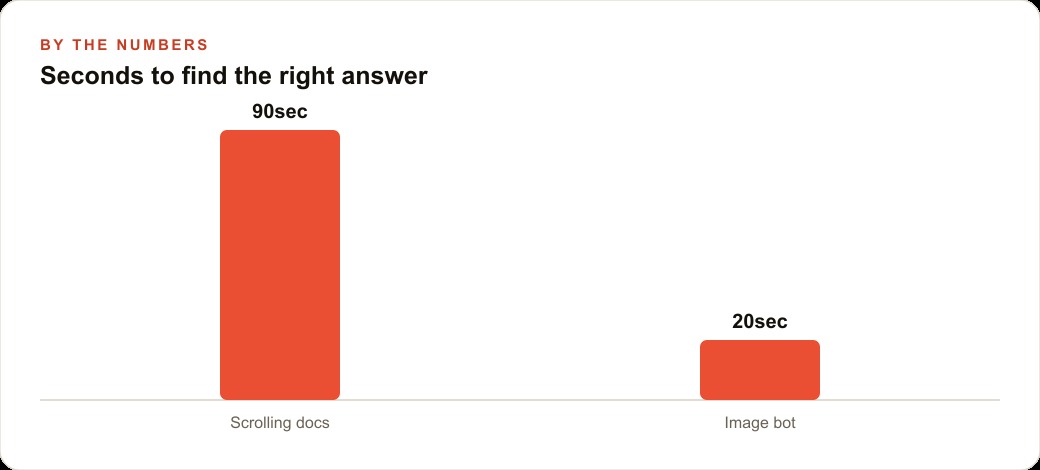
Before, the flow looked like this. A junior staffer hits a question, say how to match a specific bank transaction, and gets pointed to a fourteen page guide. They scroll, hunting for the one screenshot that shows the match button, and it takes maybe ninety seconds of skimming and backtracking to land on the right image, longer if they open the wrong guide first. Multiply that by a team, and during tax season, when the same handful of questions gets asked dozens of times a day, those ninety-second hunts stack into hours of quiet drag. Worse, half of them end with the junior staffer walking over to interrupt a senior staffer, who now loses their own focus to answer something the guide already covered.
After, the picture-answering bot changes the shape of the day. The junior staffer types the question and gets back the two relevant steps plus the exact annotated screenshot showing where to click, in around twenty seconds, with no scrolling and no wrong guide. The interruptions to senior staff drop sharply, because the fast answer is now self-serve. The firm also points it at common client questions, like which receipt format to upload, and instead of a paragraph the client will half-read and get wrong, the bot returns the example image that shows exactly what a good upload looks like. Fewer bad uploads means fewer back-and-forth emails, which during the busy months is its own kind of relief.
The part I like most is that the firm changed nothing about how it works. Nobody had to rewrite guides or make new assets. They kept documenting the way they always had, full of screenshots, and the system simply made sure those screenshots reach whoever asks, the moment they ask. The knowledge was already excellent. The pipeline finally stopped hiding it.
The wider pattern under all of this
Step back and the lesson generalizes far past accounting. Any team whose best explanations are visual is currently leaking value through a text-only bot. A firm can surface the exact clause instead of paraphrasing it. A software team can return the screenshot of the right settings screen. A parts dealer can show the diagram of the component a customer described. In every one of these, the visuals already exist inside the real documentation. The only question is whether your pipeline carries them to the answer or deletes them at the door.
This is also why the fix is so satisfying to run for clients. It rides on documentation you already own, it needs no fancy model, and its whole job is to stop losing something you already made. When we plan the retrieval and content layer of a client's CRM and website stack, keeping images alive through the pipeline is one of the quiet upgrades that makes the assistant feel dramatically more helpful without a dramatic rebuild. And because clearer answers keep people on the page and reduce dead ends, the same instinct that improves a support bot tends to improve your SEO and organic search footprint too, since well-structured, image-rich content is easier for both humans and search systems to make sense of.
If you enjoy building, this is a genuinely fun project to wire up yourself, and you will learn a lot about how retrieval really behaves once images are in play. If you would rather have it connected to your real documentation, path-repaired, prompted correctly, and running cleanly for your team, that is exactly the kind of system we set up. Either way, the takeaway is small and worth keeping: your best answers were probably pictures all along, and the whole job is refusing to throw them away.
That is exactly what we do at AI DOERS. Book a private 30-minute call with Madhuranjan Kumar and we will map the fastest path to it for your specific business.
Book your call →
Madhuranjan Kumar
Madhuranjan Kumar brings 20 years of performance-marketing experience and has managed over $200 million in Facebook ad spend for brands across the United States and beyond. His expertise spans the full modern marketing stack: Meta, Google Ads, TikTok, email automation, CRM, and the websites that hold it together. At AI DOERS he turns that track record into lead-generation systems for businesses across every industry.