
How an AI Browser Turns Your Tabs and Bookmarks Into a Work Assistant
AI-powered browsers let you chat with your open tabs, reuse saved prompts, and reference your own examples on the fly. Here is how it works and how a coffee shop could use it.

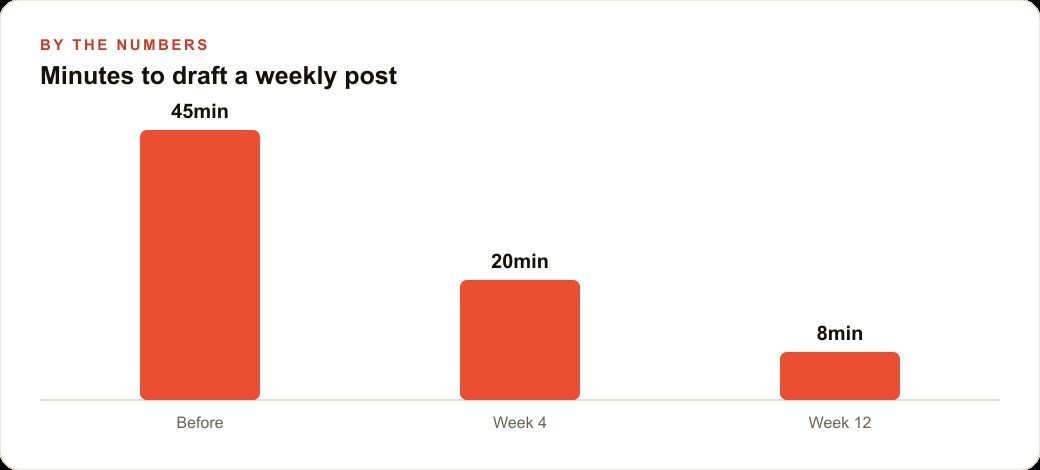
The owner of a small independent coffee shop spent approximately forty-five minutes producing a single Instagram post in January. This was not an anomaly for the month. The shop averaged twelve to fifteen posts across platforms in a typical week, which put the owner's weekly content time somewhere between eight and eleven hours, not counting responses to comments, caption revisions that felt off-brand, or drafts that had to be scrapped and restarted. The shop had three employees and served a loyal neighborhood crowd. Revenue was steady. The owner had calculated that a part-time social media contractor in their city would cost between 1,200 and 1,800 dollars per month for the level of management they actually wanted. The budget existed in theory. In practice, it would have come directly from the owner's own draw. The owner kept doing the content themselves and kept underestimating, every single week, how long it took.
In February, a regular customer mentioned an AI-powered browser. The description was specific enough to be interesting: a browser that could read open tabs and respond to questions about them, accept bookmarked examples as a reference library, trigger predefined slash commands with a single keystroke, and insert output directly into whatever field or document you were working in. The owner downloaded it that afternoon, with no clear plan for what to do with it. Madhuranjan Kumar traces this kind of experiment closely: what happens when a small operator picks up a capability-dense tool without a pre-built use case and has to discover the workflow by running it.
Before the Browser: Forty-Five Minutes for a Single Post
The pre-browser workflow was a fair representation of how small businesses manage content without dedicated staff. The owner would open a notes document, check the shop calendar for upcoming events or menu changes, and then attempt to write something that matched the shop's established voice. The voice was the hardest and most time-consuming part.
The shop had built an aesthetic over seven years: warm without being saccharine, neighborhood-specific without being exclusionary, occasionally funny in a way that required lightness and precision. Any caption that felt slightly off from that register needed a rewrite. The owner could identify within seconds when a draft was wrong. Articulating why, and then correcting it in writing, took considerably longer. A single post might go through three or four drafts before it felt right, and some reached the five-draft mark.
Posting across three platforms multiplied the coordination overhead. What worked as an Instagram caption was too long for X and calibrated incorrectly for Facebook's current algorithmic preferences. Each platform needed its own version. A coffee shop that appeared to need only a handful of posts per week was in practice producing between twelve and fifteen distinct content units, each requiring individual attention across platforms.
The owner tracked this precisely for two weeks before downloading the browser, recording start and end times for each piece of content. The total across fourteen days was nineteen hours and forty minutes. Comment responses added another two to three hours. Twenty-two hours of content work over a two-week period: not all of it felt burdensome, but much of it consumed time that should have gone elsewhere.
To put specific numbers on the implied cost: if the owner's time was valued at what a comparable skilled freelancer would charge in their market, roughly 45 to 55 dollars per hour, the content operation was running at an implied cost of approximately 500 dollars per week. The contractor option at 1,500 dollars per month was actually cheaper by this measure. The owner had not done this calculation before doing the time tracking. Seeing the number changed the urgency of finding a different approach.
Building the Voice Folder From Four Real Posts
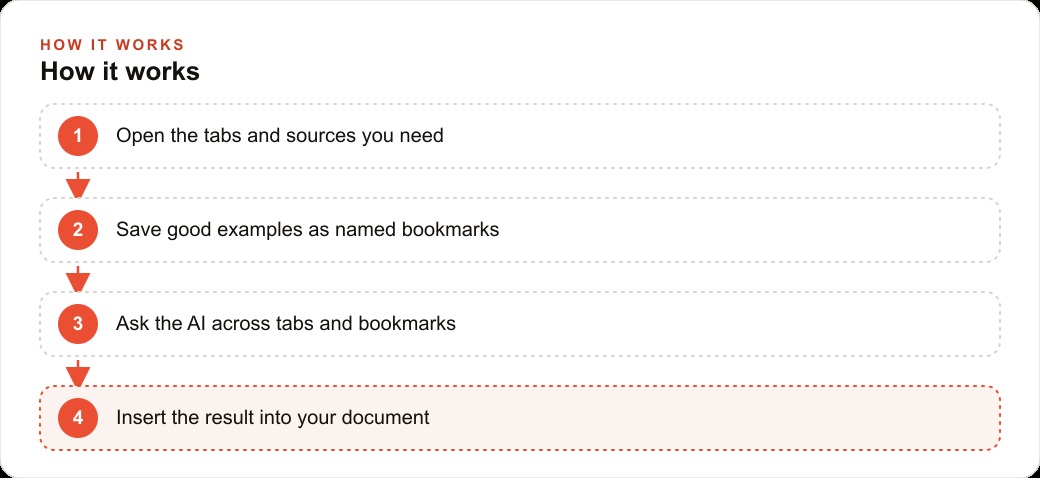
The AI browser required examples before it could do anything useful. Unlike a generic AI chatbot that needed the brand voice re-explained at the beginning of every session, the browser worked from a bookmark folder of the owner's actual past posts, which it could read and reference during any session without being prompted each time.
The owner spent one afternoon going through two years of Instagram archives. The goal was to find four posts that each represented the shop at its best in a different register.
The first choice was a caption from the previous summer for a limited-run lavender latte. The post had driven the highest engagement the account had ever seen, not because of any particular technique but because it was specific and genuinely excited without overselling. The second was a community post about a local high school fundraiser that managed to feel authentic rather than performative. The third was an irreverent post about a supplier delay that turned a frustration into a running joke with regulars. The fourth was a simple Tuesday-morning post with no promotion attached, just an observation about the light through the front window at 7 AM, which had connected with the audience in a way the owner still did not fully understand.
These four posts became the reference layer in the voice folder. Every content session started with the browser reading those examples. What followed was not imitation. The browser extended the voice into new situations: a new seasonal menu item, an upcoming community event, a response to something happening in the neighborhood. The output was not correct on the first pass. But the failures were different in kind from before. Instead of generic marketing copy, the misses looked like a strong first draft with a specific error that could be fixed in one edit rather than a complete rewrite.
In the first week with the browser, the owner published three posts that went from blank document to scheduled in under twelve minutes each. That was not yet the norm. It was evidence that the method was working well enough to refine.
One additional step the owner took in week two: they annotated two of the four example posts with brief informal notes explaining why those posts worked. Not formal explanations, but observations like this one worked because it named the specific street corner rather than just saying neighborhood. Those annotations became part of the context the browser could reference, and the quality of subsequent drafts improved noticeably when the annotations were present.
The Slash-Command Library That Changed the Daily Routine
By the end of the first month, the owner had built a library of seven slash commands. A slash command is a shorthand that triggers a predefined prompt. The owner had no technical background and had not written anything more complex than a spreadsheet formula before this. The browser's command setup required only that the owner write out what they wanted in plain language, give it a name, and save it. The process took about three minutes per command.
The commands used most frequently were these. The /seasonal command produced first-draft captions for new menu items using the voice folder as context. The owner would type the name of the item, one or two notes about what made it distinctive, and the command would generate a draft in the shop's register. The draft typically needed one editing pass but rarely a complete rewrite.
The /respond command drafted replies to comments and direct messages. The owner could highlight an incoming comment, run /respond, and get a reply that matched the shop's voice without starting from scratch. This was especially useful for the recurring questions about hours, parking, and oat milk availability.
The /event command produced a sequence of three teaser posts, a full announcement, and a follow-up for any community event the shop was hosting. What had previously taken an hour of drafting and scheduling now took about fifteen minutes of review and a single editing pass.
The /crosspost command took a draft written for one platform and adapted it for the other two. The adaptation preserved the substance and the voice while adjusting length and framing for each platform's conventions.
The /crosspost command saved time that was disproportionate to how simple it was. Adapting a post manually was not cognitively demanding. But it required switching attention from one task to another, and attention-switching has a real cost when you are also managing a shop, ordering supplies, handling staff schedules, and answering the phone. The browser's ability to handle the adaptation while the owner moved on to something else eliminated a category of task that had previously been interrupting the workday several times per week.
The inline editing feature added another layer of utility. When a paragraph in a draft was too long or too formal, the owner could highlight it, type a brief instruction like shorter, more direct, more specific to morning commuters, and see a revised version in place. This replaced the previous habit of opening a second AI tab, re-entering context, and copy-pasting between windows.
What the Numbers Looked Like Three Months In
At the end of month three, the owner repeated the two-week time-tracking exercise. The total content time across fourteen days was four hours and twenty minutes, down from nineteen hours and forty minutes. Including comment responses, the total was six hours and thirty minutes, compared to twenty-two hours previously. Roughly fifteen hours of content-related work had been recovered over a two-week period.
Those hours went into two places. About eight hours went into developing a wholesale arrangement with two local restaurants that had been requesting the shop's signature cold brew for their lunch service. That arrangement, once formalized, added approximately 600 dollars per month in revenue without adding significant operational complexity. The remaining seven hours went into being present on the floor during the morning rush, which the owner noted had improved the customer experience in ways that were harder to quantify but visible in the regulars' behavior over time.
The engagement metrics on social media moved in a direction the owner had not anticipated. Average engagement on Instagram, measured as interactions divided by followers, went from 3.2 percent to 4.7 percent over the three months. The owner's assessment of why: posting frequency became more consistent because the production burden had dropped significantly, and the quality of the final posts was higher because the owner was reviewing a draft that was already close to the correct register, rather than one that needed major reconstruction. When the production process is not exhausting, the editorial judgment improves.
The cross-platform coherence also improved noticeably. Before the browser, the Facebook and X versions of a post often felt like translations made under time pressure: technically accurate but lacking the specific texture that made the Instagram version work. After three months with the /crosspost command and the voice folder as active context, regulars who followed the shop on multiple platforms mentioned that the content felt cohesive. No one used that word unprompted, but several people said variations of it when asked directly.
The owner has not hired a social media manager. The 1,200 to 1,800 dollars per month that would have gone to a contractor stayed in the business. The owner's description of the outcome is precise: the browser did not replace a person. It made the job the owner was already doing manageable at a quality level that would previously have required delegation. The voice stayed theirs. Enough of the time returned to make the rest of the operation work better.
Looking back at the six months since the experiment began, the owner identifies three things they would do differently at the start. They would annotate the example posts immediately rather than adding annotations in week two. They would build the /crosspost command on day one rather than week three. And they would track time from the very beginning, because the baseline measurement was the single most motivating input in the entire process. Knowing that twenty-two hours over two weeks was going to content changed how seriously the owner took the tool. Without that number, the tool might have stayed a novelty.
The owner also tracked one metric that had not been in the original experiment plan: the number of posts published per month versus the number planned. Before the browser, the gap between planned and published ran at about 18 percent. Posts planned for specific dates would slip by a day, then two, then get quietly dropped when the next week's content needed attention. After three months with the AI browser, the gap had closed to under 4 percent. The owner credited this not to working more hours but to the reduction in friction at the drafting stage. When starting a post takes three minutes instead of forty-five, the friction that leads to procrastination largely disappears.
That is exactly what we do at AI DOERS. Book a private 30-minute call with Madhuranjan Kumar and we will map the fastest path to it for your specific business.
Book your call →
Madhuranjan Kumar
Madhuranjan Kumar brings 20 years of performance-marketing experience and has managed over $200 million in Facebook ad spend for brands across the United States and beyond. His expertise spans the full modern marketing stack: Meta, Google Ads, TikTok, email automation, CRM, and the websites that hold it together. At AI DOERS he turns that track record into lead-generation systems for businesses across every industry.