
AI Automations vs AI Agents: Which One Does Your Business Actually Need?
Most business owners are building automations when they think they are building agents. Here is the real difference, why it matters, and how a roofing company can save 45 minutes every day with a simple workflow.

A roofing company losing the race to the phone
The roofing company was closing plenty of jobs, but it was quietly losing a race it did not know it was running. Every time a homeowner filled out the contact form on its website, a clock started. And by the time the owner or the estimator, busy on a roof or driving between sites, got back to that lead, thirty minutes to several hours had passed. In the home services world, that delay is not a minor inconvenience. Research across the industry consistently shows that leads contacted within five minutes convert at dramatically higher rates than leads contacted after thirty. The company was not losing jobs to better roofers. It was losing them to faster ones.
This is the story of how that company fixed the gap with a single, well-chosen AI automation, and why the choice to build an automation rather than an agent was the reason it worked. Along the way it is a lesson in a distinction most business owners get wrong, and getting it right is the difference between a system you can trust and one that quietly creates problems.
The mistake the owner almost made: reaching for an agent
Before the build, the owner had been reading about AI agents and nearly went down the wrong road. An AI agent has access to tools and uses its own reasoning to decide what to do next at each step. You do not define the sequence in advance. You give it a goal and let it choose the path, which sounds powerful and is genuinely useful for open-ended, exploratory work. But for handling incoming leads, it is the wrong tool, and understanding why is the whole foundation of this case.
If a fully autonomous agent handles lead follow-up and makes an unexpected decision, misclassifies a high-value lead, or sends a strange message, you have a customer relationship problem with no clear trace of why it happened. What the company needed was the opposite: an AI automation, a workflow with a fixed sequence of steps, triggered by a specific event, that runs the same way every time. A lead fills out the form, which is the trigger. Claude evaluates the lead and drafts a follow-up, which is the AI step. The email sends, which is the output. The model is used inside the workflow, but the workflow itself controls what happens next. Every decision is logged, every path is auditable, and when something goes wrong you can see exactly where and fix it. For the vast majority of business tasks, that reliability beats raw autonomy, and this was one of them.
Chapter one: writing down the decision logic no one had written down
The first real work had nothing to do with software. It was thirty minutes with a blank page. Before you can automate a process, you have to make its logic explicit, and the owner discovered something common and uncomfortable: the way he sorted good leads from weak ones lived entirely in his head. A good employee does it automatically, which is exactly why no one had ever written it down.
So he wrote it down. A high-value lead had existing damage, an urgent timeline, or an insurance claim in progress. A medium lead was planning a replacement, gathering quotes, with a flexible timeline. A low lead was a general inquiry with no clear project. That act of writing the logic down was valuable on its own, before any AI touched it, because it forced a fuzzy instinct into a rule the whole team could see. This is the step most people skip, and skipping it is why their automations later miss the mark. The chaos of a business process is almost always just decision logic that no one has bothered to make explicit.
Chapter two: building the workflow on a visual canvas
With the logic on paper, the build itself was fast, because the tools have become genuinely accessible. Platforms like VectorShift, Make, and n8n let you connect a trigger, AI steps, and an output on a visual canvas with no code. The barrier is no longer technical skill. It is clarity about what the process should do, and that clarity already existed on the page.
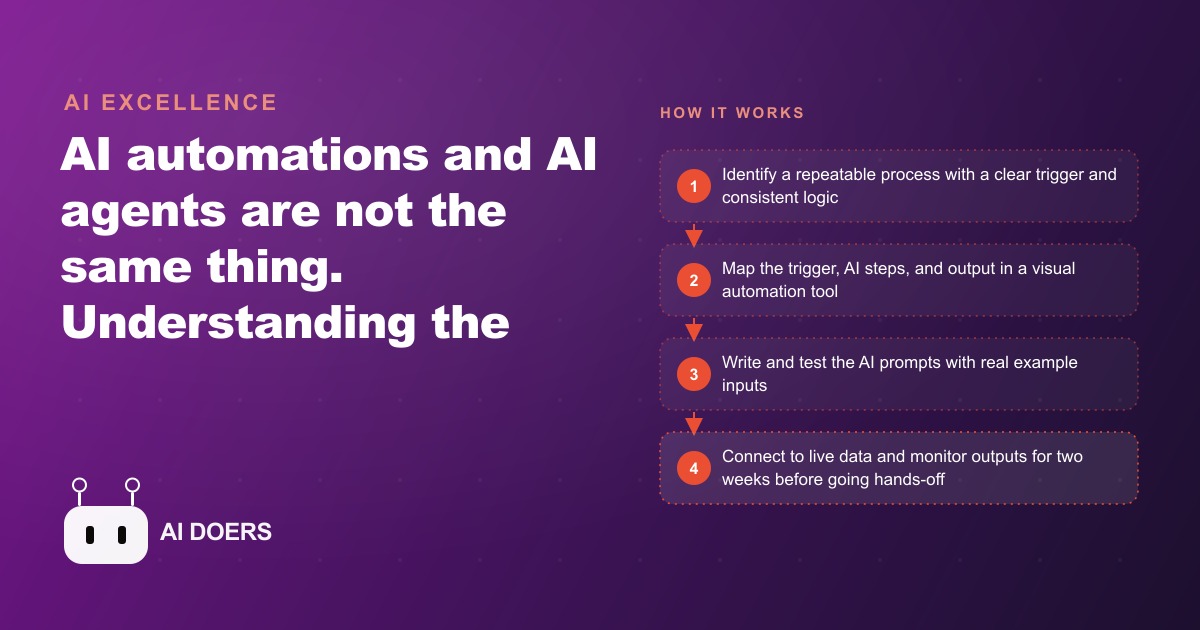
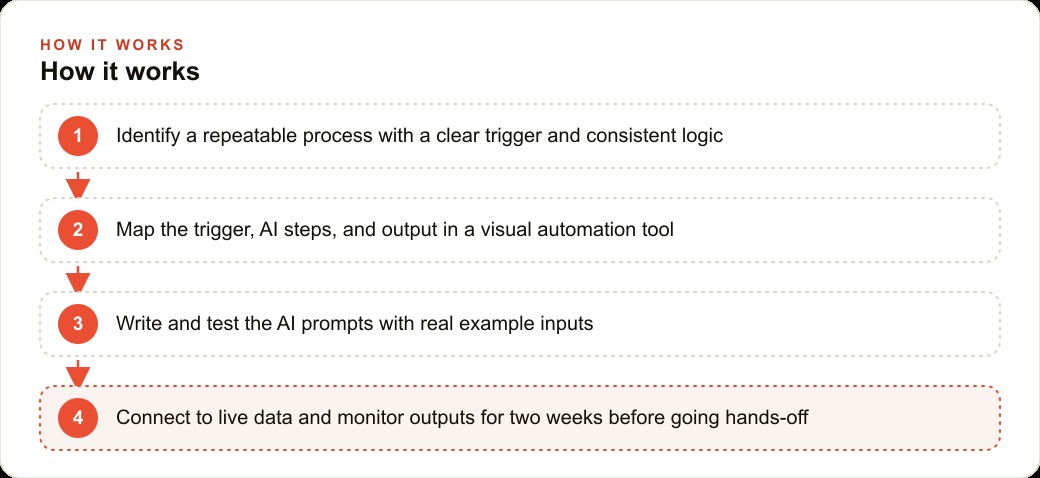
The trigger node listened for a new form submission from the website. Most form tools can send a signal to an automation platform the moment someone submits, carrying the lead's name, contact details, and a free-text description of what they need. The first AI step took that free-text description and classified the lead, using a prompt that told the model to read the description and sort it into high, medium, or low using the exact definitions the owner had written, and to output the classification plus a one-sentence rationale. The second AI step drafted a personalized two-paragraph follow-up email, where the first paragraph acknowledged the lead's specific situation and the second described the next step and asked for a good time to call or inspect. The output node did two things at once: it sent that email from the owner's own address, and it logged the classification, the rationale, and the email text into a spreadsheet the owner reviews each morning. From the homeowner's side, a personal response arrived within two minutes. From the owner's side, every lead was classified, answered, and recorded before he even opened the inbox.
Chapter three: the two weeks of testing that made it trustworthy
The company did not point this at real customers on day one, and that discipline is why it worked. The team ran ten to twenty test submissions through the system first, reading every single email the automation drafted. A bad automated email sent to twenty leads is not one problem, it is twenty customer relationship problems at once, so the prompts got refined until every draft read naturally and accurately reflected the lead's situation.
Only then did they connect it to live form submissions, and even then they watched. For the first two weeks, the owner checked the morning log every day to confirm the model was classifying leads correctly and drafting emails that matched the company's voice, making small prompt adjustments as real leads surfaced edge cases the tests had missed. That supervised break-in period is the quiet hero of the whole project. It is the difference between an automation you trust and one you hope is working.
Chapter four: the numbers after it was running
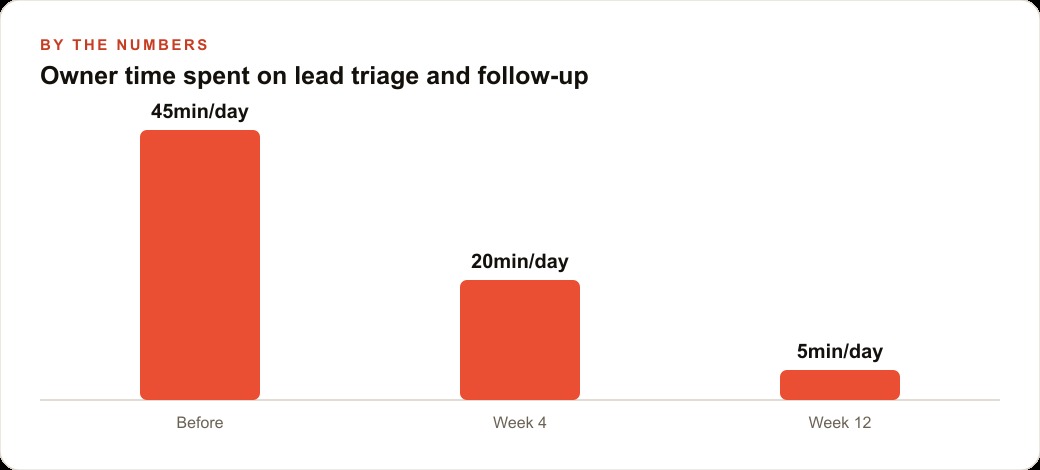
Once it settled, the results were easy to measure because the problem had been so concrete. The owner had been spending about forty-five minutes every day reading submissions, sorting leads in his head, and writing individual follow-ups. That is roughly 3.75 hours a week. Valuing his time at around 75 dollars an hour, the recovered time alone was worth on the order of 280 dollars a week, close to 1,200 dollars a month, against a total automation cost under 15 dollars a month. The platform's paid tier ran about 9 dollars monthly, and the model's per-lead cost for classification and drafting landed around one to three cents per lead, so a hundred leads a month cost a few dollars in AI. The payback period was under two days.
The response-speed gain stacked on top of the time savings. If moving from a thirty-minute reply to a two-minute reply improved the lead-to-job conversion rate by even two percentage points, and the company closed twenty roofing jobs a month at an average of 8,000 dollars, that two-point improvement added roughly 0.4 jobs a month, or about 3,200 dollars in additional monthly revenue. The time savings paid the rent on the system. The speed improvement is where it actually made money. And because every lead now landed cleanly in the CRM and website stack with a classification attached, the follow-up beyond that first email got tighter too, and the same fast-response engine made every dollar spent on Facebook and Instagram ad campaigns work harder, since a lead that gets a personal reply in two minutes is far likelier to become a booked inspection than one that waits an afternoon.
Chapter five: keeping it alive
The last chapter is the one most owners forget, which is that an automation is not finished when it is built. Processes change, pricing changes, and new kinds of leads appear. The company scheduled a short monthly review of the automation's outputs to confirm the model was still classifying correctly and the email template still matched current messaging. Small adjustments made regularly prevent large failures later. That habit is cheap and it is what keeps a working automation working, rather than slowly drifting out of tune until someone notices it has been sending slightly wrong emails for a month.
Why the fixed sequence was the whole secret
It is worth returning to the choice that made this project succeed, because it is the part most owners get wrong when they read about AI. The company did not build something smart. It built something predictable, and predictability was the feature. Every lead flowed through the exact same three steps in the exact same order, which meant that when the owner reviewed the morning log, he was reading a system he fully understood. If a classification looked off, he knew precisely which prompt produced it and precisely how to adjust it. Nothing about the system was a mystery he had to reverse-engineer.
Contrast that with the autonomous path he nearly took. An agent that decided its own approach to each lead would have been impossible to audit the same way, because two similar leads might have been handled by two different reasoning paths for reasons that were never logged. When a customer relationship is on the line, "I am not sure why it did that" is not an acceptable answer, and a fixed automation never forces you to give it. The reliability that made this build trustworthy came directly from the fact that its behavior was scripted rather than improvised. That is the counterintuitive lesson: for handling real customers, the less clever system was the more powerful one.
What this case actually teaches
Pull back from the roofing company and the lessons generalize to nearly any small or mid-size business, because almost all of them have three to five repeatable processes hiding in plain sight. Lead intake and qualification. Appointment reminders. Review requests when a job is marked complete. Proposal drafting from a submitted scope. Inventory or scheduling alerts when a threshold is hit. The common thread is any process where the same kind of input reliably leads to the same kind of output and only the content varies, not the structure. Those are automations, and they are more reliable, more auditable, and easier to fix than a fully autonomous agent trying to reason its way through the same job.
The mistakes to avoid are the mirror image of what this company did right. Do not try to automate a process that is not actually consistent, because if the real logic varies on factors the form does not capture, the automation will miss. Do not skip the testing, because an untested automation aimed at real customers multiplies every flaw across every lead at once. And do not treat it as finished the day it is built. This same discipline of writing the logic down first, building it simply, testing it hard, and reviewing it monthly, is exactly how the automation keeps feeding clean content and clean data into the rest of the business, including the material that supports SEO and organic search over time.
You can build this entire workflow yourself with no technical background, and I would encourage any owner to start with the single automation that hurts most. If you want to connect it to more complex systems like your CRM, your scheduling software, or your quoting tool, or to build several automations that work together, someone who builds these regularly will get you there faster and with fewer iterations. That is the kind of work I do for clients.
That is exactly what we do at AI DOERS. Book a private 30-minute call with Madhuranjan Kumar and we will map the fastest path to it for your specific business.
Book your call →
Madhuranjan Kumar
Madhuranjan Kumar brings 20 years of performance-marketing experience and has managed over $200 million in Facebook ad spend for brands across the United States and beyond. His expertise spans the full modern marketing stack: Meta, Google Ads, TikTok, email automation, CRM, and the websites that hold it together. At AI DOERS he turns that track record into lead-generation systems for businesses across every industry.