
Agentic Workflows: Give the AI an Outcome, Not Every Step
Agentic workflows let you describe the result you want in plain English while the agent plans the steps, fixes its own errors, and wires in the tools. Here is the shift and a worked example for a coffee shop.

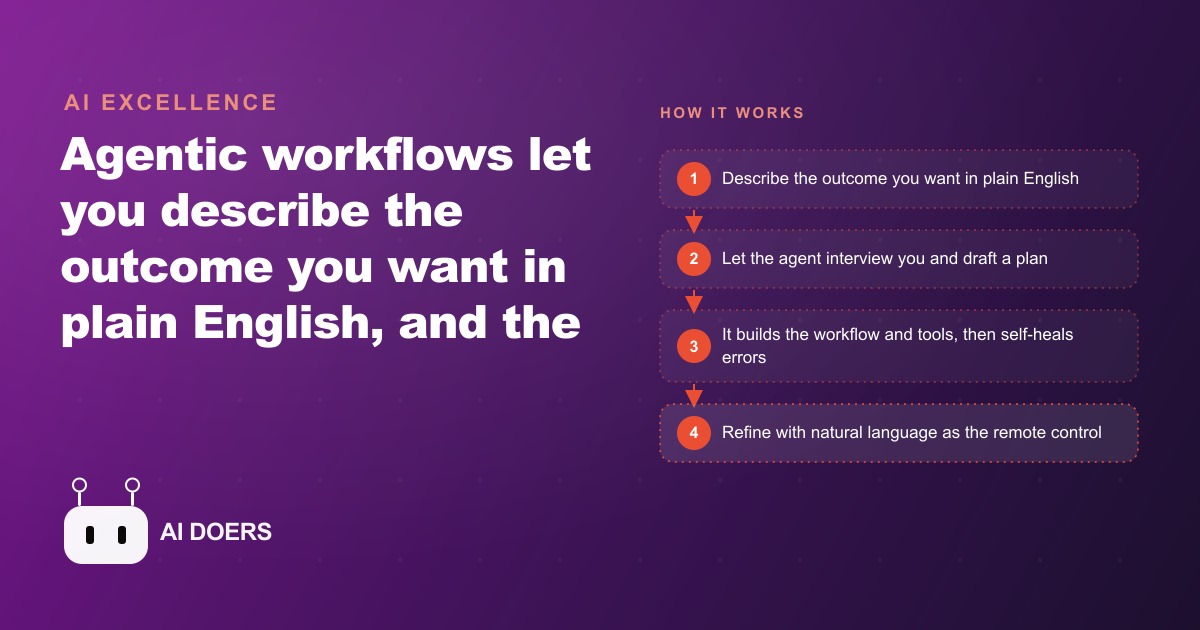
Last quarter, a coffee roaster spent three hours every Monday researching local businesses that might become wholesale accounts, composing personalized outreach emails for each one, and logging responses in a tracking spreadsheet. An agentic workflow, built over one afternoon, now handles all three steps automatically while the owner focuses on roasting and deliveries.
That is the shift agentic workflows represent. Not an AI that helps you do the task faster, but an AI that runs the task on its own, fixes its own errors when something breaks, and works through hundreds of items without checking in every few minutes. The step from "AI assistant" to "AI doing work autonomously" is the most practical development in business automation right now, and it requires far less technical knowledge to access than most people assume.
Write the outcome statement the agent can actually execute
The difference between a vague prompt and a useful outcome statement is specificity about what done looks like. An agent given "help me with outreach" has no idea what to build. An agent given a clear outcome statement can plan the full workflow, identify the tools it needs, and confirm the design with you before writing a single line.
A usable outcome statement has three components: what data comes in, what should happen to it, and where the finished result goes. "Find local offices and small businesses within a five-mile radius of a downtown coffee shop, research each one to find a likely contact role and one specific detail about the business, write a personalized warm outreach email that references that detail and offers a wholesale coffee trial, and export the name, address, contact information, and draft email for each business into a spreadsheet I can review before sending" is an outcome statement an agent can execute.
Notice that it does not say how to find the businesses, how to research them, or how to format the email. Those are implementation choices the agent makes. The outcome statement names the inputs, the transformation, and the destination. Everything else is the agent's job to figure out. This is the mental shift that makes agentic automation different from traditional workflow building: you define the destination and let the system find the route.
Writing a precise outcome statement also clarifies your own thinking about what you actually want. Many people who struggle to build automations struggle because they have not finished deciding what the output should look like. Forcing the answer into one clear statement surfaces that ambiguity before the agent touches any tools.
The testability of the outcome statement matters as well. A good outcome statement makes it immediately obvious when the agent has succeeded. "Export a spreadsheet with a name, address, contact role, and personalized email for each business in the target area" is testable. You can open the spreadsheet and check each column. "Do some outreach research for me" is not testable. If the outcome statement cannot be evaluated against a clear definition of done, the agent cannot know when to stop and neither can you.
Let the agent interview you before it builds anything
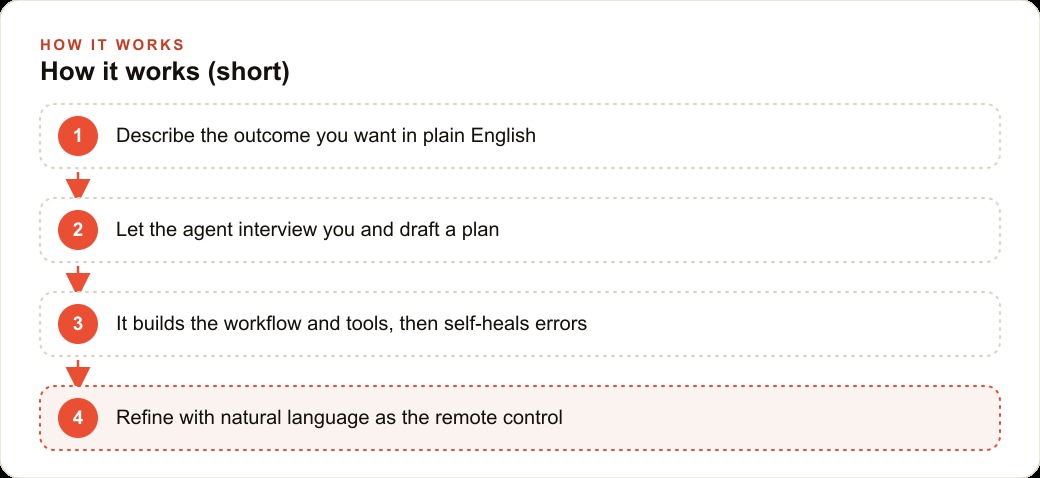
A well-designed agentic workflow does not start building the moment it receives the outcome statement. It enters a planning mode first, asking questions about the specifics before committing to a design. This interview step is one of the most valuable parts of the process, and skipping it in favor of a faster start is a common mistake.
The questions a good agent asks before building a wholesale outreach workflow will sound like this: Which neighborhoods or zip codes should the search cover first? How formal should the email tone be? Do you have existing API credentials for the business search tool you want to use, or should I find a free alternative? What should happen if a business already appears in your existing customer spreadsheet? What is the maximum number of emails to generate in each weekly run?
These questions surface edge cases that would otherwise surface as failures after the workflow has already processed a hundred businesses incorrectly. Finding out that you need to exclude existing customers before the workflow runs is a planning conversation that takes five minutes. Finding out after the workflow has generated duplicate outreach to thirty existing accounts is a cleanup problem that takes far longer.
The interview also forces the agent to state the full plan before it builds. You get to review the intended sequence of steps, the tools it plans to use, the data flow from start to finish, and any assumptions it is making about your existing setup. Reading the plan carefully and correcting misunderstandings at this stage saves hours of debugging later. An agent that skips this step and starts building immediately is faster in the short term and more expensive in the medium term.
Test on five examples before you run the full list
Once the workflow is built and an initial test seems reasonable, the most important thing you can do is run it against a small, manually verifiable set before trusting it with hundreds of items. Run it on five businesses you already know well enough to judge the output quality. For each one, check: did the research produce real and accurate information about this specific business, does the email reference something genuinely specific about this business rather than a generic placeholder, does the tone feel appropriate for a first outreach from a small local business?
If the output for two of the five businesses is weak, identify specifically what went wrong for those two. Was the research data too sparse because the businesses had minimal online presence? Was the email tone too formal or too casual? Was the specific detail pulled from the wrong source, producing a detail that was technically true but irrelevant to an outreach? Each failure mode has a different fix, and identifying it on five examples is far easier than trying to diagnose it after running the full list.
The test set also establishes your quality baseline. Once you know what a good output looks like for this workflow and this type of business, you can add a quality check step to the workflow itself that flags results falling below that baseline for manual review before they enter the export spreadsheet. That check becomes the difference between a workflow that requires constant supervision and one that runs reliably with only occasional attention.
Resist the urge to test on only one or two examples. A single result can be strong by chance. Five results across different business types reveal whether the workflow handles variation or whether it performs well only on the easiest cases. The goal is confidence that the workflow produces acceptable output across the full range of inputs it will encounter in production, not just on the one example that showed the demo in the best light.
Build the guardrails into the brief, not as an afterthought
The biggest source of agentic workflow problems is guardrails added after something has already gone wrong. A workflow that auto-sends emails to businesses without a human review step will eventually send a message with an off-tone or an inaccuracy before anyone catches it. A workflow that uses a paid research API without a monthly spending limit will eventually run longer than expected and generate a bill that surprises you.
Both problems are prevented by building the limits into the original outcome statement rather than hoping you will add them later. Every agentic workflow should have an explicit statement of what it must never do. "Never send an email without putting it in the review spreadsheet first" is a guardrail. "Stop if the total number of API calls this month exceeds 500" is a guardrail. "Flag any result where the business address shows it is outside the target area and do not include it in the export" is a guardrail.
These limits are written in plain language in the brief and the agent enforces them through the build. You can also make them conditional: "If the contact email address cannot be found, include the business in a separate tab labeled 'needs manual research' rather than leaving it out of the export entirely." That kind of conditional guardrail keeps the workflow from silently dropping results it cannot fully complete, which is a common failure mode that produces a shorter-than-expected output list without any indication that items were skipped.
Security guardrails belong in the brief as well. "Never store or transmit customer contact information to any external service other than the final export spreadsheet" is a plain-language security requirement the agent enforces at every step where data moves between tools. Stating it explicitly is more reliable than assuming it will be respected by default.
The coffee shop wholesale outreach: a complete worked example
Madhuranjan Kumar would set this up for a coffee shop client in the following way. The starting point is a clear outcome statement: find local businesses within a defined radius that could be wholesale or catering accounts, research each one to identify the business type and a specific contextual detail, write a warm personalized email from the coffee shop owner, and export everything to a spreadsheet for review before any message is sent.
That statement, typed into an agentic tool in plan mode, triggers the interview. The agent asks about the target neighborhoods, the desired email length and formality, the preferred research sources, and what to do with businesses that are already in the existing customer list. It confirms that no email will be sent without the owner reviewing the spreadsheet first. It states the tools it plans to use: a business search function for the geographic lookup, a web scraping function for gathering context about each business, and the export function for writing results to the spreadsheet. The owner reviews the plan, corrects the geographic radius, and approves.
The workflow runs on the first batch of ten businesses. Each row in the output spreadsheet contains the business name, address, estimated employee count, a one-sentence context note about the business, and a personalized email that references the context specifically. A bakery on the list gets an email that mentions the morning customer rush and positions the coffee trial as a complement to their existing baked goods. A design studio gets an email that mentions the creative environment and positions specialty office coffee as a team perk. Neither email reads like a mail-merge template.
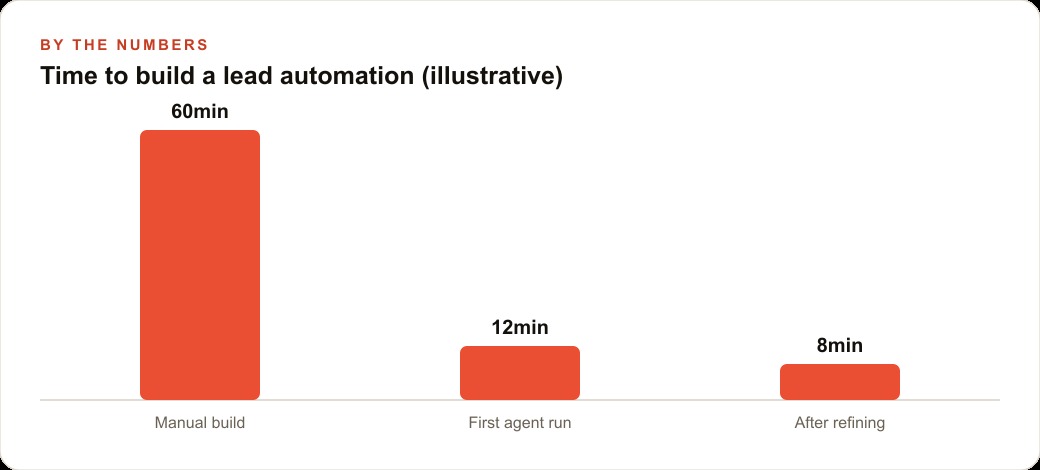
The owner reviews the ten results in fifteen minutes, approves eight, notes two that need tone adjustments, and sends the corrections back in plain language. The workflow is adjusted and the next batch runs. Within the first week, a consistent outreach pipeline is running that the owner spends perhaps thirty minutes reviewing each Monday before approving the week's batch, compared to the three hours previously spent on the same task from scratch.
The same principle extends to the internal side of the business. A separate workflow can monitor weekly sales by product category, compare against the same period last year, and draft a brief summary for the owner each Monday morning. Another can scan the shop's Google reviews each day and draft a reply to any new ones, ready for approval before posting. Each workflow runs in the background, and each one returns hours per week that were previously consumed by tasks that follow clear, repeatable rules but require human time to execute.
How the self-healing loop works when something breaks
Agentic workflows face a different maintenance reality than traditional automations. A traditional automation that encounters an error stops and waits for a human to fix the specific problem. An agentic workflow reads the error, identifies the likely cause, tries a different approach, and continues. The self-healing behavior is what makes agentic tools practical for processes that touch the real world, where APIs occasionally return unexpected responses, web pages change their structure, and edge cases appear that no one anticipated during design.
For the outreach workflow, self-healing might look like this: a business research API returns an error for one particular entry because the address is in an unusual format. The traditional automation stops on that row and halts the whole run. The agentic workflow reads the error, tries reformatting the address and resubmitting, and if that also fails, moves the row to a manual review tab and continues to the next business. The run completes. The owner sees a handful of items flagged for attention rather than a broken workflow that processed nothing after the third row.
The agent also updates its own approach when it encounters a recurring issue. If the same class of error appears on multiple rows, the agent identifies the pattern, adjusts the way it handles that input type going forward, and notes the change so you can review it when you check the output. This is qualitatively different from a traditional automation, which fails the same way every time the same edge case appears until a human patches it manually.
What reliable looks like by the end of the first week
A week of real use with a well-built agentic workflow establishes the baseline for what reliable operation looks like for your specific process. By the end of the first week you should know: what percentage of outputs are approved without changes, what the common adjustment patterns are when something needs editing, and how long the workflow takes to process a batch of your typical size.
The goal in the first week is not perfection. It is calibration. A workflow where eighty percent of outputs are approved directly and twenty percent need minor adjustments is performing well. A workflow where fifty percent of outputs need substantive corrections is telling you that either the outcome statement needs tightening, the research quality is too variable for the source type, or the email tone is missing the target for a consistent subset of business types. Each of those is a fixable problem once it is identified through the pattern in the correction requests.
By the end of the first week you also know which guardrails are working and which are generating unnecessary friction. A limit that stops the workflow when it should not can be loosened in plain language. A gap in the guardrails that let through an output that should have been flagged can be tightened by adding one more condition to the brief. The workflow that starts the second week is better than the one that started the first, and the one that starts the third week is better still. That calibration process is the real work of agentic workflow development, not the initial build.
That is exactly what we do at AI DOERS. Book a private 30-minute call with Madhuranjan Kumar and we will map the fastest path to it for your specific business.
Book your call →
Madhuranjan Kumar
Madhuranjan Kumar brings 20 years of performance-marketing experience and has managed over $200 million in Facebook ad spend for brands across the United States and beyond. His expertise spans the full modern marketing stack: Meta, Google Ads, TikTok, email automation, CRM, and the websites that hold it together. At AI DOERS he turns that track record into lead-generation systems for businesses across every industry.